7 Best CoSchedule Alternatives in 2026
CoSchedule built its name on the marketing calendar: one screen for blog, social, campaigns, and tasks. But Starter is $29 a month billed annually for one user and three profiles, extra profiles cost $5 a month each, and X costs $16 per profile per month on top. These seven alternatives cover the same ground.
Quick verdict
If you want CoSchedule-style planning without the add-ons and the three-profile ceiling, OneUp at $15 a month billed annually for 5 accounts is the best swap — Buffer is the cheapest free start.
- CoSchedule Starter is $29 a month billed annually for 1 user and 3 profiles, plus $16 per X profile per month.
- OneUp Basic is $15 a month billed annually for 5 accounts, with unlimited posts and 12 networks including Snapchat and Discord.
- SocialPilot Essentials costs $30 a month ($25.50 billed annually) for 7 accounts.
- Buffer's free plan covers 3 channels; CoSchedule's allows 1 profile and 15 scheduled posts.
CoSchedule alternatives at a glance
Prices checked November 10, 2026. Our pricing comparison puts these tools side by side.
1. OneUp — best direct replacement
OneUp is the closest like-for-like swap for CoSchedule's scheduling, without the add-on billing. Basic is $15 a month billed annually for 5 accounts ($5 per extra account); Growth is $84 a month for 30, Business $240 for 80. All plans include unlimited posts, recurring posts, crossposting, bulk upload, inbox, approvals, AI captions, listening, and API plus MCP.
OneUp posts to 12 networks — Facebook, Instagram, X, LinkedIn, TikTok, YouTube, Pinterest, Threads, Bluesky, Snapchat, Discord, and Google Business Profile — including several GBP locations at once. CoSchedule covers most of those but not Snapchat or Discord, and X costs extra.
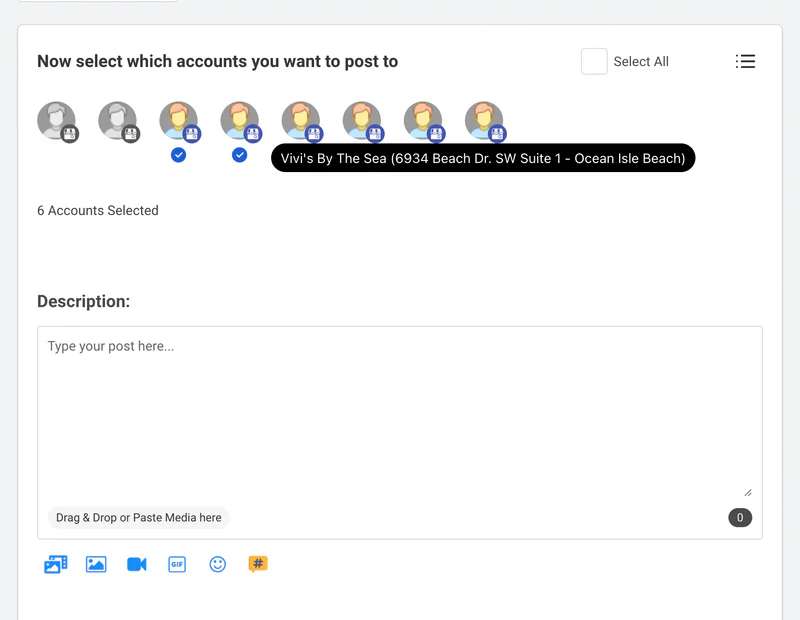
CoSchedule's ReQueue is its answer to evergreen content; OneUp matches it with recurring posts and no cap on how many repeat.
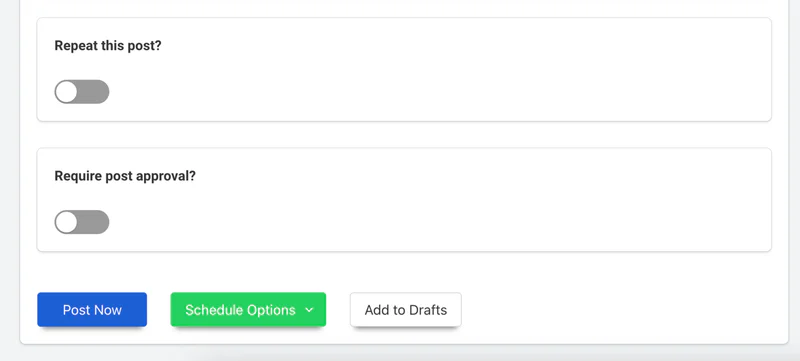
Verdict: Pick OneUp for CoSchedule's scheduling and evergreen recycling at roughly half the price, with more accounts and no X surcharge — see our CoSchedule vs OneUp comparison.
2. Buffer — cheapest free start
Buffer is the simplest tool here, with the only genuinely free plan: $0 for 3 channels. Essentials is $5 per channel per month billed annually, and Team is $10. That per-channel model is cheap for one or two accounts but pricey as you add channels — where OneUp's flat per-account plans pull ahead. Its evergreen recycling is thinner than OneUp's or CoSchedule's ReQueue. See our best Buffer alternatives.
Verdict: Pick Buffer if you manage three or fewer channels and want to pay nothing.
3. SocialPilot — best value for agencies
SocialPilot's Essentials plan is $30 a month ($25.50 billed annually) for 7 accounts — more than twice CoSchedule's Starter profiles for the same money. It includes a social inbox, bulk scheduling, a content library, and client management CoSchedule reserves for Professional and Suite. The trade-off is a less polished calendar: a scheduler with a calendar view, not a marketing project planner.
Verdict: Pick SocialPilot for the lowest per-account cost with agency features included from day one.
4. Later — best for visual-first creators
Later starts at $25 a month, built around visual planning: a drag-and-drop calendar, a media library, Link in Bio, and strong Instagram and TikTok support. For mostly Reels, TikToks, and carousels, Later's visual workflow beats CoSchedule's text-first calendar. Limits: weaker LinkedIn and GBP support, no Snapchat or Discord, and analytics on higher tiers.
Verdict: Pick Later if Instagram and TikTok are your main channels.
5. Metricool — best analytics per dollar
Metricool's Starter plan starts from $20 a month billed annually, bundling scheduling with the strongest analytics here: per-post performance, competitor benchmarking, and ad reporting. CoSchedule's AI Insights and white-label reports sit on Professional and Suite. Its scheduling is competent rather than exceptional — no ReQueue equivalent, and a simpler calendar.
Verdict: Pick Metricool if reporting and competitor tracking matter as much as scheduling.
6. Hootsuite — best enterprise listening and inbox
Hootsuite is the honest upgrade, not the budget pick. Standard is $99 per user per month billed annually for 10 accounts, leading this list on listening, inbox automation, and enterprise controls. If you have outgrown CoSchedule — bigger team, compliance needs, web-wide listening — Hootsuite is built for that. If price is why you are leaving, it makes things worse: per-user billing climbs with every seat. See our best Hootsuite alternatives.
Verdict: Pick Hootsuite for enterprise listening and team scale if the budget is real; skip it if price is why you are leaving.
7. Sprout Social — best reporting and inbox depth
Sprout Social's Essentials plan is $79 per seat per month billed annually for 5 profiles, earning that price with the deepest inbox, listening, and reporting here — plus Smart Inbox triage and review management CoSchedule does not attempt. The catch is per-seat pricing: three seats cost $237 a month before add-ons, versus $15 for OneUp Basic or $49 for CoSchedule Professional.
Verdict: Pick Sprout Social if inbox volume and reporting depth justify per-seat pricing; otherwise the value picks above schedule just as well for far less.
Where CoSchedule still wins
Three things keep CoSchedule competitive. First, the unified marketing calendar: blog posts, social posts, campaigns, and tasks on one screen, with project templates no scheduler here matches. Second, ReQueue groups: evergreen posts grouped to repost on different schedules beat a single repeat toggle. Third, Suite's project management — Kanban boards, custom project types, SSO, guest access — makes it a real marketing-ops platform. With a 30% nonprofit discount, CoSchedule suits a team that plans campaigns, not just posts. It loses when the job is mostly scheduling: the 3-profile Starter plan, the $16 X add-on, and no Snapchat or Discord are hard to defend.
FAQ
Is there a free alternative to CoSchedule?
Yes. Buffer's free plan covers 3 channels at $0, and Metricool also has a free tier. CoSchedule's free plan allows 1 profile and 15 scheduled posts.
Which CoSchedule alternative is best for agencies?
SocialPilot is the cheapest agency-style pick at $25.50 a month billed annually for 7 accounts, client management included. OneUp's Business plan at $240 a month billed annually covers 80 accounts at $1 per extra account — cheaper per client at scale.
Can I move my scheduled CoSchedule posts to OneUp?
Yes. Export your planned content, use OneUp's bulk upload to fill your calendar in minutes, and set your best posts to repeat as evergreen content. OneUp's 7-day free trial lets you test it before you cancel CoSchedule.
The bottom line
CoSchedule is a good planning tool with a pricing model that punishes small teams: 3 profiles on Starter, $5 per extra profile, and $16 per X profile per month. For campaign planning across a team, it may still be worth it. If you mostly schedule posts, OneUp gives you more accounts, more networks, and unlimited posts for $15 a month billed annually — try it free for 7 days.