Best Discord Scheduling Tools in 2026
Discord has no send-later button for most users. Compare 5 schedulers that post to Discord, with prices...
Contents
Discord is built for real-time chat, and it shows: there is no send-later button in the composer for most people. Discord is testing scheduled messages as a beta for a small, randomly chosen group of users, and you cannot request access. What Discord does offer is Scheduled Events: an event card that notifies members when it starts. It announces an event; it does not post a message.
So scheduling a Discord message means a second system holds the time and posts for you. Only a handful of general schedulers do it at all. Buffer's own help center says it cannot, and Hootsuite, Later, Metricool, SocialPilot, Onlypult, and Sprout Social do not list Discord either. The five tools below do.
Quick verdict
For most teams, OneUp is the best Discord scheduler: Discord plus 11 other networks from $15 a month billed annually, with recurring posts and crossposting on every plan.
- Discord has no native scheduled messages for most users — only a limited beta, and Scheduled Events announce events instead of posting messages.
- Schedulers reach Discord through a webhook or a connected account, posting into a channel at the time you pick.
- OneUp starts at $15 a month billed annually for 5 accounts; approvals start on Intermediate at $48 a month.
- Buffer, Hootsuite, Later, Metricool, SocialPilot, Onlypult, and Sprout Social do not publish to Discord.
Comparison table
Prices checked November 20, 2026.
What "scheduling to Discord" actually means
A webhook is a URL that posts automated messages into one text channel: create it in Server Settings, connect it to a scheduler, and the scheduler calls it at the time you pick. One webhook covers one channel, cannot send direct messages, and cannot read replies or reactions. The other route is a direct connection — the scheduler connects your Discord account or invites a bot with permission to post. Either way, the message appears in the channel on schedule. No scheduler can schedule a DM or read the conversation back.
OneUp — best overall for Discord scheduling
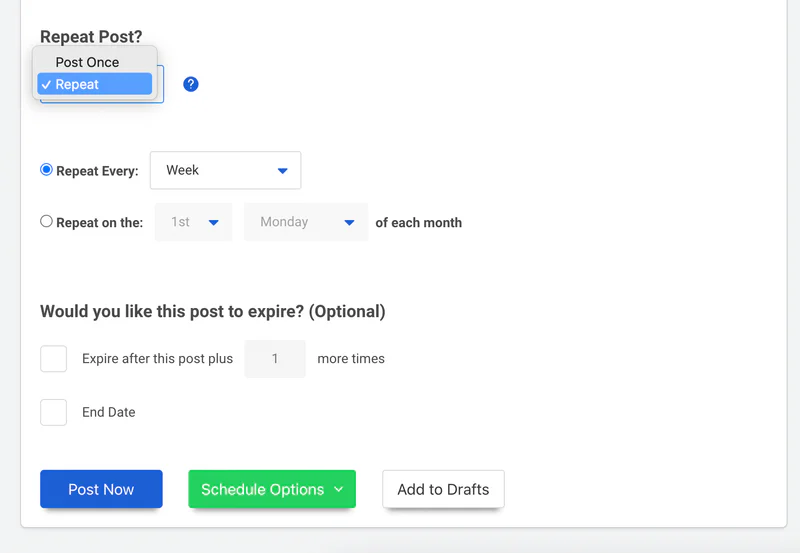
OneUp treats Discord as one of 12 equal networks: it publishes Discord messages, crossposts them from Facebook, Instagram, and X, and repeats them as recurring posts — ideal for weekly announcements. Plans start at $15 a month billed annually for 5 accounts; Intermediate at $48 adds approvals and 15 accounts. Verdict: the best Discord scheduler for anyone posting to more than one network.
PostEverywhere — best cheap Discord scheduler
PostEverywhere is the cheapest way to schedule Discord messages: Lite is $9 a month (2 accounts, 10 AI credits), or $7.50 a month billed annually, and every plan includes unlimited scheduled posts, the REST API, and a hosted MCP server for Claude or ChatGPT. It posts to Discord through a webhook — one per channel, no bot to host. The limits are the 20-account cap and no free plan, only a 7-day trial. Verdict: best if you want the lowest bill or an AI assistant doing the scheduling.
ShortSync — best Discord scheduler for video creators
ShortSync is built for creators who post video everywhere: upload once and it goes to Discord among 18 platforms, each with its own caption. The free plan covers 5 uploads a month to all 18 platforms, and Creator is €14.99 a month for unlimited uploads. Discord sits in the same queue as TikTok, YouTube Shorts, and Instagram. The trade-off: it is a publishing tool, not a full management suite. Verdict: best for video-first creators who crosspost everywhere.
Postiz — best Discord scheduler for self-hosters
Postiz is an open-source scheduler (AGPL-3.0) that publishes to 30-plus networks including Discord, Bluesky, Reddit, and Slack. The hosted cloud starts at Standard, $29 a month ($23 billed annually) for 5 channels, with a 7-day trial; self-hosting is free. Every plan includes the API, CLI, webhooks, and a hosted MCP server. The catch: self-hosting means registering your own developer app with each network. Verdict: best if you want to own the software or drive it from an AI agent.
Fuxux — best flat-price Discord scheduler for creators
Fuxux is a scheduler for creators and small teams: write a post once, let AI adapt the caption per platform, and schedule it to 14 networks including Discord, Bluesky, Twitch, and Kick. The free plan covers 3 accounts and 5 posts a month with no card; Creator is $29 a month ($27 billed annually) for 15 accounts and unlimited posts. It has an MCP server and RSS auto-posting. The trade-off: a newer, smaller tool with narrower analytics. Verdict: best if you want a flat price, a real free plan, and AI captions.
Tools that do not publish to Discord
Buffer's own help center is blunt: "No, unfortunately, it's not possible to schedule posts to Discord." Hootsuite, Later, Metricool, SocialPilot, Onlypult, and Sprout Social do not list Discord either. That matters: a scheduler without Discord leaves your most engaged channel manual. If Discord is essential, all seven are out regardless of price. Our best Snapchat scheduling tools roundup covers another network most schedulers skip.
How to choose a Discord scheduler
Webhook or direct connection? PostEverywhere uses a webhook — one per channel, no bot to host — the simplest setup for a single announcements channel. The other tools connect your account directly, which suits several channels. Decide whether announcements repeat. OneUp's recurring posts handle weekly event reminders on every plan. Check the rest of your mix. Discord usually sits next to X, YouTube, or Twitch — pick one tool that covers them. Details on OneUp's Discord support are in Does OneUp Support Discord?
FAQ
Can I schedule Discord messages natively?
Only if Discord put you in its scheduled-messages beta — a small, randomly chosen group; you cannot request access. For everyone else, there is no send-later button.
Can I schedule a Discord DM?
No. Webhooks post to channels only, and no scheduler can send a scheduled DM. The scheduled-messages beta is the only built-in route, and most users do not have it.
Do I need a bot in my server to schedule Discord posts?
Not necessarily. PostEverywhere posts through a webhook, so there is no bot to host. Other tools connect your Discord account or invite a bot with permission to post.
Which tool is best for scheduling Discord posts in 2026?
OneUp is the best overall pick, from $15 a month billed annually. PostEverywhere is cheapest at $9 a month, ShortSync is the pick for video, and Postiz for self-hosting. For the wider cost picture, see how much a social media scheduler costs in 2026, and our guide to auto-posting Facebook updates to Discord covers the crossposting setup.
Try OneUp free for 7 days
Start OneUp's 7-day free trial and connect Discord alongside your other networks — from $15 a month billed annually.
OneUp
OneUp is a social media management tool. Scheduling, cross-posting, analytics, social inbox, DM automations, social listening, and API & MCP, all in one place.
Visit Site