Best Google Business Profile Scheduling Tools in 2026
The best schedulers for Google Business Profile posts, compared on post types, multi-location posting, and price...
Contents
Google Business Profile posts show up exactly where buying decisions happen — in Search and Maps results — but keeping them fresh is tedious. Google's own editor now lets you schedule a post, yet only one profile at a time, in a separate interface from the rest of your marketing. A good GBP scheduler fixes that: every location, every post type, planned on the same calendar as your social posts.
We verified each tool below against its own documentation in November 2026. The differences that matter are quieter than the marketing pages suggest: which post types are actually supported (Offers are the usual casualty), whether multi-location posting is truly bulk, and what the plan really costs once locations and teammates are added.
Quick verdict
OneUp is the best Google Business Profile scheduler for most businesses: all three post types (What's New, Event, and Offer) with call-to-action buttons, genuine multi-location bulk posting, and pricing from $15/mo billed annually — while Sprout Social charges $79 per seat and doesn't support Offer posts at all.
- OneUp: from $15/mo billed annually · all post types, multi-location bulk, Google review replies in the same inbox · 7-day free trial
- RecurPost: from $9/mo · built around posting to many client locations · 14-day free trial
- SocialPilot: from $25.50/mo billed annually · solid mid-range all-rounder for agencies
What to check before you choose
- Post types. A GBP tool should publish What's New, Event, and Offer posts with CTA buttons. Some well-known tools quietly skip Offers — check before you trial. Our guide to Google Business Profile post types explains each type.
- Multi-location posting. If you run a chain or manage clients, you need to select many locations and post once — not repeat the same post location by location. Our Google Business Profile scheduling for local SEO agencies guide covers that workflow in depth.
- Reviews in the same tool. GBP value compounds when review replies live in the same inbox as your social messages.
The tools at a glance
1. OneUp — best overall GBP scheduler
OneUp treats Google Business Profile as a first-class network. In one composer you pick a single location or dozens, choose a What's New, Event, or Offer post, attach a photo and a call-to-action button (Book, Order, Learn more, Call now), and schedule it alongside your other social posts. Google review replies live in the same social inbox, so the whole local-presence loop happens in one place.
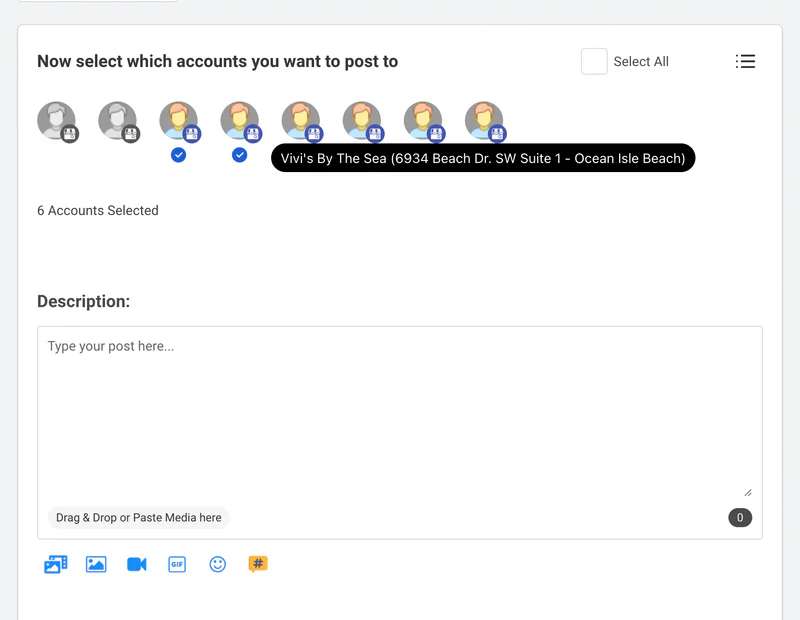
Pricing is flat and simple: Basic is $15/mo billed annually ($25 monthly) for 5 social accounts, and GBP is included on every plan. Scheduled posts are capped at 300 at a time on Basic and 800 on Intermediate; Growth and Business are unlimited. OneUp also posts to 12 networks in total — including Snapchat and Discord, which most GBP-capable tools skip — and includes API, MCP, and CLI access on every plan. If you need those hard networks too, see our comparison of the best schedulers for Snapchat and Google Business Profile.
2. RecurPost — cheapest start for many locations
RecurPost is built around recurring content and multi-location posting for agencies: its GBP scheduler publishes What's New and Offer posts to every client location and re-checks that posts actually went live. Plans start at $9/mo with a 14-day free trial — the lowest entry price here. The trade-offs are breadth (10 networks, no Snapchat or Discord) and a smaller ecosystem.
3. SocialPilot — mid-range agency all-rounder
SocialPilot schedules Google Business Profile posts as part of a broad agency feature set, at $25.50/mo billed annually for its entry plan — a sensible pick for agencies that mainly need the mainstream networks plus GBP. It does not post to Snapchat or Discord, and its lower-tier account limits are worth checking against your client count.
4. Publer — low price, tiered features
Publer supports Google Business Profile scheduling with images, call-to-action buttons, and event details, and its Professional plan is just $12/mo billed annually across 11 networks. The catch is tiering: bulk scheduling, recycling, and other workflow features sit behind higher plans, so price your actual workflow, not the headline plan.
5. Buffer — simple, priced per channel
Buffer schedules Google Business Profile posts and is easy to learn, with Essentials at $5 per channel per month billed annually. That per-channel model is the catch: a business posting to five channels pays for five, and costs climb with every location and network you add. Buffer also skips several networks entirely — no Snapchat, no Discord.
6. Sprout Social — enterprise GBP, with a post-type hole
Sprout Social publishes Google Business Profile posts and folds them into enterprise-grade reporting, approvals, and listening. But check the fine print: Sprout's own documentation lists What's New and Event posts as supported — Offer posts are not. At $79 per seat per month billed annually, that is an expensive gap. Sprout makes sense if your organization already runs it; buying it for GBP alone is hard to justify.
The popular tool that does not schedule GBP posts
Later. Despite its size, Later's own help center lists Google Business Profile as unsupported — local businesses need a second tool for Google posts if they choose Later. Always check a scheduler's supported-networks list for GBP before trialing; several roundup articles get this wrong.
How to schedule Google Business Profile posts in OneUp
- Connect your Google Business Profile locations under Accounts in OneUp.
- Click Create a post and select one location, several, or all of them.
- Choose the post type — What's New, Event, or Offer — add a photo and a call-to-action button.
- Post now, schedule it, or set it to repeat.
- Reply to the Google reviews it generates from the same social inbox.
FAQ
Can you schedule Google Business Profile posts natively in Google?
Yes — the profile editor has a schedule option. But it works one profile at a time, outside your content calendar. A scheduler earns its keep with multiple locations or when Google posts are planned alongside your social posts.
Which GBP post types should a scheduler support?
All three: What's New, Event, and Offer, each with a call-to-action button. Offer posts are the ones most often missing — Sprout Social, for example, does not support them.
What is the cheapest scheduler for Google Business Profile posts?
RecurPost starts at $9/mo, and OneUp at $15/mo billed annually with all post types and 5 accounts included. Compare like for like: per-channel and per-seat pricing (Buffer, Sprout) usually costs more. Our social media scheduler pricing compared breakdown shows real costs at 5 to 80 accounts.
Can I post to multiple Google Business Profile locations at once?
Yes — in OneUp you select as many locations as you like in the composer and post once. It is the single biggest time-saver for chains and agencies; our roundup of the best social media schedulers for multi-location businesses goes deeper.
Keep every location posting, without the tab-hopping
Google posts only work if they keep happening — every week, at every location. Connect your profiles to OneUp and they join the same calendar as everything else: start the 7-day free trial and schedule this month's Google posts in one sitting.
For inspiration, see 37 Google Business Profile post examples from restaurants, bars, dentists, law firms, and more.
OneUp
OneUp is a social media management tool. Scheduling, cross-posting, analytics, social inbox, DM automations, social listening, and API & MCP, all in one place.
Visit Site