Best LinkedIn Scheduling Tools in 2026
The 7 best LinkedIn scheduling tools in 2026, judged on LinkedIn: native limits, price per account, recurring posts, and comment auto-replies...
Contents
On LinkedIn, scheduling well compounds: consistency builds an audience that comments, and comments are what the algorithm rewards. But the tools that handle LinkedIn well are not all the same. Some charge per seat, some per channel, some cap your monthly posts. We judged seven tools on profile and Page support, scheduling depth, engagement, analytics, and cost per account.
Quick verdict
For most LinkedIn posters, OneUp is the best value: $15/month billed annually covers 5 accounts across 12 networks with recurring posts and keyword comment auto-replies, while per-seat tools start at $79–$99 per user.
- LinkedIn's own scheduler is free but one-off only: no recurring posts, no bulk scheduling, no first comment, and no cross-network queue.
- Hootsuite Standard is $99 per user per month billed annually; Sprout Social Standard is $199 per seat per month.
- Buffer is $5 per channel per month billed annually, with recurring posts in beta, limited to single-post repeats.
- Later's Starter is $18.75/month billed annually but caps you at 30 posts per profile per month, and Later no longer publishes to X.
First, what LinkedIn's own scheduler does — and doesn't
LinkedIn has a real built-in scheduler: write the post, click the clock icon next to the Post button, pick a date and time, and click Schedule. Profiles can schedule 10 minutes to 3 months ahead; Pages 1 hour to 3 months.
LinkedIn's scheduler cannot schedule events, jobs, or service posts, and Company Pages additionally cannot schedule polls, posts with multiple photos, or reshares. There is no recurring option, no bulk scheduling, no queue, and no first comment. If LinkedIn is your only network and you post a few times a week, the native scheduler is enough. See our LinkedIn scheduler guide for the native steps.
The 7 best LinkedIn scheduling tools in 2026
1. OneUp — best value for LinkedIn plus everything else
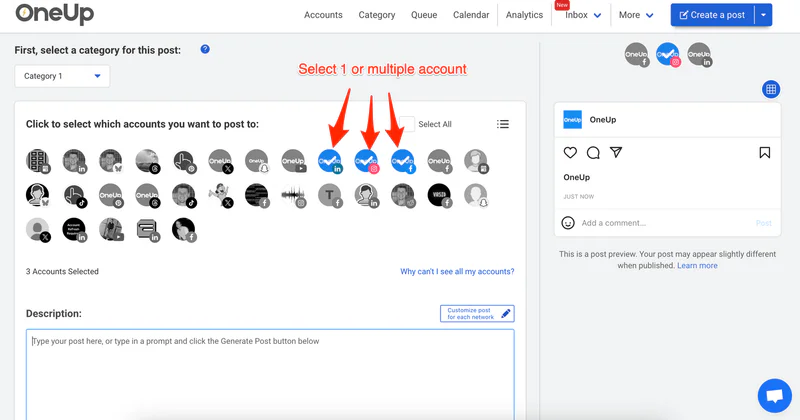
OneUp schedules to LinkedIn profiles and Company Pages inside a 12-network queue. Basic is $15/month billed annually for 5 accounts, Intermediate $48 for 15, Growth $84 for 30, Business $240 for 80. It includes recurring evergreen posts on every plan, bulk upload by CSV, crossposting workflows, and keyword comment auto-replies on LinkedIn, which matter where reply speed drives reach. Post approvals start on Intermediate. Verdict: the best LinkedIn scheduler for the money if you run several networks.
2. Hootsuite — the enterprise default, priced per seat
Hootsuite Standard costs $99 per user per month billed annually for up to 10 social accounts, Professional $199 per user for unlimited accounts, and Advanced $399 per user — approval workflows only arrive on Advanced. A three-person team on Professional pays $597 a month. What you get is breadth: scheduling to LinkedIn profiles and Pages, a unified inbox, analytics, AI post generation, and social listening. It suits large teams; for a solo poster it is $99 a month. Verdict: best for large teams that need approvals, listening, and reporting in one contract.
3. Buffer — simplest LinkedIn scheduling, priced per channel
Essentials is $5 per channel per month billed annually ($6 monthly); Team is $10 per channel ($12 monthly). The free plan covers 3 channels; Team adds unlimited members and approvals. The catch is the repeat story: Buffer's recurring posts are in beta, limited to single-post repeats with no evergreen library, so a queue of rotating LinkedIn content needs manual rebuilding. Verdict: best for solo creators who want the simplest LinkedIn queue.
4. Later — best visual planning, with a post cap that bites
Later's Starter plan costs $18.75/month billed annually ($25 monthly) for one social set — one profile per supported network — one user, and 30 posts per profile per month. Growth is $37.50 for two sets and 180 posts per profile, with approvals; Scale is $82.50 for six sets and unlimited posts. But 30 posts per profile per month is one a day, and Later discontinued X support in August 2025, Verdict: best for visual-first creators posting under 30 times a month per profile.
5. SocialPilot — cheapest flat-rate agency option
SocialPilot Essentials costs $24/month billed annually ($30 monthly) for 7 accounts and 1 user, Standard $40 ($50 monthly) for 15 accounts and 3 users, Premium $80 for 25 accounts, Ultimate $160 for 50. It includes an API and MCP on every plan and charges flat per plan, not per seat. Essentials has no inbox, analytics, or bulk scheduling; approvals start on Standard. Verdict: best flat-rate pick for small agencies that live on LinkedIn, Facebook, and Instagram.
6. Sprout Social — deepest LinkedIn analytics, highest seat price
Sprout Social Essentials costs $79 per seat per month billed annually ($99 monthly) for 5 profiles, Standard $199 ($249 monthly) for 5 profiles with the consolidated inbox, Professional $299, Advanced $399. What the money buys is depth: strong LinkedIn analytics, review management, and enterprise-grade collaboration. For a single poster it is overkill; for a team reporting LinkedIn ROI to a CMO, it is the benchmark. Verdict: best for teams that need board-ready LinkedIn reporting and can pay per seat for it.
7. Metricool — best analytics per dollar, with an X add-on
Metricool Starter costs $20/month billed annually ($25 monthly) for up to 5 brands, or $36 for 10 brands; Advanced starts at $53. Pricing is per brand, which makes it cheap for one person running several LinkedIn profiles. The free plan covers 1 brand with 20 scheduled posts a month, with good LinkedIn analytics and competitor tracking. Watch the add-ons: every X account needs a $10-a-month add-on, and Flows costs $12 a month per 2,500 executions. Verdict: best for freelancers who want strong LinkedIn analytics on a per-brand budget.
LinkedIn scheduling tools compared
Prices checked November 17, 2026. See how much a scheduler costs in 2026 for the market-wide picture.
What actually moves the needle on LinkedIn
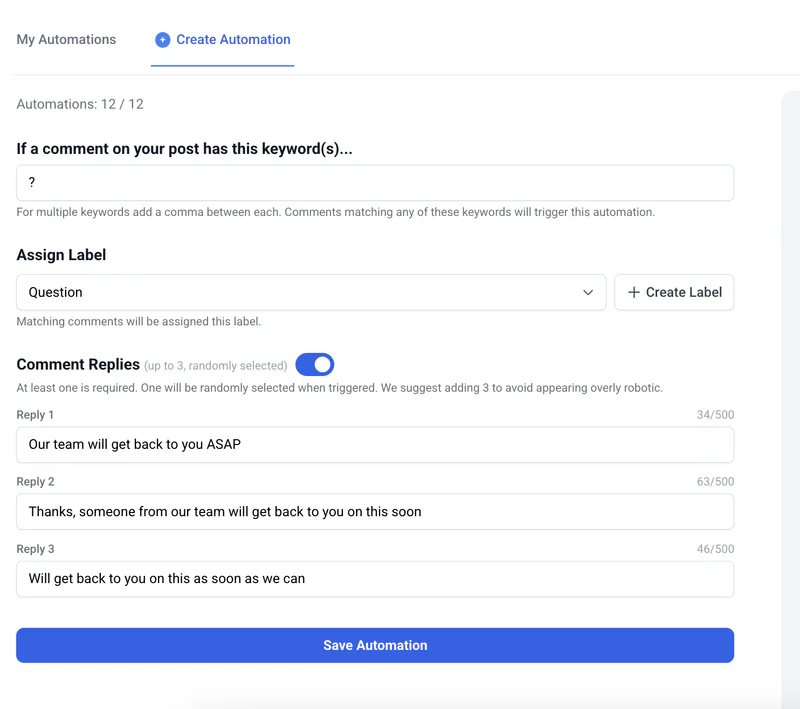
LinkedIn prohibits browser-extension automation. Use only official-API scheduling, and never automate comments on other people's posts.
FAQ
Can I schedule LinkedIn posts for free?
Yes. LinkedIn's built-in scheduler is free: write a post, click the clock icon, pick a date and time, and click Schedule.
What is the best LinkedIn scheduling tool for a small business?
OneUp: $15 a month billed annually covers 5 accounts across 12 networks with recurring posts, bulk upload, and comment auto-replies included.
Can a scheduler auto-reply to LinkedIn comments?
Yes, through the official API. OneUp auto-replies to LinkedIn comments by keyword on your own posts, and Metricool's Flows can send DMs from comments. LinkedIn has no native comment auto-reply — stick to official-API tools.
Which tool is cheapest for scheduling LinkedIn at scale?
At 5 accounts, OneUp Basic ($15/month annually) and Metricool Starter ($20/month annually for 5 brands) are the cheapest paid options; Per-seat tools are the most expensive at scale: one Sprout Standard seat is $199 a month for 5 profiles. See the Instagram and TikTok roundups if you schedule those too.
Start free: LinkedIn's native scheduler if you post occasionally, or OneUp's 7-day free trial if you want a queue, repeats, and auto-replies.
OneUp
OneUp is a social media management tool. Scheduling, cross-posting, analytics, social inbox, DM automations, social listening, and API & MCP, all in one place.
Visit Site