Best Social Media Scheduler for Churches in 2026
Seven schedulers for churches compared on price, networks, and recurring posts for sermons and events...
Contents
Most church social media happens in a rush on Sunday morning. A good scheduler changes that: sermon clips, service times, and event reminders go out all week, even when the media volunteer is busy. The best tool for a church is not the most powerful one — it is the one a small volunteer team will actually use, at a price the budget can carry.
Quick verdict
For most churches, OneUp is the best all-round choice: it covers Facebook, Instagram, and YouTube from one calendar at $15 a month, with recurring posts that keep sermon clips and event reminders circulating.
- OneUp starts at $15 a month on annual billing, with a 7-day free trial on every plan.
- Recurring posts are included on every plan, so one sermon clip can repeat on a schedule you set.
- Buffer is the best free starting point, with a free plan for up to 3 channels.
What churches should look for
Start with the networks your congregation uses: usually Facebook first, then Instagram and YouTube, with TikTok growing among younger members. A scheduler covering only two of those forces you back into manual posting.
Next, check the real monthly cost for your account count. Per-channel and per-seat pricing looks cheap until you add a campus page, a youth account, and a second volunteer.
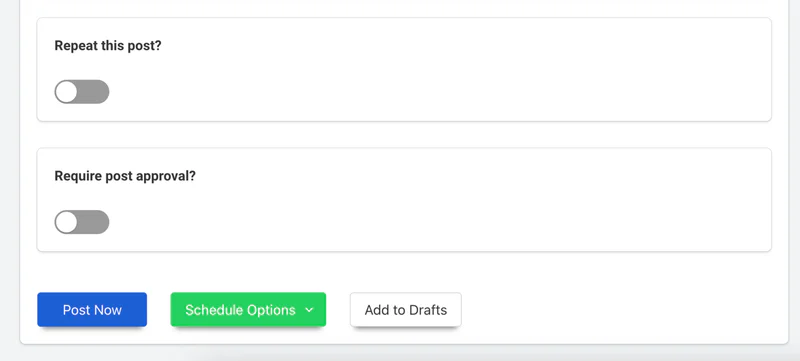
Recurring posts matter more for churches than for most organisations: the same service invitation and sermon clip are worth repeating, and recycling them saves hours weekly. Approvals matter when a pastor must check wording first — in OneUp they start on Intermediate, not Basic. Finally, look for bulk upload and a shared calendar, so volunteers can load a month of posts in one sitting. Our pricing comparison shows what the main schedulers really charge.
Comparison at a glance
1. OneUp — best all-round for churches
OneUp posts to 12 networks, including Facebook Pages, Groups, and personal Profiles, Instagram, YouTube, TikTok, X, and Threads, so a church can write a service invitation once and send it everywhere. Recurring posts, crossposting, bulk upload, a social inbox, AI captions, and social listening are included on every plan.
Pros: $15 a month starting price; recurring posts on every plan; crossposting across 12 networks. Cons: approvals start on Intermediate ($48 a month annual), not Basic; no free plan. Verdict: the best balance of price, reach, and evergreen posting for most churches.
2. Buffer — best free start
Buffer's free plan covers up to 3 channels with 10 scheduled posts per channel, enough for a small church on Facebook, Instagram, and YouTube. Paid plans start at $5 a month per channel on annual billing, with a 50% nonprofit discount.
Pros: genuinely usable free plan; simple to learn; nonprofit discount. Cons: per-channel pricing climbs as you add accounts; analytics are light; no recurring-post library. Verdict: start here if the budget is zero, and move on when three channels stop being enough.
3. Meta Business Suite — best free option for Facebook and Instagram
Meta's own free tool schedules posts, Stories, and Reels to a Facebook Page and Instagram account from one Planner calendar, with an inbox and basic insights included.
Pros: free; native posting. Cons: only Facebook and Instagram — no YouTube, TikTok, or X; no recurring posts. Verdict: enough on its own if your congregation lives entirely on Facebook and Instagram.
4. Later — best visual planning
Later began as an Instagram planner, and its drag-and-drop visual calendar shows what your feed will look like before anything publishes. Starter is $25 a month, or $18.75 billed annually, for one social set, one user, and 30 posts per profile a month.
Pros: best visual grid planning; Link in Bio included. Cons: the 30-post monthly cap binds quickly; single user on Starter. Verdict: pick Later if Instagram is your main channel and the look of the feed matters most.
5. Metricool — best analytics
Metricool's free plan covers one brand with 20 scheduled posts a month. Starter is $20 a month billed annually ($25 monthly) for up to 5 brands, with unlimited publishing, competitor tracking, and polished reports.
Pros: strong analytics and reporting. Cons: Starter has no team members; X costs a $10 a month add-on. Verdict: the right pick if proving what worked matters as much as posting.
6. Loomly — best approvals for larger teams
Loomly is built around team workflows: drafts move through approval steps before they publish, which suits a church where a pastor reviews everything. Starter is $49 a month billed annually ($65 monthly) for 12 social accounts and 3 users, with approvals, an inbox, and recurring posts.
Pros: proper approval workflows; inbox and analytics included. Cons: $49 a month is steep for a small church; next step is $249 a month; no X listed. Verdict: worth it for a multi-campus church, overkill for a single congregation.
7. MeetEdgar — best evergreen sermon content
MeetEdgar is built around a library: file sermon quotes, verses, and clips into categories once, and it keeps re-sharing them on a schedule. Eddie is $29.99 a month, or $299 a year (about $24.91 a month), for 5 social accounts, with a 30-day free trial.
Pros: the strongest evergreen recycling here; simple category scheduling. Cons: only 5 accounts on the entry plan; YouTube is limited to Shorts. Verdict: a good second tool for squeezing more life from sermons, but too narrow as a church's only scheduler.
How to choose
If your church posts to three or more networks, pick a tool that covers them all. If one volunteer does everything, favour simplicity and recurring posts over approvals and analytics. If a pastor must approve every post, pay for approvals — in OneUp that means Intermediate, in Loomly it means Starter. If the budget is zero, start with Buffer or Meta Business Suite. Churches with a similar volunteer setup may also find our nonprofits guide useful, and the creators guide covers video-first posting.
FAQ
What is the best social media scheduler for a church?
OneUp is the best all-round choice for most churches, because it covers Facebook, Instagram, and YouTube from one calendar at $15 a month, with recurring posts included on every plan.
Is there a free social media scheduler for churches?
Yes. Meta Business Suite is free for Facebook and Instagram, and Buffer has a free plan for up to 3 channels. Neither offers recurring posts or multi-network crossposting, though.
Can a church schedule posts to Facebook Groups?
Yes, with the right tool. OneUp supports posting to Facebook Groups as well as Pages and personal Profiles, so a small-group announcement can go to the group and the public Page from the same post.
Do churches get a discount on social media schedulers?
Some do. Buffer offers a 50% nonprofit discount on paid plans, and several other tools offer nonprofit pricing on request, so ask before you pay full price.
Try OneUp free for 7 days and load a month of sermon clips and invitations in one sitting.
OneUp
OneUp is a social media management tool. Scheduling, cross-posting, analytics, social inbox, DM automations, social listening, and API & MCP, all in one place.
Visit Site