Best Social Media Scheduler for Teachers and Educators in 2026
Best schedulers for teachers and educators in 2026 — from Buffer's free plan to OneUp at $15 a month...
Contents
Teachers run social media on a budget that is usually zero and a schedule that is already full: parent updates on the school Facebook Page, student work on Instagram, reminders about term dates and open days, and the occasional TikTok — all between lessons. The right scheduler is cheap, simple, and good at repeating the same announcements every term.
This roundup evaluates seven tools against what educators need: a free or near-free entry point, Facebook and Instagram covered properly, evergreen reposting for recurring announcements, and approvals so a second pair of eyes sees a post before parents do.
Quick verdict
For most teachers and small schools, OneUp at $15 a month is the best value; for a single teacher on zero budget, Buffer's free plan is the best start.
- OneUp Basic is $15 a month billed annually for 5 accounts across 12 networks, with recurring posts, crossposting, and approvals from Intermediate.
- Buffer's free plan covers 3 channels with 10 scheduled posts per channel — enough for one teacher's Facebook, Instagram, and TikTok.
- Later's visual calendar suits Instagram-first classrooms, from $18.75 a month for 8 profiles.
- Hootsuite ($99 a user a month) and Sprout Social ($79 a seat a month) are built for districts, not individual teachers.
What educators should look for
Four criteria decide this roundup. First, price: school budgets are tight, so a free plan or a $15 entry point matters more than enterprise features. Second, Facebook depth: school communication still runs on Facebook Pages and Groups. Third, evergreen reposting: term dates, open days, and exam reminders repeat every term, so a tool that re-publishes them automatically saves hours. Fourth, approvals: a headteacher should be able to check a post before it goes live. Our social media scheduler pricing comparison shows what each tool costs at 10, 30, and 80 accounts.
The 7 best schedulers for teachers and educators compared
| Tool | Starts at (annual) | Best for |
| --- | --- | --- | --- |
| OneUp | $15/mo, 5 accounts | No (7-day trial) | Best overall value |
| Buffer | $0; $5/channel/mo | Yes, 3 channels | Zero-budget start |
| Later | $18.75/mo, 8 profiles | No (14-day trial) | Visual, Instagram-first |
| Metricool | $20/mo, 5 brands | Yes, 1 brand | Analytics on a budget |
| SocialPilot | $25.50/mo, 7 accounts | No (14-day trial) | Small school teams |
| Hootsuite | $99/user/mo, 10 accounts | No (14-day trial) | Districts |
| Sprout Social | $79/seat/mo, 5 profiles | No (30-day trial) | District reporting |
1. OneUp — best overall value
Verdict: the cheapest full scheduler that covers every network a school uses, with evergreen reposting built in. Basic costs $15 a month billed annually for 5 accounts — enough for the school Facebook Page, Instagram, TikTok, X, and Google Business Profile — and every plan includes recurring posts, crossposting, bulk upload, the inbox, AI captions, listening, and API plus MCP access. Post approvals start on Intermediate at $48 a month, and scheduled posts are capped at 300 at a time on Basic, 800 on Intermediate, and unlimited on Growth and Business. OneUp also publishes to personal Facebook Profiles and Groups. The trade-off: no free plan, only a 7-day trial.
2. Buffer — best zero-budget start
Verdict: the only genuinely free scheduler here, and the right first step for a single teacher. The free plan covers 3 channels with 10 scheduled posts per channel, plus the AI Assistant and API and MCP access. Essentials is $5 per channel per month billed annually, so three channels cost $15 — the same as OneUp Basic — but with fewer networks and no recurring posts, inbox, or listening.
3. Later — best for visual, Instagram-first classrooms
Verdict: the nicest calendar for photo- and video-led school accounts, with post caps that punish heavy posters. Starter is $18.75 a month billed annually for 1 set of 8 profiles and 30 posts per profile per month; Growth is $37.50 for 2 sets; Scale is $82.50 for 6 sets. The visual calendar and Linkin.bio suit Instagram- and TikTok-first accounts. The limits: 30 posts per profile a month on Starter is thin during a busy term, and there is no API or MCP access.
4. Metricool — best analytics on a budget
Verdict: the cheapest way to get real analytics, with a free plan for a single brand. The free plan covers 1 brand; Starter is $20 a month billed annually for 5 brands, and Advanced is $53 for 15 brands. A brand holds one profile per network, so a school with one account on each network fits neatly. Analytics are stronger here than on Buffer or Later at this price. The catches: X costs $10 a month extra per account, and there is no recurring-post engine comparable to OneUp's.
5. SocialPilot — best for small school teams
Verdict: a solid budget pick for a small team that needs an inbox, but no free plan and no Snapchat. Essentials is $25.50 a month billed annually for 7 accounts and 1 user, and Standard at $42.50 adds the inbox, analytics, and manager approval. Bulk scheduling waits for Premium at $85. For a school office with two or three people posting, Standard is a reasonable buy. The gaps: no free plan, no Snapchat or Discord, and no listening — and at $25.50 it costs more than OneUp Basic while covering fewer networks.
6. Hootsuite — best for districts, overkill for teachers
Verdict: enterprise depth at a price no individual teacher should pay. Standard is $99 per user per month billed annually for up to 10 accounts; Professional is $199, Advanced is $399. A three-person team on Standard pays $297 a month.
7. Sprout Social — best district reporting, highest price
Verdict: the deepest analytics here, at the highest price in this list. Essentials is $79 per seat per month billed annually for 5 profiles, Standard is $199, Professional is $299, Advanced is $399. A 30-day trial needs no card. Districts buy it for reporting — a single school will never use enough of it to justify $79 a seat.
Evergreen announcements: the feature that saves teachers the most time
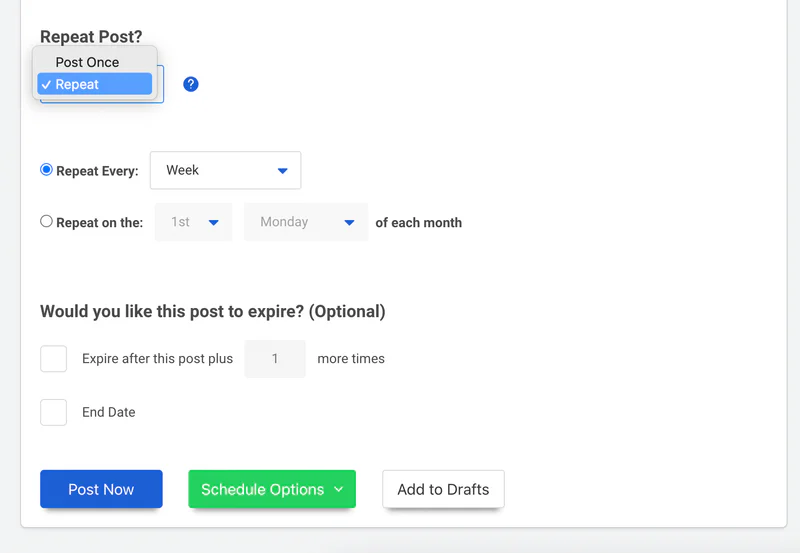
The same announcements repeat every term: term dates, open days, exam reminders, club sign-ups, and holiday closures. A scheduler with recurring posts lets you set each one once and have it re-publish on schedule — repeating evergreen posts are included on every OneUp plan, and they are the single biggest time-saver in this roundup for a teacher. Buffer, Later, and Metricool have no equivalent engine; each announcement must be re-queued by hand.
FAQ
What is the best free social media scheduler for teachers?
Buffer. Its free plan covers 3 channels with 10 scheduled posts per channel. Metricool's free plan covers 1 brand. OneUp has no free plan, only a 7-day trial.
Which scheduler is best for school Facebook Pages?
OneUp, for depth: it publishes to Pages, Groups, and personal Profiles, with crossposting to Instagram and TikTok in the same workflow. See our Facebook scheduling tools roundup for the wider field.
Do teachers need post approvals?
Yes, when posts go out under the school's name. OneUp includes approvals from Intermediate ($48 a month); SocialPilot includes manager approval from Standard ($42.50); Hootsuite and Sprout include them on higher tiers.
How much should a school spend on a scheduler?
$0 to $15 a month for a single teacher or small school; $25 to $50 for a school office team. Anything above that is district-level spending, and should be justified by reporting needs.
The bottom line
Start free with Buffer if you are one teacher paying out of pocket. Move to OneUp at $15 a month when you need more than three channels, recurring term announcements, or approvals — the cheapest full scheduler here, and the only one that repeats your announcements for you. Try OneUp free for 7 days and set up your term's recurring announcements in one sitting.
OneUp
OneUp is a social media management tool. Scheduling, cross-posting, analytics, social inbox, DM automations, social listening, and API & MCP, all in one place.
Visit Site