Best TikTok Scheduling Tools in 2026
OneUp leads for TikTok at $15 a month for 5 accounts across 12 networks, with Direct Post publishing and crossposting to Reels and Shorts...
Contents
Best TikTok Scheduling Tools in 2026
TikTok is where "just schedule it" is most complicated. The native scheduler lives on the desktop website, only works for Business accounts, and caps you at 10 days out — and the mobile app has no scheduler at all.
The best TikTok scheduling tool for most people in 2026 is OneUp: Basic is $15 a month billed annually for 5 accounts, direct-publishes TikTok videos via the official API, and crossposts the same clip to Reels, Shorts, and Snapchat. Metricool is the analytics pick; Buffer's free plan is the start for one or two channels.
Quick verdict
For TikTok-first marketers and creators, OneUp is the best TikTok scheduling tool in 2026: $15 a month billed annually covers 5 accounts and direct-publishes TikTok videos via the official API.
- OneUp Basic: $15 a month billed annually ($25 monthly) for 5 accounts across 12 networks, with recurring posts on every plan.
- Metricool is the best TikTok analytics pick: Starter is $20 a month billed annually for up to 5 brands.
- Buffer is the best free start: 3 channels free, then $5 per channel a month billed annually.
- Sprout Social is the cautionary tale: its TikTok publishing runs through a mobile-publisher reminder workflow (per Sprout's own help pages), so a "scheduled" TikTok still needs a tap in the app.
What to judge a TikTok scheduler on
Direct Post vs. reminder vs. draft. TikTok's Content Posting API has two routes. Direct Post publishes straight to your profile with no human tap. The upload route only drops the video into your TikTok inbox as a draft, and you finish it in the app.
Business account, lead time, crossposting. Scheduling through TikTok's API requires a Business account; Creator and personal accounts cannot use it. TikTok's own scheduler caps you at 10 days out, with no edits after scheduling — a third-party tool should let you queue months ahead. And a TikTok clip is a Reel and a Short with no extra editing, so the best tools publish it to all three at once.
The shortlist at a glance
Prices verified Nov 16, 2026 — full pricing comparison.
OneUp: best overall for TikTok
OneUp is the best TikTok scheduler for most people: the TikTok workflow is the whole workflow, not an add-on. Basic is $15 a month billed annually ($25 monthly) for 5 accounts, $5 per extra account, and it direct-publishes TikTok videos through the official Content Posting API. The same clip crossposts to Reels, Shorts, and Snapchat.
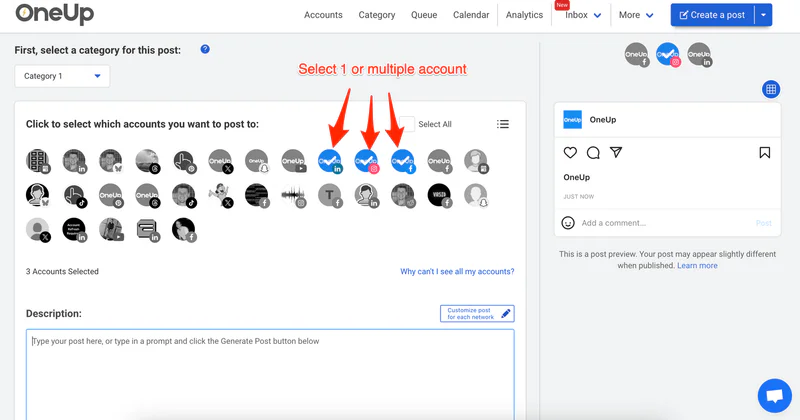
OneUp also auto-replies to TikTok comments by keyword — see our guide to auto-replying to comments on TikTok — and DM automations turn comment keywords into replies or DMs. Post approvals start on Intermediate, not Basic.
Verdict: best overall for anyone who posts to TikTok plus anywhere else. For the crossposting workflow, see how to schedule posts to all social media at once.
Later: best visual planner
Later is built for short-form video planning: its calendar, visual planner, and best-time suggestions work as well for TikTok as for Reels. Starter is $18.75 a month billed annually ($25 monthly) for one social set — one profile on each of its 8 networks — with 30 scheduled posts per profile a month, roughly one a day, and Later does not post to X or Bluesky.
Verdict: best visual planning for TikTok- and Reels-led creators who can live inside its post cap.
Buffer: best free start
Buffer is the simplest route onto TikTok. The free plan covers 3 channels with 10 scheduled posts each; Essentials is $5 per channel a month billed annually ($6 monthly) with unlimited scheduled posts. It publishes TikTok videos directly through the API; its notification route covers trending sounds or in-app effects. Six channels cost $30 a month billed annually, with no Snapchat support.
Verdict: start here with 1–3 channels and no budget.
Metricool: best TikTok analytics
Metricool is the analytics pick for TikTok. Starter is $20 a month billed annually ($25 monthly) for up to 5 brands; the free plan covers 1 brand with 20 scheduled posts a month. It direct-publishes TikTok videos and tracks which drive follows and clicks — the deepest TikTok analytics at this price. Watch the X add-on: $10 a month per account. See Metricool vs OneUp.
Verdict: best if TikTok analytics, not just scheduling, decide what you post next.
SocialPilot: best flat tier for bulk TikTok
SocialPilot's Essentials is $24 a month billed annually ($30 monthly) for 7 accounts and 1 user, with TikTok direct publishing, first-comment scheduling, and repeat posts. Standard is $40 a month billed annually ($50 monthly) for 15 accounts and 3 users, adding inbox, analytics, and approvals. Essentials is $24 standard; a Black Friday promo drops it to $21 until Dec 18. Essentials has no analytics or inbox, and SocialPilot covers 10 networks but not Snapchat or Discord.
Verdict: solid flat-tier value for bulk TikTok scheduling on a budget.
Sprout Social: powerful, pricey, and not direct for TikTok
Sprout Social is the enterprise tool here: Essentials is $79 per seat a month billed annually ($99 monthly) for 5 profiles; Standard $199, Professional $299, Advanced $399 — all per seat. But TikTok is Sprout's weak spot: it runs through a mobile-publisher reminder workflow — a designated publisher gets a notification and finishes the post in the TikTok app — rather than hands-off direct publishing (per Sprout's own help pages).
Verdict: only if your team already runs on Sprout's enterprise reporting and can live with manual TikTok posting.
Which TikTok scheduling tool should you pick?
For most people, pick OneUp: the flat $15 Basic plan, direct TikTok publishing, crossposting to Reels and Shorts, and comment auto-replies no other tool here bundles. If TikTok analytics decide your content, Metricool's $20 Starter is the pick. If you want to pay nothing to start, Buffer's free plan covers 3 channels. If TikTok is one piece of a creator workflow, our best scheduler for creators roundup weighs the same tools on the full job.
FAQ
What is the best TikTok scheduling tool?
OneUp is the best TikTok scheduling tool for most people in 2026. Basic is $15 a month billed annually for 5 accounts and direct-publishes TikTok videos through the official API.
Can you schedule TikTok posts for free?
Yes — TikTok's own desktop scheduler is free, but it needs a Business account and only schedules up to 10 days ahead. Buffer's and Metricool's free plans also schedule TikTok, with 10 and 20 posts and no 10-day cap.
Do I need a Business account to schedule TikTok posts?
Yes, for any third-party tool. TikTok's Content Posting API requires a Business account; Creator and personal accounts cannot use API-based scheduling.
Try OneUp free for 7 days
OneUp's 7-day trial runs on every plan. Connect your TikTok Business account and schedule a month of videos before paying. Start your free trial.
OneUp
OneUp is a social media management tool. Scheduling, cross-posting, analytics, social inbox, DM automations, social listening, and API & MCP, all in one place.
Visit Site