Best X Scheduling Tools in 2026
X's free scheduler can't do threads, queues, or bulk uploads. The best X scheduling tools, compared...
Contents
X schedules posts free from its web composer, so a tool has to earn its keep — the moment you need threads, a queue, bulk uploads, or the same post going to LinkedIn and Instagram too. If you post to X a few times a week and nowhere else, the built-in scheduler is enough.
Quick verdict
For most people scheduling X posts, OneUp is the best X scheduling tool: $15 a month billed annually covers X plus 11 other networks, with a queue, recurring posts, and cross-posting in one place.
- X's web composer schedules single posts free, but no threads or polls, no queue or bulk upload, and a 1,000 draft-plus-scheduled cap.
- OneUp starts at $15/mo annual for 5 accounts and schedules X posts alongside TikTok, Instagram, LinkedIn, and 8 more networks.
- Buffer ($5/channel/mo) is cheapest if X is your only paid channel, but per-channel pricing climbs as you add networks.
- Later ended X support on August 28, 2025 — do not buy Later for X scheduling.
- Metricool ($20/mo) charges X as a $10/mo per-account add-on on every paid plan, so its real X price is $30.
What X's built-in scheduler does
On x.com, write a post, click the calendar icon, pick a date and time, and click Schedule. That is the whole feature. It is free, it works in X Pro (formerly TweetDeck) and the X Ads Composer, and the iPhone app gained scheduling in September 2026 — but the Android app still has none, and drafts do not sync between app and web. Single posts only: no native thread scheduling, no polls on scheduled posts, and posts over 280 characters cannot be scheduled or saved as drafts on the web. Media is limited to 4 images, 1 GIF, or 1 video per post. There is no bulk or CSV upload, no queue view, and no best-time suggestion. X also caps combined drafts and scheduled posts at 1,000 per account. X Pro now sits behind Premium+ (around $40 a month) since March 2026. For casual posters, that is fine. For a business posting daily, a queue and cross-posting save an hour a day.
Comparison table
Prices are annual billing, November 2026 (full table in the pricing comparison). Later is absent: it ended X support on August 28, 2025.
OneUp — best for multi-network posters
OneUp schedules X posts from the same composer as your TikTok, Instagram, LinkedIn, Threads, and YouTube posts — one post goes out everywhere at once. The Basic plan is $15 a month billed annually for 5 social accounts, with recurring posts, automated crossposting, bulk upload of up to 100 posts per batch via CSV or Google Sheet, and the social inbox included. Scheduled posts are capped at 300 at a time on Basic and 800 on Intermediate ($48/mo annual); Growth and Business are unlimited, and post approvals start on Intermediate. There is a 7-day free trial. The honest limit: OneUp schedules X posts, not standalone threads, and it is a scheduler, not a deep X analytics suite. See the social media scheduler pricing index for the full cost picture.
Buffer — cheapest paid option
Buffer's Essentials plan is $5 per channel a month billed annually ($6 month-to-month), so X costs $5 if it is your only channel, with a free plan for 3 channels. Buffer schedules posts and threads with a queue. The catch is the per-channel model: X plus TikTok, Instagram, and LinkedIn is $20 a month, and at that point OneUp's flat $15 for 5 accounts is cheaper. Pick Buffer if X is genuinely your only paid channel.
Metricool — best analytics
Metricool's Starter plan is $20 a month billed annually ($25 month-to-month) for up to 5 brands, and its strength is analytics: X performance sits next to TikTok, Instagram, and YouTube numbers in one dashboard. It schedules X posts with a queue. The catch is the X add-on: X costs an extra $10 a month per account on every paid plan, so a workflow built around X is $30, not $20. Approvals and teams start on Advanced ($53/mo annual).
SocialPilot — best budget team tool
SocialPilot's Essentials plan is $25.50 a month billed annually ($30 month-to-month) for 7 accounts and 1 user. It schedules X posts with bulk scheduling, and client approvals start on Premium. Note: SocialPilot repriced in November 2026 — older roundups still quote $24 a month annual, which is now stale.
Publer — cheapest per-account pricing
Publer's Professional plan is $4 per account a month billed annually ($5 for one account), with Business at $8 per account. It schedules X posts with a queue, and every 10th account is free. Recycling, approvals, analytics, AI, and API+MCP are Business-only. There is a free plan for 3 accounts, though it excludes X. Publer is the cheapest way to cover many X accounts — but compare the total against OneUp's flat $15 for 5 accounts first.
Hootsuite and Sprout Social — for large teams
Hootsuite Standard is $99 per user a month billed annually for 10 accounts (Professional $199, Advanced $399). Sprout Social Essentials is $79 per seat a month billed annually for 5 profiles (Standard $199, Professional $299, Advanced $399). Both schedule X posts and threads with deep approvals and reporting, priced per seat — a three-person team pays three times the headline price. Sprout also charges extra for listening on every plan. Unless you need enterprise reporting or formal approval chains, they are more tool than an X workflow needs.
How to schedule X posts in OneUp
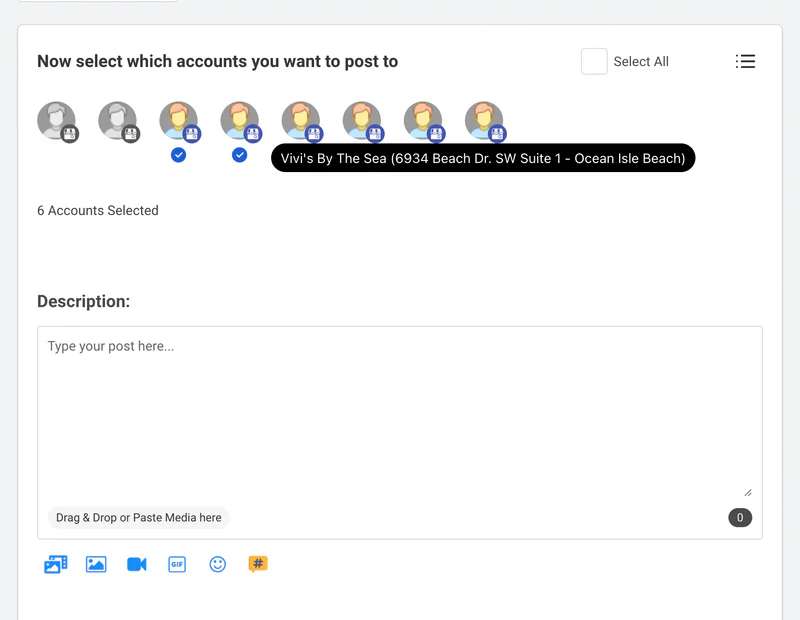
Connect X in OneUp's Accounts page, click Create a post, write your post, and select X plus any other network. Pick a date and time, or drop the post into a queue slot, and turn on repeating posts for evergreen content. For the wider routine, see how to schedule posts to all social media at once and the best LinkedIn scheduling tools roundup.
FAQ
Can you schedule a thread on X natively?
No. X's built-in scheduler handles single posts only. Buffer, Hootsuite, Sprout, and Publer schedule threads from their own composers.
How far ahead can you schedule a post on X?
X does not officially document a limit; the documented cap is 1,000 combined drafts and scheduled posts per account.
Does scheduling posts on X cost money?
No. Scheduling from the web composer is free. You only pay for a third-party tool's queue, threads, bulk upload, or cross-posting.
What happened to TweetDeck for scheduling?
TweetDeck became X Pro and moved behind Premium+ (around $40 a month) in March 2026. The free web composer still schedules posts.
Bottom line
If X is your only channel, the free web composer is enough. The moment you need threads, a queue, or the same post on LinkedIn and Instagram, a scheduler pays for itself. OneUp covers X plus 11 more networks at $15 a month billed annually, with a 7-day free trial.
OneUp
OneUp is a social media management tool. Scheduling, cross-posting, analytics, social inbox, DM automations, social listening, and API & MCP, all in one place.
Visit Site