Best YouTube Scheduling Tools in 2026
YouTube Studio is free, but queues and cross-posting earn a tool its keep. The best YouTube schedulers, compared...
Contents
YouTube Studio already lets you schedule videos for free, so a scheduling tool has to earn its keep — when you publish to more than one network, when you want a queue instead of uploading one video at a time, or when Shorts, TikTok, and Reels all need the same clip on the same day. If you only post to YouTube, Studio is enough.
Quick verdict
For most creators who publish beyond YouTube, OneUp is the best YouTube scheduling tool: $15 a month billed annually covers YouTube plus 11 other networks, with a queue, recurring posts, and cross-posting in one place.
- YouTube Studio schedules videos and Shorts free, including Premieres — but one video at a time, with no queue, no bulk upload, and no cross-posting.
- OneUp starts at $15/mo annual for 5 accounts, scheduling YouTube videos and Shorts alongside TikTok, Instagram, and X.
- Hootsuite ($99/user/mo) and Sprout Social ($79/seat/mo) are team tools first; both cost far more than a solo creator needs for YouTube alone.
- Buffer ($5/channel/mo) is the cheapest paid route if you only add YouTube, but its per-channel pricing climbs as you add networks.
What YouTube Studio does for free
Upload a video in YouTube Studio, go to the Visibility step, and choose Schedule instead of Public. Pick a date, time, and time zone; the video stays private until then, then goes public automatically. There is no subscriber or monetization threshold, and the same flow works in the YouTube mobile app. Shorts schedule exactly the same way: any vertical or square video up to 3 minutes counts as a Short. Premieres are available for regular videos — tick "Set as Premiere" while scheduling for a public watch page with a countdown and live chat — but not for Shorts, 360° video, or output above 1080p. A video that is already public cannot be scheduled again.
What Studio does not do is the queue work: no bulk scheduling, no queue view, no best-time suggestion, and no way to send the same video to TikTok or Instagram at once. YouTube publishes no documented cap on how far ahead you can schedule; the practical constraint is the daily upload limit (around 15 videos a day on newer accounts).
Comparison table
Prices are annual billing, November 2026; see the pricing comparison for the full table.
OneUp — best for multi-network creators
OneUp schedules YouTube videos and Shorts from the same composer as your TikTok, Instagram, X, LinkedIn, and Threads posts, so a Short goes out everywhere at once instead of being uploaded four times. The Basic plan is $15 a month billed annually for 5 social accounts, with recurring posts that re-share evergreen videos, automated crossposting, bulk upload of up to 100 posts per batch via CSV or Google Sheet, and the social inbox included. Scheduled posts are capped at 300 at a time on Basic and 800 on Intermediate ($48/mo annual); Growth and Business are unlimited, and post approvals start on Intermediate. There is a 7-day free trial. The honest limit: OneUp is a scheduler, not a video editor — you still cut the video elsewhere. See the social media scheduler pricing index for the full cost picture.
Buffer — cheapest paid option
Buffer's Essentials plan is $5 per channel a month billed annually ($6 month-to-month), so adding YouTube costs $5 if it is your only channel, with a free plan for 3 channels. The catch is the per-channel model: YouTube plus TikTok, Instagram, and X is $20 a month, and at that point OneUp's flat $15 for 5 accounts is cheaper.
Later — best visual planner
Later starts at $18.75 a month billed annually for one Social Set (8 profiles, 1 user, 30 posts per profile a month). Its visual calendar suits creators who plan Instagram and TikTok alongside YouTube, and it schedules YouTube videos and Shorts. Approvals and the inbox start on the $37.50 Growth plan. It fits visual planners; for a fast queue and cross-posting, OneUp costs less.
Metricool — best analytics
Metricool's Starter plan is $20 a month billed annually ($25 month-to-month) for up to 5 brands, and its strength is the analytics: YouTube performance sits next to TikTok and Instagram numbers in one dashboard. It schedules videos and Shorts, with a free plan for 1 brand and 20 posts a month. Note: X costs an extra $10 a month per account on every paid plan, so a YouTube-plus-X workflow is $30, not $20.
SocialPilot — best budget team tool
SocialPilot's Essentials plan is $25.50 a month billed annually ($30 month-to-month) for 7 accounts and 1 user. It schedules YouTube videos and Shorts, has bulk scheduling, and client approvals start on Premium. Note: SocialPilot repriced in November 2026 — older roundups still quote $24 a month annual, which is now stale.
Hootsuite and Sprout Social — for large teams
Hootsuite Standard is $99 per user a month billed annually for 10 accounts (Professional $199, Advanced $399). Sprout Social Essentials is $79 per seat a month billed annually for 5 profiles (Standard $199, Professional $299, Advanced $399). Both schedule YouTube videos and Shorts with deep approvals and reporting, and both are priced per seat — a three-person team pays three times the headline price. Unless you need enterprise reporting or formal approval chains, they are more tool than a YouTube workflow needs; compare them in the best social media scheduler for agencies roundup.
How to schedule a YouTube video in OneUp
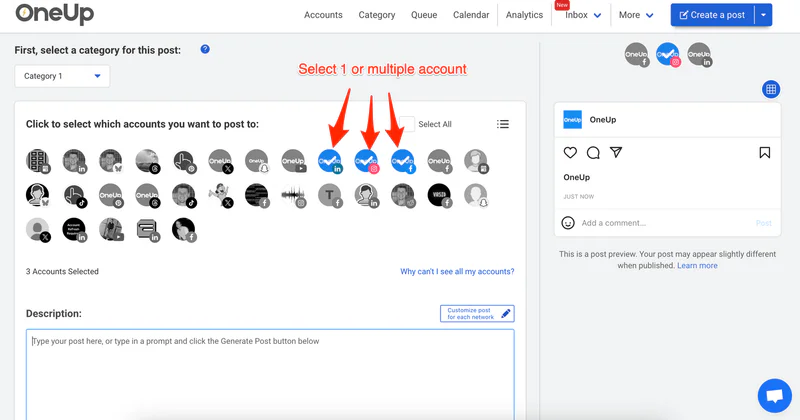
Connect your YouTube channel in OneUp's Accounts page, click Create a post, add your video file, title, and description, and select YouTube plus any other network the same clip should go to. Pick a date and time, or drop the post into a queue slot, and turn on repeating posts for evergreen videos. The same flow works for Shorts. For the wider routine, see how to schedule posts to all social media at once.
FAQ
Can you schedule YouTube Shorts?
Yes. In YouTube Studio, upload any vertical or square video up to 3 minutes and choose Schedule at the Visibility step, exactly like a long-form video. OneUp, Buffer, and Later handle Shorts the same way.
Does scheduling a YouTube video hurt its views?
No. YouTube has never said scheduled videos are treated differently, and creators schedule routinely. What matters is publishing when your audience is online.
Can a scheduling tool set a YouTube Premiere?
Not reliably. Premieres are a YouTube Studio feature, and most schedulers publish the video as a standard scheduled upload instead. If a Premiere with a countdown and live chat matters, schedule that video in Studio itself.
Bottom line
If YouTube is your only channel, use YouTube Studio — it is free and does the job. The moment TikTok, Instagram, or X join the routine, a scheduler earns its price by removing the repeated uploads. OneUp covers YouTube plus the rest at $15 a month billed annually, with a 7-day free trial.
OneUp
OneUp is a social media management tool. Scheduling, cross-posting, analytics, social inbox, DM automations, social listening, and API & MCP, all in one place.
Visit Site