CoSchedule is a marketing calendar first and a scheduler second: campaigns, projects, and tasks sit alongside social messages in one calendar. OneUp is a scheduler first: broad coverage, flat per-account pricing, and automation included on every plan.
Quick verdict
Choose OneUp if you want the lowest cost per social account and the widest platform coverage; choose CoSchedule if you need a full marketing calendar with campaigns, projects, and tasks.
- OneUp costs $15 per month on annual billing for 5 accounts, $40 for 10, and $84 for 30; CoSchedule Professional costs $49, $74, and $174 at the same counts.
- CoSchedule includes unlimited scheduled messages and unlimited AI writing on every plan, even the $29 per month Starter plan.
- OneUp supports Snapchat, Reddit, and Discord; CoSchedule supports none of the three.
- X costs an extra $16 per profile per month on CoSchedule and is not included in its base plans.
CoSchedule vs OneUp at a glance
Pricing: the per-profile and per-user maths
Starter is $29 per month billed annually ($39 monthly) for 1 user and 3 profiles, with extra profiles at $5 each. Professional is $49 per month billed annually ($59 monthly) for 2 users and 5 profiles, with extra profiles at $5 each and extra users at $29 each, up to 3 users. Suite is custom-priced. Unlimited scheduled messages are included on all plans, nonprofits get 30% off, and a free plan exists, though its limits are not stated. Free trial: 14 days on Starter and Professional, card required.
At 5 profiles on annual billing, Professional is $49 per month; Starter is $39, but allows only 1 user and no approvals. At 10 profiles, Professional is $74. At 30, it is $174 — before X at $16 per profile per month (another $80 for 5 X profiles). OneUp's annual pricing is $15 per month for 5 accounts, $40 for 10, and $84 for 30. Monthly billing is $25, $120, and $300, and every plan includes unlimited posts, recurring posts, automated crossposting, bulk upload, the social inbox, approval workflows, AI captions, social listening, and API plus MCP.
The per-user maths is where CoSchedule's price jumps fastest: a three-person team on Professional pays $49 plus one extra user at $29, or $78 per month before extra profiles, and the plan caps at 3 users. OneUp charges per account, not per user. See the social media scheduler pricing comparison.
Platform coverage
CoSchedule supports 11 networks on all paid plans: Facebook, Instagram, LinkedIn, Pinterest, TikTok, Threads, Bluesky, Mastodon, Google Business Profile, YouTube including Shorts, and X as a paid add-on.
OneUp supports 13 networks: Facebook, Instagram, X, LinkedIn, TikTok, YouTube, Pinterest, Threads, Bluesky, Snapchat, Reddit, Discord, and Google Business Profile. The gap is Snapchat, Reddit, and Discord, which CoSchedule does not support. If X is in your mix, CoSchedule charges $16 per profile extra, while OneUp includes X.
Automation, calendar, and workflow
CoSchedule's core product is the calendar: drag-and-drop campaigns, projects, tasks, and social messages in one view, with Kanban and digital asset management on Suite. ReQueue handles evergreen resharing (5 groups on Starter, 10 on Professional), bulk import covers up to 365 messages at once, and analytics are on all plans, with white-label reports on Professional and above. AI is generous: unlimited AI assistants on every plan, plus AI image generation, even on Starter.
OneUp's core product is the scheduler. Every plan includes unlimited posts, recurring posts, automated crossposting (1 workflow on Basic, 5 on Growth, 8 on Business), bulk upload, the social inbox, approval workflows, AI captions, social listening, and API plus MCP. See how to set up repeating evergreen posts in OneUp.
Approvals and inbox coverage are gated differently. On CoSchedule, approvals start on Professional, project-level approvals are Suite only, and the Starter inbox covers Facebook and Instagram only. On OneUp, approvals and the full inbox are included on every plan.
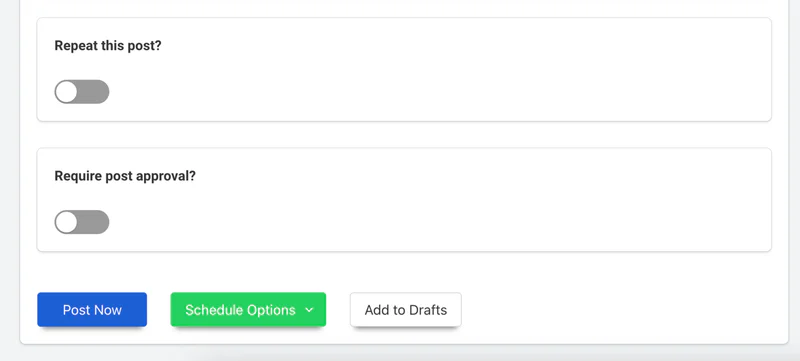
The image above shows OneUp's post settings for repeating a post and requiring approval. On CoSchedule, repeating runs through ReQueue groups and approvals require Professional; on OneUp, both are available from Basic. OneUp also includes API and MCP on every plan, so Claude or ChatGPT can schedule posts through its MCP server, and OneUp offers DM automations on Instagram and Facebook. See the 7 best social media schedulers with an MCP server; CoSchedule's MCP availability is not stated as included on every plan.
Where CoSchedule wins
CoSchedule wins clearly on the marketing calendar. A drag-and-drop calendar holding campaigns, projects, tasks, and social messages in one view is a different product from a scheduler with a calendar attached, and for campaign-planning teams it saves real coordination time.
It also wins on AI and analytics at the entry price. Unlimited AI writing assistants and AI image generation on a $29-per-month Starter plan is genuinely generous, and analytics on all plans with white-label reports from Professional is strong reporting.
FAQ
Is CoSchedule cheaper than OneUp?
No, not at the same number of accounts. Professional costs $49 per month for 5 profiles, $74 for 10, and $174 for 30 on annual billing, while OneUp costs $15, $40, and $84. Starter is $29, but includes only 1 user, 3 profiles, and no approvals.
Does CoSchedule include X (Twitter)?
No, not in its base plans. X costs $16 per profile per month as an add-on. OneUp includes X in its base price on every plan.
Does CoSchedule support Snapchat, Reddit, or Discord?
No. CoSchedule supports none of the three. OneUp supports all three, plus the mainstream networks listed above.
Which is better for a small team, CoSchedule or OneUp?
It depends on the work. CoSchedule is better for a team planning campaigns with tasks and deadlines that wants unlimited AI writing cheaply. OneUp is better for a team wanting the lowest cost per account, the widest platform list, and approvals and the full inbox on every plan.
The bottom line
CoSchedule is a strong choice when the calendar is the job: campaigns, projects, tasks, and social messages in one place, with generous AI and analytics from the cheapest plan. Its weakness here is the maths as you grow: $5 per extra profile, $29 per extra user, and $16 per X profile add up fast, and Snapchat, Reddit, and Discord are not supported. OneUp is the better value for most small teams publishing across many networks. Try OneUp free for 7 days and compare it on your own accounts.