Google Business Profile has exactly three post types — Update, Offer, and Event — and each one does a different job. Product is not a post type, despite what older guides say; products are managed separately on your profile.
Quick verdict
Google Business Profile has three post types — Update, Offer, and Event — and Google's own dashboard can now schedule all three, with repeats and multi-profile posting; a scheduler earns its keep when you manage many locations, need approvals, or want GBP posts alongside your other networks.
- Update posts share news and announcements with a photo or video and an action button; Offer posts require a title, dates, and time, and add a "View Offer" button; Event posts need a title and start and end dates and times.
- Google's dashboard now supports scheduling a post, repeating it weekly or monthly, and posting across multiple Business Profiles at once — all free.
- Posts older than 6 months are archived unless a date range is set, and Google reviews every post against its content policy before it goes live.
- OneUp schedules all three post types to GBP alongside Facebook, Instagram, TikTok, and 9 other networks, with approvals and bulk posting across locations.
The three post types
Google's own help article, "Create & manage posts on your Business Profile," lists exactly three types under "Select the post type." Here is what each one does.
Update ("What's New"). The general-purpose post: announcements, news, new services, behind-the-scenes content. An Update supports a description, a photo, a video, and an action button with a link — Google's examples of button destinations are making a booking, ordering online, and learning more. Use Updates for anything that is not a sale or a dated event.
Offer. The promotional post. An Offer requires a title, dates, and a time, and it automatically includes a "View Offer" button. It can also include a description, a photo, a video, a coupon code, a link, and terms and conditions. Use Offers for sales, discounts, and limited-time deals — the required dates make the urgency explicit, and the coupon code field is unique to this type.
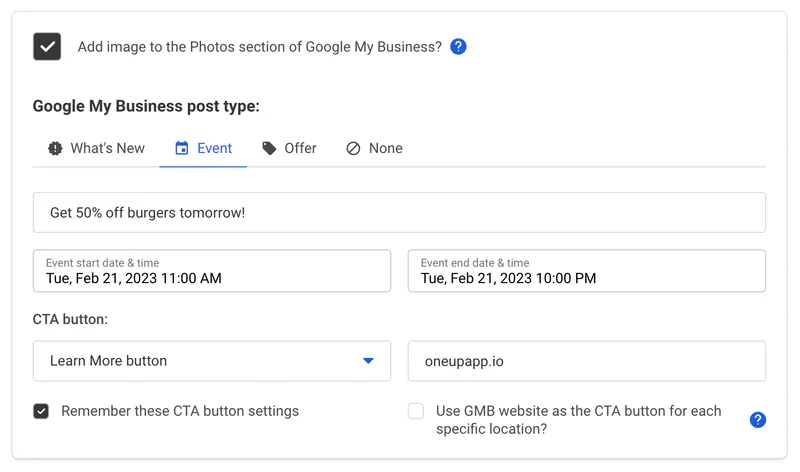
Event. The dated post. An Event needs a title and start and end dates and times; if you do not give a start and end time, the event shows as lasting 24 hours on the event dates. It can also include a description, a photo, a video, and an action button. Use Events for openings, workshops, webinars, seasonal happenings — anything with a date.
Posts can show text, photos, or videos, and they appear in the "Updates" and "Overview" tabs on mobile and in the "From the owner" section on desktop, in both Search and Maps. Two claims you will see in third-party guides should be treated carefully: the widely cited 1,500-character description limit and the full call-to-action button menu (Book, Order Online, Buy, Learn More, Sign Up, Call Now) are not stated on Google's help page, so do not treat them as Google's own limits.
How to schedule each type in Google's dashboard
Google's own dashboard now has native scheduling, which changes the calculation for small businesses. In the post composer, turn on "Schedule this post," then select the date and time to publish. A "Repeats" dropdown offers recurring publication — weekly, monthly, or a custom schedule. The same flow lets you post across multiple Business Profiles at once: select the profiles, then Post, or Skip for one profile. Scheduled posts can be edited or deleted before they publish.
How to schedule each type in OneUp
In OneUp, GBP is one of 13 supported networks, and all three post types are scheduled the same way. Connect your Google Business Profile locations, write the post, pick the type, and set the schedule.
For an Update, write the announcement, add a photo or video, and attach your action button link. For an Offer, add the title, the offer dates and times, the coupon code, and the terms — the "View Offer" button is included automatically. For an Event, add the title and the start and end dates and times; OneUp handles the 24-hour default the same way Google does when no times are given. Then pick the schedule: a one-time post, or a recurring post that re-shares on your chosen cadence.
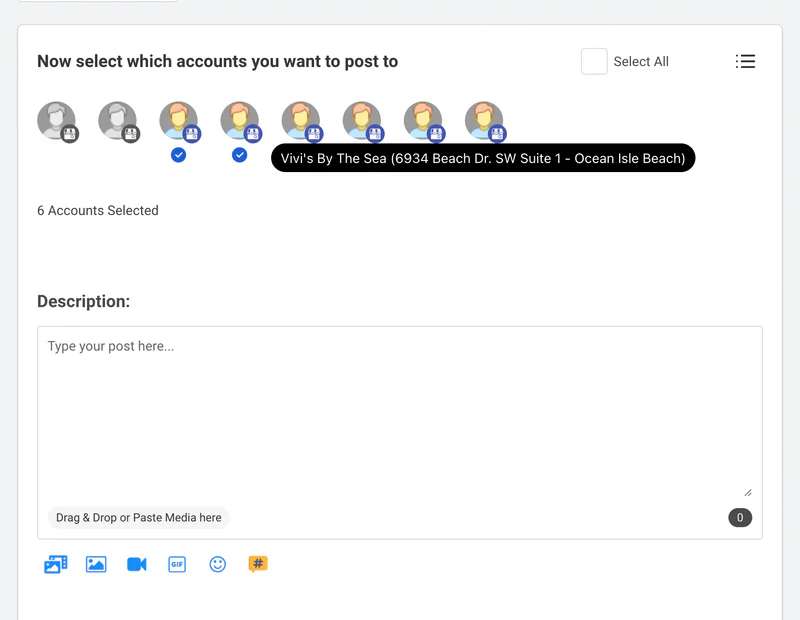
The advantage over Google's dashboard is scale and workflow. Select multiple GBP locations at once and post the same Offer to all of them, or customize per location. Require approval before a post goes live, so a client or manager signs off first. And schedule the same campaign to GBP, Facebook, Instagram, and TikTok from one composer instead of four tools. Agencies managing dozens of client profiles use a scheduler for exactly this reason — see Google Business Profile Scheduling for Local SEO Agencies — and multi-location businesses should read Best Social Media Scheduler for Multi-Location Businesses and Franchises. OneUp supports GBP posting on every plan — see Does OneUp Support Google Business Profile Posts?.
Limits and gotchas
Google reviews every post against its content policy, and a post's status after publishing is Live (public on Search and Maps), Pending (still uploading or processing, or the profile is unverified), or Not approved (a policy violation, with the question mark next to the status naming the policy). Phone numbers in a post description may get the post rejected if the number is not verifiable as connected to the business.
Posts older than 6 months are archived unless a date range is set, so old Offers and Events disappear from public view on their own. Google's help page states no maximum scheduling horizon and no cap on the number of scheduled or recurring posts, so do not assume one exists.
Which type should you post, and how often?
A healthy GBP posting rhythm uses all three types for different jobs. Post an Update once or twice a week with real news — new services, staff, hours, photos of recent work. Post an Offer whenever a promotion runs, with the dates and coupon code filled in so the urgency is visible. Post an Event for anything with a date, scheduled to go live a week or two before it so it has time to be seen. A profile with nothing but Offers reads like a coupon book; a profile with nothing but Updates buries its promotions. Mix the three, keep the cadence steady with scheduled and recurring posts, and the profile stays visible in Search and Maps without daily manual work.
FAQ
How many post types does Google Business Profile have?
Three: Update, Offer, and Event. Product is not a post type — products are managed separately via "Edit products" on the profile, not created through Add post.
Can you schedule Google Business Profile posts natively?
Yes. Google's dashboard now supports scheduling a post, repeating it weekly or monthly, and posting across multiple Business Profiles at once, all free. A scheduler adds approvals, bulk posting across locations, and GBP alongside your other networks.
What is the difference between an Offer post and an Update post?
An Offer requires a title, dates, and a time, automatically includes a "View Offer" button, and can carry a coupon code and terms. An Update is a general announcement with a description, photo or video, and an optional action button, with no required dates.
How long do Google Business Profile posts stay live?
Posts older than 6 months are archived unless a date range is set. Posts also go through Google's content review and can show as Live, Pending, or Not approved.
Try OneUp free for 7 days and schedule your next Update, Offer, and Event to Google Business Profile alongside your other networks.