How to Auto-Reply to Comments on Threads and Bluesky
Neither Threads nor Bluesky offers a native comment auto-reply. How to set up keyword auto-replies on both with OneUp, with examples for each network...
Contents
How to Auto-Reply to Comments on Threads and Bluesky
Threads and Bluesky are the two newest networks most creators are trying to grow, and they share the same gap: neither one offers a native way to auto-reply to comments. Both give you good tools for controlling what appears under your posts — filters, reply limits, hidden replies — but none of them writes a reply for you. That leaves the same problem on both networks: a post takes off, the replies pile up, and the people asking for the link or the details wait hours for an answer.
OneUp fills that gap on both networks with the same feature: keyword-based comment auto-replies, set up once in Social Inbox → Automations. This guide covers both networks together because the setup is the same — but the native tools, the limits, and the etiquette are different on each, so the guide keeps them separate where it matters.
Quick verdict
Neither Threads nor Bluesky offers a native comment auto-reply; OneUp auto-replies to comments by keyword on both networks through their official APIs, so a "link?" reply on Threads or a "source?" reply on Bluesky can be answered in seconds, on your own posts only.
- Threads has Hidden Words, reply controls, and Reply Approvals — all of them filter or gate replies, none of them writes one.
- Bluesky has reply controls, hidden replies, moderation lists, and labelers — all of them filter or gate replies, none of them writes one.
- OneUp's keyword auto-replies work on Threads and Bluesky, as well as TikTok, YouTube, Instagram, Facebook, and LinkedIn; on Instagram and Facebook, a comment keyword can trigger a public reply, a DM, or both.
- OneUp automations fire only on new comments from other accounts, after the automation is created, and only on your own posts.
What Threads offers natively — and what it does not
Threads gives you three tools for managing replies, and all three are about what appears, not what gets answered. Hidden Words automatically filters replies containing common offensive, misleading, or spam words — it is on by default — and you can add your own custom filters for words, phrases, hashtags, numbers, and emojis, with optional time limits. Hidden replies sit behind a "Hidden replies" cover that other people can still open: it hides, never deletes or answers. You will find it under Profile → Menu → Content preferences → Hidden Words.
Reply controls let you limit who can reply to each post: everyone, profiles you follow, or mentioned users only. And Reply Approvals, launched in late 2025, adds a per-post toggle: new replies wait in a Pending tab until you approve them. Both are useful for keeping a thread clean. Neither writes a reply.
One limit is specific to Threads: there is no DM API, so keyword-to-DM automation is impossible on Threads. Auto-replies can only be public replies, published through the official Threads API — which does permit reading replies and publishing responses. That is the route OneUp uses, and it is why the Threads setup below produces a public reply, not a DM. (On Facebook and Instagram the same keyword trigger can also send a private DM, as covered in our guide to auto-replying on Facebook.)
What Bluesky offers natively — and what it does not
Bluesky's native tools are also built around control. Reply controls let you choose who can reply to each post — everyone, followers, people you follow, mentioned users, or nobody — and you can set a default under Moderation → Interaction Settings. You can hide replies on your own posts, which moves them behind a "Hidden replies" screen where they stay public. Beyond that, Bluesky's moderation is list-based: moderation lists let you subscribe to shared block and mute lists, labelers let you subscribe to labeling services and set Show, Warn, or Hide per category, and you can block, mute, report, detach quote posts, and filter notifications by who they come from.
None of these writes a reply. Bluesky has no keyword auto-reply, no auto-responder, and no saved-reply feature of any kind. The official API does permit authorised tools to read replies and publish responses, which is how OneUp's auto-replies work on Bluesky — as public replies on your own posts.
How OneUp auto-replies on Threads and Bluesky
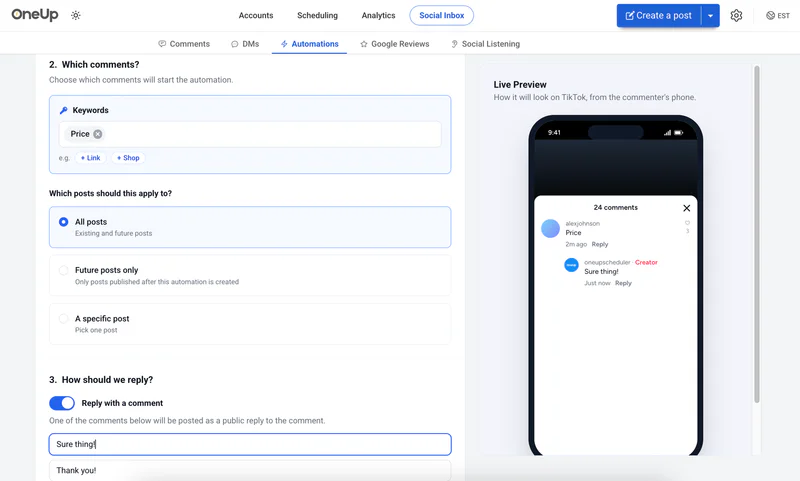
OneUp's Automations page in the Social Inbox watches your connected Threads and Bluesky accounts for new replies on your posts. When a reply contains a keyword you chose, OneUp publishes the reply you wrote for that keyword. The automation only fires on replies that arrive after you create it, only on replies from accounts other than your own, and only on posts where you are the author. The same feature also works on YouTube, TikTok, and LinkedIn — LinkedIn is the strictest of the five, and our LinkedIn auto-reply guide explains why its rules need extra care.
Setting it up in OneUp
- Connect Threads and Bluesky. In OneUp, open the Accounts page and connect both accounts if you have not already.
- Open Automations. Go to Social Inbox → Automations, where OneUp lists the networks that support keyword comment replies — TikTok, YouTube, Instagram, Facebook, Threads, Bluesky, and LinkedIn.
- Create one automation per network. Choose the Threads account for the Threads automation and the Bluesky account for the Bluesky automation. Keep them separate: the audiences and the trigger words are different, and a reply written for Bluesky will read oddly on Threads.
- Add your keyword trigger. Enter the exact word or phrase that should trigger the reply. On Threads, "link" and "waitlist" are the common ones; on Bluesky, "source" and "blog" come up most. Keep triggers specific — a broad word like "great" fires on comments that need no reply.
- Write the reply. Write the exact reply OneUp will post, in the voice of that network. Threads replies can be casual and short; Bluesky replies should be direct and link-forward, since Bluesky's audience expects the source in the reply itself.
- Save and test. Save the automation, then leave a test reply from a second account containing the keyword and confirm the reply appears. Automations never reply to comments posted before they were created, so only new replies will trigger them.
The same setup works on YouTube, covered in our YouTube auto-reply guide.
Example keyword → reply pairs
Threads — fast, casual, and link-hungry:
- "link" → "Here you go — the link is in my bio, and I just dropped it in the replies below too."
- "waitlist" → "You're in — the waitlist link is in my bio, and I'll post here when the next batch opens."
- "part 2" → "Part 2 is coming tomorrow — follow so you don't miss it, and the first part is pinned on my profile."
Bluesky — direct, and the source belongs in the reply:
- "source" → "Source is here: [link] — the full write-up is on our blog, and I'm happy to dig into the method in the replies."
- "blog" → "The post is live here: [link] — it covers the full comparison, including the pricing table."
- "how" → "Short version: we tested all five tools for two weeks. The long version, with screenshots, is here: [link]."
Each reply is useful, specific, and something you would plausibly type yourself. That is the test: if you would not send the reply manually, do not automate it.
Safety: only your own posts, through the official API
Three rules apply on both networks:
- Only your own posts. Automate replies only on posts you authored. Never automate replies on other people's posts — that is spam on every network, and on small networks like Bluesky it is noticed fast.
- Use the official API only. OneUp's auto-replies run through the official Threads and Bluesky APIs. Never use browser extensions, scripts, or unofficial tools to automate replies.
- Keep triggers narrow and monitor what gets sent. One keyword on one high-traffic post is the right scope. Check the replies your automation sends, and turn it off if they start looking automated or firing on the wrong comments. You are responsible for what is posted on your account, even when a tool posts it.
If you want the fuller picture of how OneUp's automation differs from a dedicated chatbot, see Best ManyChat Alternative in 2026 and OneUp vs ManyChat. ManyChat is a deeper chatbot builder; OneUp's automation is the lighter option for creators who mainly need keyword replies and scheduling in one tool.
FAQ
Can Threads auto-reply to comments natively?
No. Threads has no native auto-reply feature. Hidden Words, reply controls, and Reply Approvals filter or gate replies, but none of them writes one.
Can Bluesky auto-reply to comments natively?
No. Bluesky has no native auto-reply feature. Its reply controls, hidden replies, moderation lists, and labelers filter or gate replies, but none of them writes one.
Does OneUp auto-reply to comments on Threads and Bluesky?
Yes. OneUp offers keyword-based comment auto-replies on Threads and Bluesky, as well as YouTube, LinkedIn, and TikTok. On Instagram and Facebook, a comment keyword can also trigger a DM — Threads has no DM API, so its auto-replies are public replies only.
Will OneUp reply to comments posted before I set up the automation?
No. Automations fire only on comments that arrive after the automation is created, and only on comments from accounts other than your own.
Bottom line
Threads and Bluesky both leave the same gap: good controls for what appears under your posts, and nothing that answers anyone. OneUp's keyword auto-replies close it on both networks through their official APIs — one automation per network, a narrow trigger, and a reply you would be happy to send yourself. Set it up on your highest-traffic post first, watch what it sends, and expand from there. Try OneUp free for 7 days and set up your first Threads and Bluesky automations.
OneUp
OneUp is a social media management tool. Scheduling, cross-posting, analytics, social inbox, DM automations, social listening, and API & MCP, all in one place.
Visit Site