Can you auto-reply to comments on TikTok? Not with TikTok's own settings — they can filter comments, but they cannot reply to them automatically. TikTok's automatic messages work inside direct messages only, and only for Verified Business Accounts. To reply to comments automatically, you need a tool on TikTok's official comment API, set to watch for your keywords and post a public reply under the matching comment.
That is what OneUp does: keyword-triggered comment auto-replies on your own TikTok videos, using TikTok's official API. This guide explains what TikTok offers natively, how the tool route compares, and the exact setup steps.
Quick verdict
TikTok has no native comment auto-reply — its settings only filter comments, and its automatic messages answer DMs, not comments — so auto-replies need a tool on TikTok's official comment API, and OneUp posts a public keyword-triggered reply under the matching comment on your own videos.
- TikTok's native comment settings filter spam and offensive comments and filter by keyword, but they send no replies.
- TikTok's four automatic messages (welcome message, keyword reply, suggested question, chat prompts) fire inside DMs only, require a Verified Business Account with Advanced Access, and take 1–5 business days to review.
- A TikTok comment cannot trigger a private DM, outside a limited rollout in Vietnam, Thailand, and Indonesia — so OneUp's TikTok auto-reply is a public reply under the comment, not a DM.
- In OneUp, setup takes minutes: connect TikTok, open Social Inbox → Comments + Automation, set a keyword and reply variations, and OneUp scans for matching comments every 3 hours.
What TikTok offers natively — and what it does not
TikTok's own comment tools are filters, not replies. In Settings and privacy → Privacy → Comments, you can turn on the spam and offensive comment filter, filter by keyword, and choose who can comment. Those settings hide unwanted comments; they never post a reply.
TikTok does have automatic messages — four of them: a welcome message, a keyword reply, suggested questions, and chat prompts. All four live inside the inbox and react to something a user did there. They require a Verified Business Account with Advanced Access, take roughly 1 to 5 business days to review, and none of them reads the comment section.
One more limit: a comment cannot trigger a private DM. TikTok's messaging API is reply-only — a business answers inside a 48-hour window the viewer opens by sending a message first. A comment-to-message path exists only in a limited rollout in Vietnam, Thailand, and Indonesia, so any tool promising TikTok comment-to-DM for most accounts is promising something TikTok does not allow. What the API does allow is a public reply to a comment on your own video — the route this guide uses.
Native settings vs a tool: the honest comparison
TikTok's one native reply feature is the manual video reply: tap a comment on your own video, tap the video-camera icon, and TikTok drops the comment into a new recording as a sticker. It is manual — one video per comment, filmed by you — and it does not answer the "where is the link?" comments that arrive at 2 a.m. If you also run Instagram, the same keyword system works differently there — comment keywords trigger a DM on Instagram and Facebook — as covered in Best ManyChat Alternative in 2026: Scheduling + DM Automation in One Tool.
How to set up TikTok comment auto-replies in OneUp
OneUp's comment auto-replies work through TikTok's official API, on your own posts only — the same keyword system it uses across YouTube, LinkedIn, Threads, and Bluesky, described generally in How to Auto-Reply to Social Media Comments.
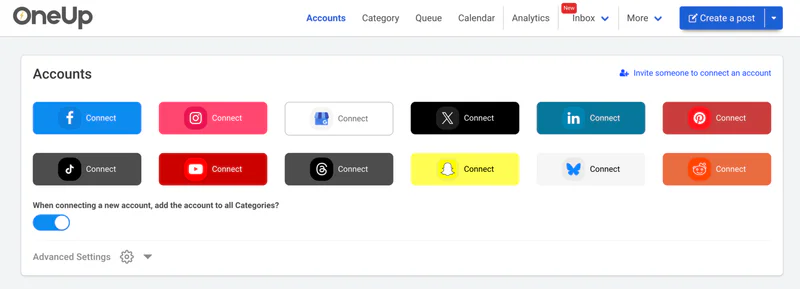
Step 1: Connect your TikTok account. In OneUp, go to the Accounts page and connect your TikTok account. Only comments on your own videos can be auto-replied to — the automation never touches other creators' posts.
Step 2: Open the comment automation settings. Go to the Social Inbox tab, click Comments + Automation, find your TikTok account, click the three-dot menu, and select Comment Labeling and Auto Replies.
Step 3: Set your trigger keywords. Choose the words that trigger a reply when a viewer leaves them on your posts — for example "LINK", "PRICE", or "GUIDE".
Step 4: Write your auto-replies. Add the reply for each keyword, and add multiple variations if you like — OneUp picks one at random, so replies do not all read identically. You can include links directly in your auto-replies; the link goes in the public reply under the comment. You can also assign labels to categorise comments. Click Save Automation.
Step 5: Test it. Comment on your own post from a different account — never the account hosting the automation — using one of your keywords, and check the reply appears. OneUp scans for matching comments every 3 hours, so allow up to 3 hours for the first reply.
Example keyword → reply pairs for TikTok
TikTok comments are short, fast, and link-hungry, so keep keywords to one word and replies to one or two lines:
- LINK → "Here it is — the link is in my bio too: [your link]. Thanks for asking!"
- PRICE → "It's $29 — the link in my bio takes you straight to checkout. Any questions, just ask!"
- PART 2 → "Part 2 is already up — it's the next video on my profile. Thanks for watching!"
Write replies that read like you, not like a bot, and keep the link to one per reply. Complaints and sensitive comments should never be auto-replied to — route those to a person.
Safety: what not to automate
Only automate comments on your own posts, through TikTok's official API. TikTok's Community Guidelines prohibit fake engagement and unauthorised automation, and enforcement runs from stripped engagement through posting restrictions to permanent bans. Never automate comments on other people's posts, never auto-like or auto-follow at scale, and never use browser extensions or unofficial scripts to act on TikTok.
Keep the automation narrow: a handful of keywords tied to real questions your audience asks, on your own videos, with replies you wrote yourself. OneUp's DM automation for Instagram and Facebook works the same honest way — keyword triggers from comments or DMs, on your own accounts — as described in OneUp's DM Automation Feature: A ManyChat Alternative for Instagram and Facebook. For TikTok-specific scheduling support, see Does OneUp Support TikTok?.
The bottom line
TikTok will filter your comments for free, but it will not answer them — and its automatic messages only work in DMs, for Verified Business Accounts. If "where is the link?" is the question your comments keep asking, a keyword auto-reply through TikTok's official API answers it while you sleep, as a public reply under the comment. Set it up in OneUp in five steps, test it from a second account, and keep the keywords to the questions you actually get. Try OneUp free for 7 days.
FAQ
Can you auto-reply to comments on TikTok?
Not with TikTok's native settings, which only filter comments. Connect a tool through TikTok's official comment API and set keyword reply rules — OneUp posts a public reply under matching comments on your own videos.
Can a TikTok comment trigger a DM?
No, for most accounts. TikTok's messaging API is reply-only and a comment does not open a messaging window; a comment-to-message path exists only in a limited rollout in Vietnam, Thailand, and Indonesia. OneUp's TikTok auto-reply is a public reply, not a DM.
Does TikTok have an automatic reply feature?
Yes, but only for DMs. TikTok's four automatic messages — welcome message, keyword reply, suggested questions, chat prompts — answer direct messages for Verified Business Accounts with Advanced Access, after a 1–5 business day review; none replies to comments.
How fast do OneUp's TikTok auto-replies go out?
OneUp scans for matching comments every 3 hours, so allow up to 3 hours for a reply to appear.