How to Schedule Posts to All Social Media at Once
Connect your accounts once, write one post, tailor it per network and schedule it everywhere — here's how to post to all your social accounts at once...
Contents
How to Schedule Posts to All Social Media at Once
You can schedule one post to all your social media accounts at once by writing it once in a scheduling tool, selecting every account, tailoring the text per network, and setting a single publish time — or by setting up an ongoing crossposting workflow. A week's posting takes an hour instead of a daily scramble across six apps.
"At once" has two meanings: one post going out to every network at the same time, and a workflow that adapts and publishes every post across your accounts automatically. This guide covers both, using OneUp, whose crossposting workflows and recurring evergreen posts are included on every plan.
Quick verdict
The fastest reliable way to schedule posts to all social media at once: connect your accounts in OneUp, compose once, tailor per network, and schedule — or set up an ongoing crossposting workflow.
- OneUp publishes to 12 networks from one composer, including Google Business Profile, Snapchat and Discord.
- Crossposting workflows are included on every OneUp plan (1 on Basic, 5 on Growth, 8 on Business), and recurring evergreen posts are included too.
- Manual posting takes six times the work; a scheduler posts everywhere at the moment you choose.
- OneUp does not post to Reddit.
Manual posting vs a scheduling tool
Posting by hand scales badly: writing the same announcement six times and publishing at the right moment on each app turns a ten-minute job into an hour, and posts go out at different times. Native scheduling helps a little, but each app only covers its own network, and none reposts your best content on a recurring schedule.
A scheduling tool fixes the repetition: write once, pick the accounts, adjust each version, choose one publish time. No tool posts to literally every network — OneUp covers 12 — so check yours are supported before committing. For the feature in depth, read how OneUp's crossposting feature works.
Step 1: Connect all your social accounts
In OneUp, go to the Accounts page and connect each profile: Facebook Page, Instagram, X, LinkedIn, TikTok, YouTube, Pinterest, Threads, Bluesky, Snapchat, Discord and Google Business Profile. OneUp also supports Facebook Groups and personal Profiles, and Instagram accounts not linked to a Facebook Page.
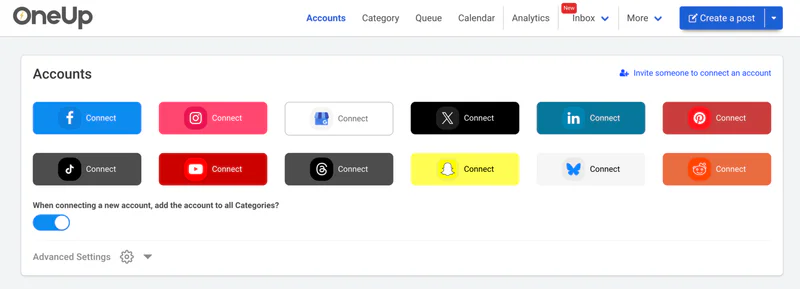
Connect every account before your first post, and check each connection — a disconnected account is the most common reason a scheduled post silently fails. Basic covers 5 accounts for $15 a month billed annually, with extras at $5 a month each. If you are comparing costs first, our social media scheduler pricing comparison shows what the same count costs elsewhere.
Step 2: Write the post once in the composer
Open the composer and write the core version: the message, the link, and the image or video. Write it for the broadest audience — a clear first line, one idea, one call to action — and keep it platform-neutral: hashtags and character counts differ by network, and that is what the next step is for.
Step 3: Tailor the post for each network
Select the accounts, then customise the version each network receives. Shorten the text and strip most hashtags for X, keep a professional tone and longer caption for LinkedIn, lead with hashtags and a visual hook for Instagram, and use a local angle for Google Business Profile. Check the image per network too — a wide image that looks fine on Facebook can crop awkwardly on Instagram.
OneUp's composer lets you edit the text per account, so the LinkedIn and X versions of one announcement can genuinely differ. Identical copy everywhere reads as automated, and audiences notice.
Step 4: Schedule it — once, or on repeat
Pick the date and time, and the post goes out to every selected account at that moment. For content worth repeating — a product feature, a customer story, a seasonal offer — set it as a recurring evergreen post instead, and OneUp will re-publish it on your schedule until you stop it. Recurring posts are included on every plan.
Watch capacity when planning a large queue: 300 scheduled posts at a time on Basic and 800 on Intermediate, with Growth and Business unlimited. Our guide to how to set up repeating evergreen posts in OneUp walks through the setup in detail.
Step 5: Set up an ongoing crossposting workflow
If you post the same kind of content to the same accounts every week, set up a crossposting workflow instead of repeating steps 2 to 4 manually. A workflow defines a source and destination accounts, so new posts flow to every network automatically. Basic includes 1 workflow, Growth 5 and Business 8.
Use one workflow for your main accounts (Facebook, Instagram, X, LinkedIn), and a second on Growth for secondary networks such as Threads, Bluesky and Google Business Profile if you want different timing there. See post once, publish everywhere: how OneUp's ongoing crossposting works.
Step 6: Review, publish, and check what went out
Before your first batch goes live, review the queue in the calendar view: one line per post per account, so a missing network stands out. After publishing, check each network received its version — particularly Google Business Profile and Snapchat. If a post fails on one account, fix that connection and reschedule just that version.
How the tools compare on crossposting
Every serious scheduler lets you post once to many networks; the differences are price, coverage and whether repetition is automated. OneUp is the only tool here combining 12 networks, automated workflows and recurring evergreen posts on its $15 entry plan.
FAQ
Can I schedule the same post to all social media at once?
Yes — a scheduling tool lets you write one post and publish it to every connected account at the same time. Connect your accounts, compose once, tailor per network, pick a publish time, and the tool posts everywhere simultaneously.
Which networks can I post to at the same time?
With OneUp you can post at once to Facebook, Instagram, X, LinkedIn, TikTok, YouTube, Pinterest, Threads, Bluesky, Snapchat, Discord and Google Business Profile. That is 12 networks from one composer. OneUp does not post to Reddit, so handle Reddit separately.
Do I have to pay for crossposting?
Not with OneUp — automated crossposting is included on every plan, starting with the $15-a-month Basic plan billed annually. Basic includes 1 workflow, Growth 5 and Business 8.
Will the same post look identical on every network?
No — and it should not. A good scheduler lets you tailor text, hashtags and image per network, so LinkedIn reads professionally while X is short and Instagram leads with visuals.
Try OneUp free for 7 days
Posting everywhere at once should take minutes, not an afternoon of app-switching. OneUp's 7-day free trial is available on every plan: connect your accounts, set up a crossposting workflow and schedule your first week before paying anything. Start your free trial.
OneUp
OneUp is a social media management tool. Scheduling, cross-posting, analytics, social inbox, DM automations, social listening, and API & MCP, all in one place.
Visit Site