How to Switch from eClincher to OneUp Without Losing Your Queue
Move from eClincher to OneUp without a gap in your queue: what transfers, what to rebuild, and the 7-step cutover plan...
Contents
How to Switch from eClincher to OneUp Without Losing Your Queue
Switching schedulers is the job everyone postpones: your queue is full, clients expect posts on time, and rebuilding everything in a new tool feels like a lost weekend. Moving from eClincher to OneUp is mostly copy-and-rebuild — if you do it in the right order and keep eClincher live until the cutover.
Quick verdict
Move in stages, keep eClincher publishing until your OneUp queue is verified, and rebuild recurring content as OneUp repeating posts — most teams finish in a week and cut their bill from $149 a month to $15 a month on OneUp's annual Basic plan.
- eClincher Standard is $149 a month ($134 billed annually) for 1 brand, 1 user, 15 profiles; OneUp Basic is $15 a month billed annually for 5 accounts.
- eClincher's Smart Queues and approvals are only on Professional ($349 a month) and above — Standard users don't have them to lose.
- OneUp includes recurring posts, crossposting, bulk upload, and the inbox on every plan; approvals start on Intermediate.
- Scheduled posts and analytics don't export from eClincher, so rebuild the queue with bulk upload.
What transfers, and what doesn't
Transfers: your content. Captions, images, and videos are yours. eClincher offers no one-click export of your scheduled queue into OneUp, so rebuild the calendar from your content library — faster than it sounds, since OneUp's bulk upload imports many posts at once. Accounts transfer trivially: reconnect each profile in minutes.
Needs rebuilding: queues and recurring schedules. On Professional, Smart Queues — recurring slots that refill automatically — don't carry over. In OneUp the equivalent is repeating posts: set a post to repeat and it keeps publishing. Approvals need rebuilding too: eClincher's approvals live on Professional and Enterprise, and OneUp's start on Intermediate, so be on Intermediate or above before promising clients the same sign-off.
Doesn't transfer: analytics and inbox history. Export reports you need before cancelling, and screenshot the numbers that matter. eClincher's local SEO and listings management is a separate product line; OneUp doesn't do listings, so keep or replace that separately.
Step 1: Audit your eClincher setup
Count your profiles (Standard caps at 15, Professional at 25), brands, and users — Standard allows just 1 user, so a second teammate already pushes you toward Professional's $349 a month. Note your networks: eClincher covers Facebook, Instagram, TikTok, X, LinkedIn, Pinterest, YouTube, Google Business Profile, Threads, and Bluesky; OneUp covers all of those plus Snapchat and Discord. List your Smart Queue categories, approval chains, and RSS feeds — each needs a OneUp equivalent.
Step 2: Start OneUp's 7-day trial and connect your accounts
Sign up for the trial and connect your accounts — but don't disconnect anything in eClincher yet. Basic is $15 a month billed annually for 5 accounts, Intermediate is $48 for 15, Growth is $84 for 30, and Business is $240 for 80. Most single-brand teams off eClincher Standard fit on Basic or Intermediate; go higher only for account count or approvals, which start on Intermediate. For a full cost comparison, see how much a social media scheduler costs in 2026.
Step 4: Rebuild your queue with bulk upload and repeating posts
Use bulk upload to import your one-off scheduled posts in batches, then rebuild each Smart Queue category as repeating posts. Repeating posts are on every OneUp plan — a genuine gain for Standard users, since Smart Queues are a Professional-and-above feature in eClincher, so at $149 a month on Standard you never had recurring queues at all.
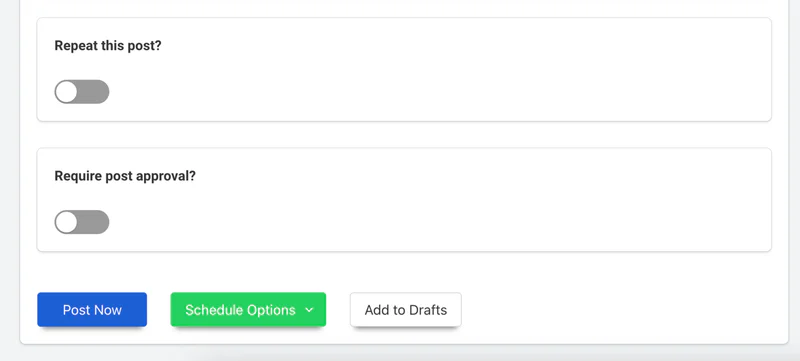
Set the repeat toggle on each evergreen post and choose its interval; use the approval toggle where a post needs sign-off. Keep the same cadence for the first month. Our guide to setting up repeating evergreen posts in OneUp walks through the settings.
Step 5: Recreate approvals and crossposting workflows
If clients approved posts in eClincher, set up the same chain in OneUp — remembering approvals start on Intermediate, not Basic. Then set up automated crossposting so one post flows to several networks with per-network customization: 1 workflow on Basic, 5 on Growth, 8 on Business.
Step 6: Run both tools in parallel for a week
Don't cancel eClincher on day one. Let it publish what's already scheduled while OneUp publishes everything new. Check daily that OneUp's posts went out on time and looked right — especially Pinterest links, Instagram carousels, and Google Business Profile posts. Once a week has published cleanly from OneUp and your eClincher queue is empty, cancel.
Step 7: Cancel eClincher and confirm the numbers
Cancel only after the parallel week, then compare month one in OneUp with your last month in eClincher: posts, accounts, and cost. A solo user on Standard at $149 a month moves to $15 on Basic; a team on Professional at $349 often fits on Intermediate at $48 billed annually. For detail, read eClincher vs OneUp and the best eClincher alternatives.
eClincher vs OneUp at a glance
Prices checked November 17, 2026 on eclincher.com/pricing and oneupapp.io/price.
Where eClincher wins
Be fair: eClincher is the broader platform. Its inbox goes deeper, with review moderation across Google Business, Google Play, the App Store, Trustpilot, and Tripadvisor, plus CRM integrations with Salesforce, Zendesk, and ServiceNow that OneUp doesn't match. Its listening is more extensive, and its local SEO and listings product is something OneUp doesn't offer. If your team lives in the inbox answering ad comments and reviews, eClincher's automation rules and AI inbox agent are genuinely stronger. If you mainly schedule and publish, you're paying for a suite you don't use.
FAQ
Can I export my scheduled queue from eClincher to OneUp?
No — there is no direct export. Export your media and captions, then rebuild the queue with bulk upload and repeating posts.
Will my posts keep publishing during the switch?
Yes, if you keep eClincher live until its queue is empty. Schedule new posts in OneUp while eClincher finishes what it holds.
Does OneUp have an equivalent to Smart Queues?
Yes. Repeating posts do the same job, and unlike eClincher they're included on every plan, including the $15 Basic plan.
What happens to my approval workflows?
Rebuild them in OneUp; they start on Intermediate ($48 a month billed annually), not Basic. Test one chain during your parallel week.
The bottom line
Switching from eClincher to OneUp is a rebuild, not a migration — and that's fine, because the rebuild is also an audit. You keep your content, accounts, and cadence; you lose analytics history and old queue settings; you gain repeating posts on every plan and a bill that's usually a tenth of what you paid. Run both tools for a week, then cancel eClincher only when OneUp has published cleanly. Start OneUp's 7-day free trial today.
OneUp
OneUp is a social media management tool. Scheduling, cross-posting, analytics, social inbox, DM automations, social listening, and API & MCP, all in one place.
Visit Site