How to Switch from Fedica to OneUp
Fedica teams and approvals need Research at $79 a month. OneUp Intermediate is $48. A step-by-step migration guide...
Contents
Fedica is a scheduler with an analytics brain. It publishes across more than 13 networks, tracks followers by demographics and location, and on Research adds competitor analysis, monitoring, and listening. For a solo creator who wants to understand an audience, that combination is genuinely useful.
But Fedica's pricing is built for one person. Publish starts at $10 a month billed annually ($15 monthly), and Grow at $19 ($29 monthly) — yet both cover one seat, one account per platform, and a capped queue. Teams and approvals arrive only on Research at $79 a month billed annually ($129 monthly). OneUp Intermediate is $48 a month billed annually for 15 accounts, with approvals included and no per-platform cap. The head-to-head is in Fedica vs OneUp.
Quick verdict
Switching from Fedica to OneUp makes sense once a second person or a second account on the same network enters the picture — you get approvals and flat pricing from $48 a month instead of $79.
- Fedica Publish is $10 a month billed annually for one seat and one account per platform, with a 100-post queue; teams and approvals need Research at $79.
- OneUp Intermediate is $48 a month billed annually for 15 accounts in any mix, approvals included.
- Fedica's follower demographics, competitor analysis, and lead identification do not transfer; keep Fedica for research or accept OneUp's simpler analytics.
Why teams switch
The bill moves when you grow. Fedica charges $10 a month for each extra account on the same platform, and its cheaper plans list one seat. A second Instagram account or a teammate who reviews posts pushes you toward Research at $79 a month. OneUp charges per account, flat, with no per-platform surcharge.
The queue is capped. Fedica's free plan stops at 10 scheduled posts at a time, Publish at 100, and Grow at 2,000. OneUp's caps are concurrent totals too — 300 on Basic, 800 on Intermediate, unlimited on Growth and Business — but they scale with the plan instead of gating everyday publishing.
Approvals cost a plan jump. On Fedica, approvals arrive only on Research. On OneUp, they start on Intermediate at $48 a month billed annually — roughly three-fifths of the price.
The network mix is different, not just smaller. Fedica publishes to the fediverse — Bluesky, Mastodon, Pixelfed, PeerTube — alongside the mainstream networks, and it schedules X threads and polls. OneUp publishes to 12 networks, including Snapchat, Discord, and Google Business Profile, with crossposting that reformats a post per network.
How to switch, step by step
1. Audit your Fedica usage
List what your team touches weekly: scheduled posts, follower-tracking reports, competitor analyses, and whether anyone uses approvals.
2. Export your calendar and media
Fedica has no one-click export of a full scheduled queue, so copy your upcoming posts into a spreadsheet — captions, links, dates, and times — and download any media not stored elsewhere.
3. Start a trial and connect your accounts
Start OneUp's 7-day free trial and connect your accounts. Accounts: 5 on Basic, 15 on Intermediate, 30 on Growth, 80 on Business. A second Instagram or LinkedIn account is just another account in your 15, not a $10 add-on. The general migration playbook is in Switching Scheduling Tools? How to Migrate Your Content Backlog to OneUp.
4. Rebuild your queue with bulk upload
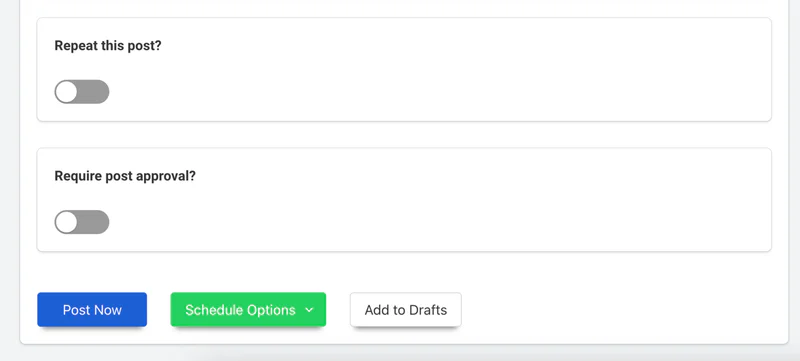
Use OneUp's bulk upload to recreate your posts from the spreadsheet — up to 200 at a time — and set your timeslots once so OneUp fills them automatically. Turn any recurring Fedica content into recurring posts in OneUp: pick a post, choose how often it repeats, and it re-shares itself.
5. Recreate your approval workflow
Recreate the same chain in OneUp — but note the boundary: approvals start on Intermediate, not Basic, so pick Intermediate or above before inviting approvers. Test with one real post first.
6. Set up crossposting workflows
Create a crossposting workflow — "every new Instagram post also goes to Facebook, X, and Threads" — and OneUp handles the reformatting. Basic includes 1 workflow, Intermediate 3, Growth 5, Business 8.
7. Run both tools, then cancel
Run OneUp live for two weeks while Fedica stays active. Once your queue is publishing cleanly, cancel Fedica.
Plan mapping: Fedica to OneUp
Prices checked November 20, 2026, on fedica.com. For the wider picture, see How Much Does a Social Media Scheduler Cost? 2026 Pricing Compared.
What you will gain, and what you will miss
You will gain: flat per-account pricing with no $10 surcharge for a second account on the same network; approvals from $48 a month instead of $79; publishing to Snapchat, Discord, and Google Business Profile; recurring posts; crossposting; comment auto-replies and DM automations; and an API and MCP server on every plan.
You will miss: Fedica's audience research — follower demographics, fake-follower checks, lead identification, and competitor analysis — has no equivalent in OneUp. You will also miss its fediverse publishing and X thread and poll scheduling. If audience research is daily work, Fedica is still the right home. Alternatives that keep more of the analytics side are in 7 Best Fedica Alternatives in 2026.
Where Fedica wins
Fedica wins outright on audience intelligence at a low price. No scheduler at $10 a month maps your followers by city and country, profiles their demographics, and analyses any X account — and Research adds competitor monitoring that would cost far more elsewhere. Its free plan is also genuinely generous: 12 accounts and unlimited drafts for $0. For a solo creator whose edge is knowing the audience, Fedica earns its keep. The switch only makes sense when a team, a second account, or approvals enter the picture.
FAQ
Is Fedica really cheaper than OneUp for one person?
Yes — for one person with one account per network, Publish at $10 a month billed annually undercuts Basic at $15. The maths flips the moment you add a second account on the same network ($10 extra) or a teammate who reviews posts (Research at $79).
Can OneUp match Fedica's approval workflows?
Yes, from Intermediate up. Basic does not include approvals, so pick Intermediate ($48 a month billed annually) or above.
What happens to my Fedica follower data if I cancel?
It stays in Fedica. Export your reports before cancelling — OneUp's analytics cover post performance, not audience research, and cannot import Fedica's data.
Can I keep Fedica for research and OneUp for publishing?
Yes — Fedica's free plan still tracks followers for $0. But you would be running two calendars, and the free plan's 10-post queue means publishing lives in OneUp. If research is occasional, the split is workable; if it is daily, keep Fedica as your home.
The bottom line
Fedica is an audience-research tool with a good scheduler attached; OneUp is a scheduler that is cheap for teams. If follower demographics, competitor analysis, and solo publishing are your daily work, stay with Fedica. If a second teammate, a second account, or approvals are entering the picture, the switch pays for itself in the first month — approvals alone drop from $79 to $48. Start a 7-day trial.
OneUp
OneUp is a social media management tool. Scheduling, cross-posting, analytics, social inbox, DM automations, social listening, and API & MCP, all in one place.
Visit Site