How to Switch from Kontentino to OneUp Without Losing Your Queue
Switch from Kontentino to OneUp without losing your queue: rebuild approval chains on Intermediate+, move your calendar, and run a parallel week...
Contents
How to Switch from Kontentino to OneUp Without Losing Your Queue
Kontentino is an approvals-first tool: agencies buy it so clients can review posts without the screenshot-email loop. Switching to OneUp means moving to a scheduler where approvals exist but aren't the center of the universe — and where the inbox, recurring posts, and extra networks fill the gaps Kontentino leaves. The queue survives the move. The approval chain is the part to rebuild with care.
Quick verdict
Keep Kontentino publishing until its queue empties, rebuild your approval chains in OneUp on Intermediate or above, and run a parallel week before cancelling — most teams cut their bill from €49 a month to $15 a month on OneUp's annual Basic plan.
- Kontentino Starter is €49 a month billed annually (€69 monthly) for 3 users and 10 profiles; Standard is €109 billed annually for 10 users and 40 profiles.
- OneUp Basic is $15 a month billed annually for 5 accounts; post approvals start on Intermediate at $48 a month billed annually — not on Basic.
- Kontentino covers 9 networks including Pinterest, but has no Bluesky, Snapchat, or Discord, and no social inbox in its plan comparison.
- Approval chains, scheduled posts, and analytics history don't transfer; rebuild them during a parallel week.
What transfers, and what doesn't
Transfers: your content, accounts, and calendar dates. Captions, images, and videos are yours, and reconnecting each profile in OneUp takes minutes. Kontentino's nine networks — Facebook, Instagram, LinkedIn, TikTok, X, YouTube, Pinterest, Google Business Profile, and Threads — are all covered by OneUp, which adds Snapchat, Discord, and Bluesky.
Needs rebuilding: your scheduled queue and approval chains. No export moves scheduled posts or approval workflows from Kontentino into OneUp. Rebuild the queue with bulk upload and repeating posts, and rebuild each approval chain in OneUp — but check your plan first: Kontentino includes approvals on every paid plan, while OneUp's start on Intermediate.
Doesn't transfer: analytics history, client comments, and task history. Kontentino's analytics is a paid add-on from €54 a month on Starter and Standard and only bundled on Pro. Export client reports, and copy approval comments that record why a post changed.
Step 1: Audit your Kontentino setup
List your plan, user count, and profile count: Starter covers 3 users and 10 profiles, Standard covers 10 users and 40 profiles, and Pro covers 10 users with unlimited profiles. Every role counts, including clients. Note which features you use: multi-level chains and the Brand Hub sit on Standard and above, analytics is an add-on below Pro.
Step 2: Start OneUp's 7-day trial and connect your accounts
Sign up for the trial and connect your accounts, leaving Kontentino untouched. Pick the plan by accounts and approvals together: Basic is $15 a month billed annually for 5 accounts; Intermediate is $48 for 15 and is the cheapest plan with post approvals; Growth is $84 for 30; Business is $240 for 80. For the market-wide cost picture, see how much a social media scheduler costs in 2026.
Step 3: Export your content, approvals, and reports
Download your media library and save your best captions. Document every approval chain: who approves what, in which order, and which clients review which brands. Screenshot the chain settings — you can't export them. Export analytics too, and prune as you go.
Step 4: Rebuild your queue with bulk upload and repeating posts
Use bulk upload to import scheduled one-off posts in batches, then set evergreen content to repeat. Repeating posts are on every OneUp plan and replace the manual re-scheduling Kontentino teams often do. Caps are concurrent totals — Basic holds 300 at a time, Intermediate 800, Growth and Business are unlimited.
Step 5: Recreate your approval chains in OneUp
This step decides whether clients notice the switch. Set up post approval workflows on Intermediate or above: enable the approval toggle on posts that need sign-off and route them to the right reviewer. Our guide to how post approval workflows work in OneUp walks through the setup.
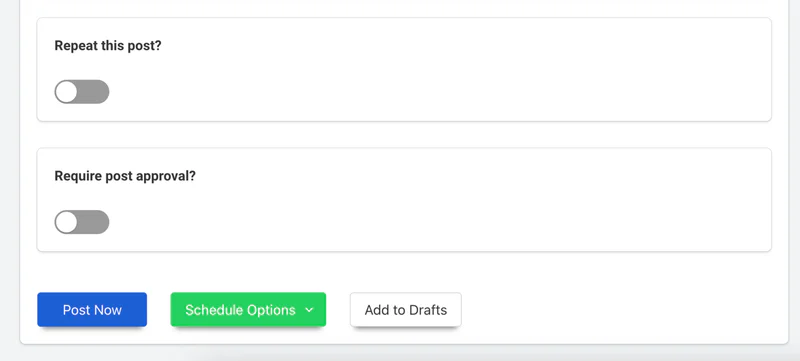
Be honest about what's different: OneUp's approvals cover the sign-off itself, not Kontentino's multi-level chains, Brand Hub, or per-market flows. Set up the social inbox too: it's on every OneUp plan, and Kontentino doesn't have one.
Step 6: Run both tools in parallel for a week
Let Kontentino finish publishing what's already scheduled while OneUp publishes everything new. Check daily that OneUp's posts went out on time. Test one full approval chain with a real client during this week. Kontentino's trial runs 14 days with no card; OneUp's runs 7 days. For detail, read Kontentino vs OneUp and the best Kontentino alternatives.
Step 7: Cancel Kontentino and confirm the numbers
Cancel only after the parallel week. Kontentino's terms: fees are non-refundable, including for early termination, and data is stored for one year after expiry — export first. Then compare month one in OneUp with your last month in Kontentino: posts, approvals, comments, and cost. A Starter team drops from €49 a month (about $59) to $15 on Basic — or $48 on Intermediate with approvals.
Kontentino vs OneUp at a glance
Prices checked November 17, 2026 on kontentino.com/pricing and oneupapp.io/price. Kontentino prices are in EUR; USD figures are Kontentino's own displayed equivalents.
Where Kontentino wins
Kontentino is the better approvals tool, full stop. Multi-level chains, separate comment threads, a pre-publish checklist, Brand Hub with AI brand voice, and per-market flows through the Global Content Manager give agencies a client-review system OneUp's single-step approvals don't match. If your agency sells a polished client-approval experience — especially across markets — Kontentino earns its price. If approvals are a simple "client sees it before it posts" step and you also want an inbox, recurring posts, and more networks for less money, OneUp is the better fit.
FAQ
Can I export my scheduled posts from Kontentino to OneUp?
No — there is no direct export. Rebuild the queue with bulk upload and repeating posts.
Will my approval workflows still work in OneUp?
The sign-off will, but only on Intermediate or above — Basic doesn't include approvals. Test one chain during your parallel week.
Does OneUp have a social inbox? Kontentino doesn't.
Yes, and it's included on every plan. Comments and DMs land in one inbox, with keyword auto-replies and DM automations on Instagram and Facebook.
What happens to my analytics and client comments?
They stay in Kontentino. Export reports before cancelling, and copy approval comments that record why a post changed.
The bottom line
Switching from Kontentino to OneUp trades approval depth for scheduling breadth and a smaller bill. The queue rebuild is straightforward. The approval chain is the real work: rebuild it on Intermediate or above, test it with a real client, and run both tools for a week before cancelling. Start OneUp's 7-day free trial today.
OneUp
OneUp is a social media management tool. Scheduling, cross-posting, analytics, social inbox, DM automations, social listening, and API & MCP, all in one place.
Visit Site