How to Switch from Loomly to OneUp Without Losing Your Queue
Loomly's Starter jumps from $65 to $332 for one more account. Switch to OneUp from $15/mo — here's how...
Contents
Loomly used to be one of the cheapest ways to run a small team's social calendar. That changed in January 2025, when Bending Spoons acquired Loomly and rebuilt its pricing around two paid tiers: Starter at $65 a month ($49 billed annually) for 12 accounts and 3 users, and Beyond at $332 a month ($249 annually) for 60 accounts. A 13th account, or a fourth login, jumps your bill more than fivefold.
Quick verdict
If Loomly's Starter-to-Beyond price cliff is squeezing you, switching to OneUp keeps approval workflows and recurring posts — Intermediate costs $48 a month billed annually for 15 accounts, against Loomly Starter's $49.
- Loomly Starter costs $65 a month billed monthly ($49 annually) for 12 accounts and 3 users; Beyond costs $332 a month ($249 annually) — a 5x jump for one extra account or user.
- OneUp Intermediate costs $48 a month billed annually for 15 accounts and includes post approvals.
- Loomly no longer lists X among its supported networks; OneUp publishes to X plus 11 other networks.
- Scheduled posts do not transfer automatically — export them and rebuild the queue with a bulk CSV upload.
Why teams leave Loomly
The price cliff is the headline reason, but not the only one. Starter caps you at 3 users, and its annual plan cannot be terminated early — Loomly's own FAQ says yearly plans cannot be ended early, so a wrong-sized annual commitment locks you in for 12 months. Social listening is rationed too: 2 feeds a month on Starter, 5 on Beyond. And Loomly no longer lists X among its supported networks. Starter still includes unlimited scheduling, recurring posts, and content export — the problem is the shape of the bill: you pay for a tier, not for what you use.
OneUp flips that logic. You pay a flat rate for a set number of accounts — Basic $15 a month billed annually for 5 accounts, Intermediate $48 for 15, Growth $84 for 30, Business $240 for 80 — with extra accounts on top instead of a forced tier jump. Recurring posts, crossposting, bulk upload, the inbox, AI captions, listening, and API and MCP access are included on every plan. The comparison of Loomly vs OneUp has the full side-by-side.
Step 1: Audit what you have in Loomly
Write down three numbers: how many social accounts you have connected, how many users need access, and how many posts are scheduled ahead. This decides your OneUp plan: 5 or fewer accounts fits Basic, up to 15 fits Intermediate, up to 30 fits Growth. If you rely on approvals, you need Intermediate or above — Basic does not include them. The best Loomly alternatives roundup covers other options if you are still weighing them.
Step 2: Export your content from Loomly
Loomly includes content export on both paid plans. Export your calendars and post lists: every scheduled post, its copy, its media, and its publish time. Save the media files separately — exports preserve text and scheduling, not the original images and videos.
Step 3: Start a OneUp trial and connect your accounts
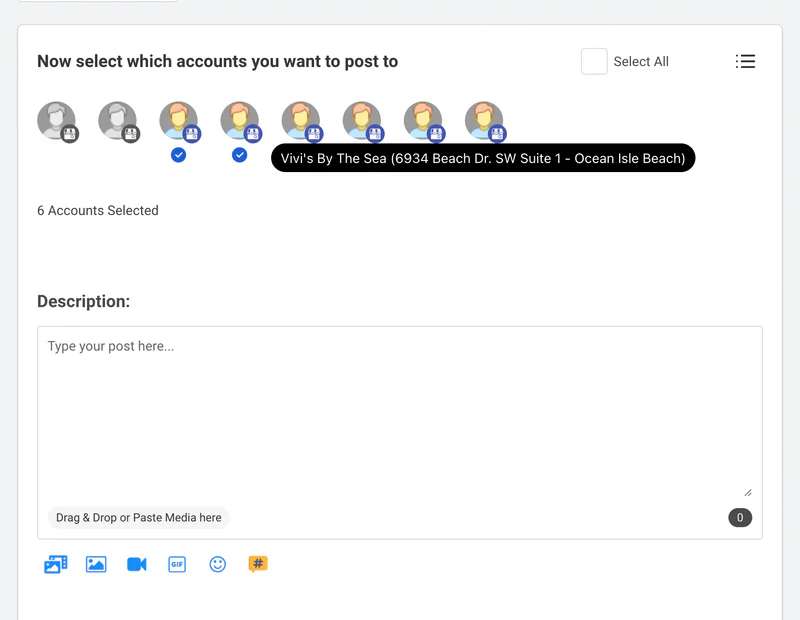
Sign up for OneUp's 7-day free trial and connect the same accounts you had in Loomly. Connect your Facebook, Instagram, LinkedIn, TikTok, YouTube, Pinterest, Threads, Bluesky, Snapchat, Discord, and Google Business Profile accounts — plus X, which Loomly no longer supports.
Step 4: Rebuild your queue with a bulk upload
Take the export from Step 2 and rebuild your queue in OneUp. OneUp's bulk upload imports many posts at once from a CSV file. Work in date order, furthest out first, so near-term posts are touched last. For posts that repeat — weekly tips, monthly offers, rotating testimonials — set them up as recurring evergreen posts in OneUp rather than scheduling dozens of copies.
Step 5: Recreate your approval workflow
If your team used Loomly's approval workflows, rebuild them in OneUp before anyone starts scheduling. On Intermediate, Growth, and Business plans, OneUp's approval workflow lets reviewers approve or request changes before posts publish. Remember the plan boundary: Basic does not include post approvals, so if approvals matter, start on Intermediate at $48 a month billed annually.
Step 6: Recreate recurring posts and crossposting
Loomly includes recurring posts, and OneUp matches that on every plan — but the setup is per-post in OneUp, so walk through your recurring list and recreate each one. Then set up OneUp's automated crossposting workflows, which publish a post from one account to your other networks automatically. Basic includes 1 workflow, Intermediate 3, Growth 5, and Business 8, with extra workflows at $5 a month each.
Step 7: Run both tools in parallel for one week, then cancel Loomly
Do not cancel Loomly on day one. Run both tools side by side for a week: Loomly keeps publishing what is already scheduled, OneUp handles everything new. Once a full publishing cycle has run cleanly in OneUp, cancel Loomly — but note you cannot terminate a Loomly annual plan early, so time your switch before its renewal date.
Plan mapping: Loomly to OneUp
A team on Loomly Starter at $49 a month billed annually moves to OneUp Intermediate at $48 and gains 3 more accounts; a team forced onto Beyond at $249 a month for 14 accounts drops to $48 — a saving of about $200 a month. For the wider market picture, see how much a social media scheduler costs in 2026.
What you'll gain, and what you'll miss
You gain flat per-account pricing with no cliff, X publishing, and an API and MCP server on every plan. Caps are generous — 300 concurrent scheduled posts on Basic, 800 on Intermediate, unlimited on Growth and Business — and listening comes on every plan, not a rationed allowance. What you give up: Loomly's post-ideas board and slideshow creator have no equivalent in OneUp, and its hashtag manager is a small convenience OneUp lacks. Loomly also offers a 50% lifetime nonprofit discount that OneUp does not match.
FAQ
How long does switching from Loomly to OneUp take?
A small team can switch in a day: audit in the morning, export and bulk-upload the queue in the afternoon, and recreate approvals the same day. Allow a full week of parallel running before cancelling Loomly.
Do my scheduled Loomly posts transfer to OneUp automatically?
No. Scheduled posts are tied to the tool that created them, so no scheduler can import another tool's live queue directly. Export your content from Loomly, then rebuild the queue in OneUp with a bulk CSV upload.
Which OneUp plan replaces Loomly Starter?
Intermediate at $48 a month billed annually is the closest replacement: 15 accounts against Loomly Starter's 12, with post approvals included. Basic at $15 a month covers up to 5 accounts but does not include approvals.
Can OneUp publish to X if Loomly can't?
Yes. OneUp publishes to X as one of its 12 posting networks.
Try OneUp free for 7 days
Start OneUp's 7-day free trial, bulk-upload your queue, and compare the bill — most teams leaving Starter land on Intermediate at $48 a month billed annually.
OneUp
OneUp is a social media management tool. Scheduling, cross-posting, analytics, social inbox, DM automations, social listening, and API & MCP, all in one place.
Visit Site