How to Switch from Meet Edgar to OneUp Without Losing Your Queue
Switching from Meet Edgar to OneUp: capture your library, reconnect accounts, refill with bulk upload, and run both tools in parallel...
Contents
How to Switch from Meet Edgar to OneUp Without Losing Your Queue
Switching from Meet Edgar to OneUp is a rebuild, not a transfer. No scheduler — OneUp included — can import your Edgar library and category schedule automatically. Instead, capture your library as a list, reconnect your accounts, refill with bulk upload. The prize: Eddie costs $29.99 a month for 5 accounts; OneUp Basic is $15 a month billed annually for the same 5 accounts, with a social inbox and API access Edgar charges extra for or lacks.
Quick verdict
You cannot import your Meet Edgar library automatically, but rebuilding it in OneUp takes an afternoon: capture the library and its category schedule, reconnect your accounts, refill with bulk upload, and run both tools in parallel until Edgar's queue drains.
- Time needed: 2 to 4 hours of active work for a typical library, plus a 1–2 week parallel run that takes almost no work.
- The one rule that prevents double-posting: schedule everything new in OneUp only, and let what is already queued in Edgar publish from Edgar.
- Cost at 5 accounts: Meet Edgar's Eddie plan is $29.99 a month ($24.91 billed annually); OneUp Basic is $15 a month billed annually ($25 month to month) for the same 5 accounts.
- What you gain: a social inbox on every plan, API and MCP access on every plan, Snapchat and Discord publishing, and recurring posts with no weekly automation cap — Eddie caps you at 10 weekly automations.
What transfers and what doesn't
Before you start
Capture every library post with its category and expiration date; note your weekly schedule and RSS feeds; check your renewal date; count accounts to pick your plan (Basic 5, Intermediate 15, Growth 30, Business 80).
Step 1: Capture your library (30–45 minutes)
Record every post — text, link, media, category, expiration date — in a spreadsheet, one row per post. This tedious step makes the rest fast: the list is the exact spec for rebuilding your queue.
Step 2: Connect your accounts in OneUp (20–30 minutes)
Connect the same accounts in OneUp. OneUp covers Facebook Pages, Groups, personal Profiles, Instagram (including accounts not linked to a Facebook Page), X, LinkedIn, TikTok, YouTube, Pinterest, Threads, Bluesky, Snapchat, Discord, and Google Business Profile. Edgar publishes to YouTube Shorts only and skips Facebook Groups and personal profiles; OneUp covers YouTube broadly, plus Groups and personal profiles.
Connecting to OneUp leaves Edgar connected, so the Step 6 parallel run works. Check each connection — a disconnected account is the most common reason posts silently fail.
Step 3: Recreate your structure (15 minutes)
Edgar sorts posts into categories and fills weekly slots; OneUp attaches the repeat to each post. In OneUp, the equivalents are Categories and Timeslots: recreate your weekly rhythm as timeslots and group posts by theme or client with categories. Eddie allows 10 weekly automations and 4 categories; Edgar, 1,000 and unlimited categories. OneUp has no weekly automation cap; daily publish caps are 150, 500, 750, and 1,000.
Step 4: Refill the queue with bulk upload (30–60 minutes)
Turn your Step 1 spreadsheet into a bulk upload — OneUp loads many posts at once from a CSV, Google Drive, or Dropbox. See our how to bulk upload social media posts with OneUp walkthrough for the exact format.
Step 5: Recreate your evergreen library (20 minutes)
In OneUp, set each evergreen post to repeat at its Edgar category's interval. Unlike Edgar's category engine, which refills slots automatically, OneUp repeats each post on its own schedule — set interval and expiry per post.
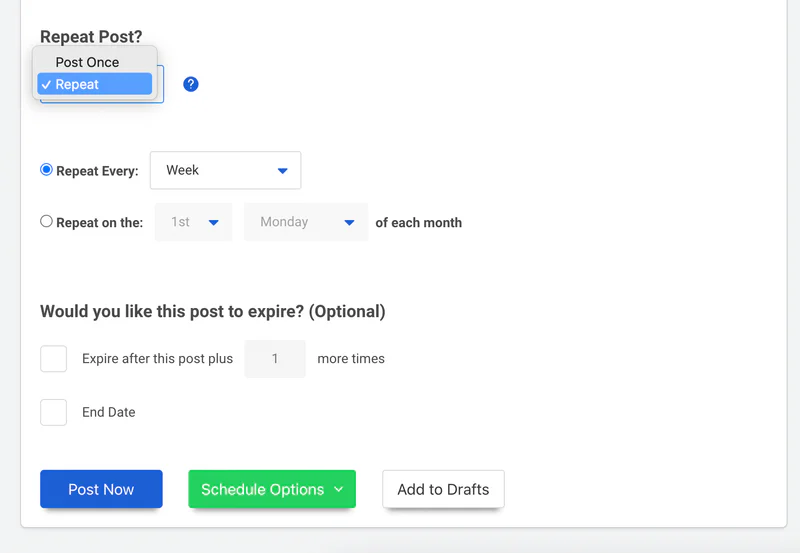
Then set up what Edgar never offered: crossposting workflows and a social inbox for all your networks — Edgar's inbox exists only on its $49.99-a-month Edgar plan, Facebook and Instagram only. Basic includes 1 workflow, Growth 5, Business 8. See our guide to setting up repeating evergreen posts in OneUp.
Step 6: Run both tools in parallel (1–2 weeks)
From today: everything new goes in OneUp only; everything already queued in Edgar stays there. Never put the same post in both queues — that is the only way to double-post.
Step 7: Cancel Meet Edgar
Once Edgar's queue is empty and OneUp has published cleanly, cancel before your renewal date. Edgar has no free plan, so cancel deliberately. Typical library: 2 to 4 hours; large libraries should budget a full day.
Meet Edgar vs OneUp at a glance
Prices checked November 2026. See our MeetEdgar vs OneUp comparison, 7 best Meet Edgar alternatives roundup, and social media scheduler pricing comparison.
Where Meet Edgar wins
Meet Edgar invented the category-based evergreen library, still the most focused version. Categories, variations, and expiration controls are built for recycling — OneUp's repeating posts do not auto-refill a time slot from a whole category, and there is no variations feature. The 30-day free trial is generous next to OneUp's 7-day trial, and both plans include 20 team members at no extra cost, where OneUp prices per account rather than per seat. If your workflow is a category library on autopilot and you never need an inbox or an API, Edgar's focus is an advantage.
FAQ
Will my scheduled Edgar posts still publish after I connect the accounts to OneUp?
Yes. Connecting to OneUp leaves Edgar untouched, so queued posts keep publishing until the queue drains.
Can OneUp import my Edgar library automatically?
No, and neither can any other scheduler — no migration export moves a library between tools, so it has to be rebuilt via bulk upload.
Will I double-post during the switch?
Only if the same post is scheduled in both tools. Keep new posts in OneUp and the old queue in Edgar.
What happens to my Edgar analytics?
Your history stays in Edgar and does not move to OneUp. Download the reports you care about before you cancel.
Start the switch today
OneUp starts at $15 a month billed annually for 5 accounts, with a 7-day free trial. Start your free trial and follow the seven steps.
OneUp
OneUp is a social media management tool. Scheduling, cross-posting, analytics, social inbox, DM automations, social listening, and API & MCP, all in one place.
Visit Site