How to Switch from Metricool to OneUp Without Losing Your Queue
Switching from Metricool to OneUp takes an afternoon: capture the queue, reconnect accounts, refill with bulk upload, and run both in parallel...
Contents
How to Switch from Metricool to OneUp Without Losing Your Queue
Metricool is a strong budget tool, but it charges per brand and stops at eleven networks. If you need Snapchat or Discord, you pay the $10-a-month X add-on per account, or you want recurring posts and crossposting, the bill and the gaps both push the same way.
Switching is a rebuild, not an import: no tool can pull your Metricool queue out automatically — but done in the right order, it takes an afternoon.
Quick verdict
You can't import your Metricool queue automatically — no tool can — but rebuilding it in OneUp takes an afternoon: capture the queue, reconnect your accounts, refill with bulk upload, and run both tools in parallel until Metricool's queue drains.
- Metricool Starter is $20/mo billed yearly for up to 5 brands, plus $10/mo per X account; OneUp Basic is $15/mo billed yearly for 5 accounts, X included. Approvals: OneUp Intermediate $48/mo vs Metricool Advanced $53.
- Metricool supports 11 networks, including Twitch and GBP, plus X as a paid add-on. OneUp publishes to 12, adding Snapchat and Discord but not Twitch.
- Metricool's free plan is $0 forever for 1 brand and 20 posts a month, no LinkedIn or X. OneUp has a 7-day trial and no free plan.
What transfers — and what does not
Scheduled posts: no, not automatically. No export of Metricool's queue exists that another tool can import — capture it as a list (Step 1) and rebuild it with bulk upload (Step 4).
Published posts: they stay live on the networks.
Drafts and media: manually — copy drafts worth posting into your spreadsheet and download media to reuse.
SmartLinks pages: no — Metricool-hosted, so rebuild those links elsewhere before cancelling.
Analytics history: no — it stays inside Metricool. Download the reports you care about before you cancel.
Approvals: rebuild them — on OneUp they start on Intermediate, not Basic.
How to switch, step by step
1. Capture your Metricool queue. Go brand by brand through Metricool's planner and record every queued post — text, link, media, scheduled time — one row per post. Tedious, but it makes the rest fast.
2. Start your OneUp trial and connect your accounts. OneUp offers a 7-day trial on all plans. Connect the same social accounts — OneUp covers all 12 networks, including Snapchat and Discord, which Metricool lacks. Connecting an account to OneUp does not disconnect it from Metricool. Pick your plan by account count: Basic $15/mo billed annually for 5, Intermediate $48 for 15, Growth $84 for 30, Business $240 for 80.
3. Mind the counting difference. Metricool charges per brand — one profile per network — so 5 brands on 4 networks each is one $20-a-month Starter bill, while OneUp would charge for 20 accounts. But one brand with 5 accounts costs $15 a month on OneUp Basic, and X is included instead of $10 a month per account extra (Basic allows up to 2 X accounts; Intermediate 4).
4. Recreate your structure — categories and timeslots. In OneUp, Categories group accounts you post to together; Timeslots are the recurring times they go out. Set up one Category per Metricool brand and recreate the timeslots. A Metricool brand holds one profile per network, so two Instagram accounts for one client need two brands — OneUp has no such limit.
5. Bulk-upload your queue. Turn your Step 1 spreadsheet into a bulk upload — text, links, media, accounts, and scheduled times, loaded many at a time. Our walkthrough of how to bulk upload social media posts with OneUp covers the exact format.
6. Rebuild evergreen posts and Flows. Metricool's Autolists already recycle evergreen queues on a schedule; in OneUp, the equivalent is repeating posts — set each evergreen post to repeat at your chosen interval, with an optional expiry date.
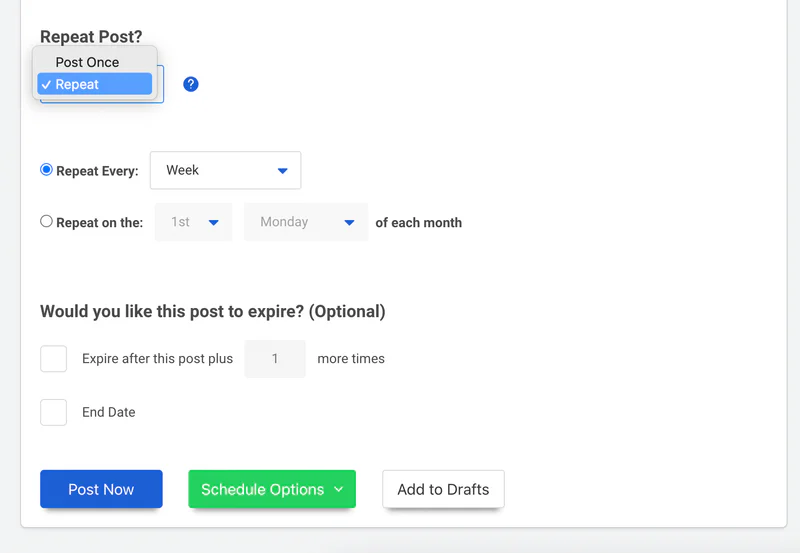
OneUp's repeat settings are shown above — pick "Repeat," choose an interval, optionally set an expiry (see our evergreen posts guide). Then rebuild your Metricool Flows as crossposting workflows: a TikTok video can re-publish to Reels and Shorts.
7. Run both tools in parallel for a week or two, then cancel Metricool. From today forward, everything new gets scheduled in OneUp only; everything already in Metricool's queue stays there and publishes as planned — never put the same post in both queues. Once Metricool's queue is empty and OneUp has published cleanly for a week or two, cancel before your renewal date. For a typical account, the active work is 2 to 4 hours in an afternoon.
Metricool vs OneUp: pricing at a glance
One brand on 4 networks pays Metricool $20 a month billed yearly — $30 with X — against $15 on OneUp Basic with X included. But five brands on 4 networks each is still one $20 Metricool bill, while OneUp would charge for 20 accounts. Full side-by-side: Metricool vs OneUp; wider market: pricing comparison. Freelancers weighing the per-brand math will find our freelancers roundup useful.
Where Metricool wins
Metricool genuinely wins in a few places. First, the free plan: $0 forever for one brand and 20 posts a month — if that covers you, there is no reason to pay anyone. Second, analytics depth: competitor tracking, ad reporting, and the Looker Studio connector beat OneUp's reporting. Third, per-brand pricing: if you run many small brands on a few networks each, one Starter bill can cover work that would cost several OneUp plans. Fourth, Twitch: Metricool schedules to Twitch, OneUp does not — if Twitch is core, stay.
FAQ
Will my scheduled Metricool posts still publish after I connect the same accounts to OneUp?
Yes. Connecting an account to OneUp does not disturb Metricool — queued posts keep publishing from Metricool until the queue drains or you cancel.
Can OneUp import my Metricool queue automatically?
No, and neither can any other scheduler. Metricool offers no export other tools can import, so the queue has to be rebuilt — capturing it as a list and refilling it with bulk upload is fastest.
I use Metricool's free plan — is switching worth it?
Maybe not: one brand, under 20 posts a month, no LinkedIn/X/Snapchat/Discord — free does the job. Switch when you outgrow the 20-post cap or want recurring posts and crossposting.
What happens to my Metricool analytics?
Your history stays in Metricool and does not move to OneUp. Download reports you care about before you cancel.
The bottom line
Switching from Metricool to OneUp is a spreadsheet exercise: capture your queue, reconnect accounts, bulk-upload the list, rebuild best posts as recurring. You lose Metricool's analytics depth and its free plan — but if the networks you need are the ones Metricool skips, or the X surcharge keeps adding up, the math is hard to argue with. Start OneUp's 7-day trial and let next week prove it.
OneUp
OneUp is a social media management tool. Scheduling, cross-posting, analytics, social inbox, DM automations, social listening, and API & MCP, all in one place.
Visit Site