How to Switch from Missinglettr to OneUp Without Losing Your Queue
How to move from Missinglettr to OneUp: rebuild drip campaigns as recurring posts, import your queue, then cancel...
Contents
Switching from Missinglettr to OneUp is a different kind of migration, because Missinglettr is built around drip campaigns, not a queue. One blog post, YouTube video, or RSS feed becomes up to 12 months of scheduled posts in Missinglettr, and that campaign structure does not export as a simple list of posts. The practical way to switch: export what you can, move your social accounts to OneUp, rebuild your best drip content as recurring evergreen posts, and run both tools side by side while campaigns wind down. Expect the move itself to take an afternoon, and the full transition to take as long as your longest running campaign.
Quick verdict
Switch from Missinglettr to OneUp if you want a full scheduling queue with TikTok, YouTube, Snapchat, and Discord support — but budget time to rebuild your drip campaigns by hand, because they do not export.
- Missinglettr Solo is $15 per month ($12.50 billed annually) for 3 profiles; OneUp Basic is $15 per month billed annually for 5 accounts.
- Missinglettr has no CSV bulk import; posts move through OneUp's bulk uploader, up to 100 per batch.
- OneUp supports 12 networks including TikTok, YouTube, Snapchat, and Discord; Missinglettr covers 6 core networks and has none of those four.
- OneUp includes recurring evergreen posts on every plan; Missinglettr has no recurring posts.
What transfers cleanly — and what does not
Your social accounts do not transfer — you reconnect each one in OneUp — and OneUp supports Facebook, Instagram, X, LinkedIn, TikTok, YouTube, Pinterest, Threads, Bluesky, Snapchat, Discord, and Google Business Profile, wider than Missinglettr's 6 core networks.
Your scheduled posts transfer only partially. Missinglettr has no CSV bulk import and no post library, so there is no clean export of a campaign's individual posts. What you can move is the underlying content: the blog posts, videos, and RSS feeds your campaigns were built from. OneUp's bulk uploader takes CSV files and Google Sheets in batches of up to 100 posts.
Drip campaigns do not transfer at all. A Missinglettr campaign that drips one blog post across 12 months has no equivalent in OneUp. The replacement is OneUp's recurring posts: take the best snippets from each campaign and set them up as recurring evergreen posts, included on every plan. Approvals need a fresh start too: no approvals feature was found in Missinglettr, while OneUp includes them starting on Intermediate — not Basic.
How to switch from Missinglettr to OneUp in 6 steps
1. Export what you can from Missinglettr
List every active drip campaign, the source content behind it (blog post URL, video, or RSS feed), and how far through its 12-month schedule it has run. Copy the best-performing post texts into a spreadsheet — the raw material for your OneUp queue. Also list the social profiles each campaign publishes to, and check them against OneUp's 12 networks.
2. Connect your accounts in OneUp
Start a 7-day free trial and connect your social accounts. Basic includes 5 accounts, extras at $5 per month each; Intermediate at $48 per month billed annually covers 15. Connect your campaign accounts first, then add TikTok, YouTube, Snapchat, and Discord if you plan to publish there.
3. Bulk-upload your scheduled posts
Import the spreadsheet with OneUp's bulk uploader, up to 100 posts per batch from a CSV file or Google Sheet. Map the columns to post text, link, scheduled time, and accounts, and check the first batch before importing the rest. With no CSV export in Missinglettr, this step is manual — prioritise the next two weeks and work backwards.
4. Rebuild your drip campaigns as recurring evergreen posts
This is the heart of the switch. For each campaign, pick the strongest snippets — the ones that earned clicks and engagement — and set them up as recurring posts in OneUp. A blog post Missinglettr dripped across a year becomes a small set of recurring posts.
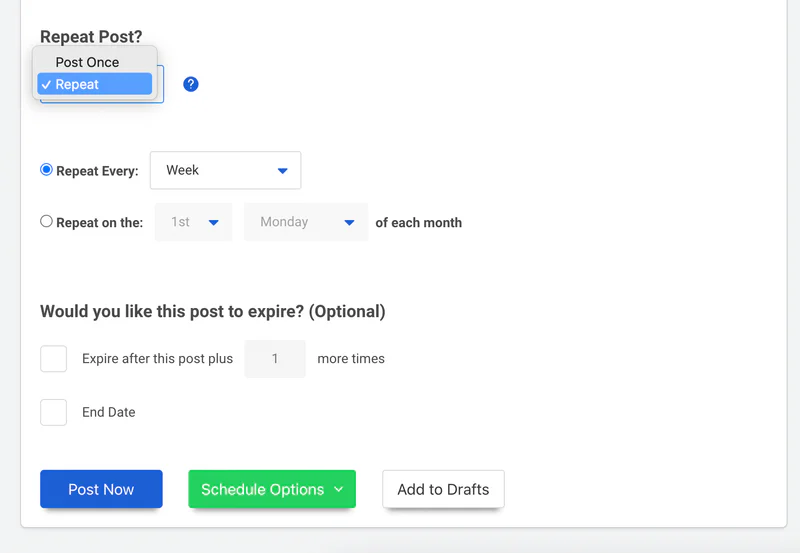
OneUp's recurring posts run on every plan, and they are the closest thing to a drip campaign in a general scheduler. While you rebuild, prune ruthlessly. Set up a crossposting workflow to send one post to multiple accounts at once; Basic includes 1 workflow.
5. Rebuild approvals and automations
Set up post approvals in OneUp on Intermediate or higher — Basic does not include them. Assign approvers and test with one post. Rebuild automations in Social Inbox → Automations: keyword comment auto-replies on TikTok, YouTube, Instagram, Facebook, Threads, Bluesky, and LinkedIn; DM automations on Instagram and Facebook only.
6. Run both tools in parallel, then cancel Missinglettr
Keep Missinglettr running until your active drip campaigns finish or you have replaced them with recurring posts in OneUp. Let OneUp handle all new scheduling from day one. Once a full cycle has published cleanly, cancel it — not while a campaign you still want is mid-drip.
Missinglettr vs OneUp pricing
Missinglettr Solo costs $15 per month, or $12.50 per month billed annually, for 3 profiles. Pro costs $39 per month, or $32.50 billed annually, for 10 profiles. Agency costs $147 per month, or $117.90 billed annually, for 25 profiles and includes a white-label client portal. Enterprise pricing is custom.
OneUp Basic costs $15 per month billed annually ($25 monthly) for 5 accounts, extras at $5 per month each. Intermediate is $48 per month billed annually ($60 monthly) for 15 accounts and adds approvals. Growth is $84 per month billed annually for 30 accounts; Business is $240 for 80. Every plan includes recurring posts, crossposting, bulk upload, inbox, AI captions, social listening, and API plus MCP. See the social media scheduler pricing comparison for costs at other account counts.
Where Missinglettr wins
Missinglettr wins on campaign automation: point it at a blog post, a YouTube video, or an RSS feed and it builds up to 12 months of scheduled posts for you, which no general scheduler — OneUp included — does automatically. If your whole workflow is turning each new blog post into a year of social promotion with minimal hands-on work, Missinglettr is genuinely better at that one job. It is also simpler, and its Agency plan's white-label client portal is built for agencies. If drip campaigns are the core of your promotion, stay with Missinglettr: see the Missinglettr vs OneUp comparison and the best Missinglettr alternatives roundup.
Frequently asked questions
Can I import my Missinglettr drip campaigns into OneUp?
No, not directly. Missinglettr has no CSV export or post library, so campaigns do not transfer as posts. Copy your best campaign content into a spreadsheet, import it with OneUp's bulk uploader, and rebuild the strongest snippets as recurring posts.
Does OneUp support all the networks Missinglettr does?
Yes, and more. Missinglettr covers 6 core networks — Facebook, Instagram, X, LinkedIn, Google Business Profile, and Bluesky — and OneUp covers all of those plus TikTok, YouTube, Pinterest, Threads, Snapchat, and Discord, for 12 in total.
Will I lose my scheduled posts when I cancel Missinglettr?
Posts still scheduled only in Missinglettr stop publishing when you cancel, so keep it running until your active campaigns finish or you have rebuilt them as recurring posts in OneUp.
How long does the switch take?
The setup takes an afternoon, but the full transition lasts as long as your longest running drip campaign. Run both tools in parallel while campaigns wind down.
Start your switch today
Start a 7-day free trial, connect your accounts, and rebuild your best campaign as recurring posts. If you are a freelancer, our best social media scheduler for freelancers guide shows how OneUp compares for solo workflows. If the trial week publishes cleanly, cancel Missinglettr.
OneUp
OneUp is a social media management tool. Scheduling, cross-posting, analytics, social inbox, DM automations, social listening, and API & MCP, all in one place.
Visit Site