How to Switch from NapoleonCat to OneUp Without Losing Your Queue
Switch from NapoleonCat to OneUp without losing your queue: rebuild posts, translate auto-moderation rules, and run a parallel week...
Contents
How to Switch from NapoleonCat to OneUp Without Losing Your Queue
NapoleonCat is a moderation-first tool: teams buy it to keep comments and DMs under control, and the scheduler comes along for the ride. Switching to OneUp means making the opposite trade — choosing the broader scheduler and giving up some moderation depth. That trade is worth it for a lot of teams — if you move your moderation rules deliberately.
Quick verdict
Keep NapoleonCat publishing until its queue empties, rebuild your posts and keyword rules in OneUp during a parallel week, and expect your bill to drop from $79 a month to $15 a month on OneUp's annual Basic plan.
- NapoleonCat Standard is $79 a month billed annually ($89 monthly) for 2 users and 5 profiles; the Social Inbox only starts on Pro at $89 a month billed annually.
- OneUp Basic is $15 a month billed annually for 5 accounts, with the inbox, recurring posts, and comment auto-replies on every plan.
- NapoleonCat does not list Pinterest among its supported profiles — OneUp covers it, plus Snapchat, Discord, Threads, and Bluesky.
- Auto-moderation rules and inbox history don't transfer; scheduled posts must be rebuilt with bulk upload.
What transfers, and what doesn't
Transfers: your content and accounts. Captions, images, and videos are yours to re-upload, and reconnecting each profile in OneUp takes minutes. NapoleonCat schedules to Facebook, Instagram, TikTok, LinkedIn Company Pages, Google Business Profile, and X — all covered by OneUp too.
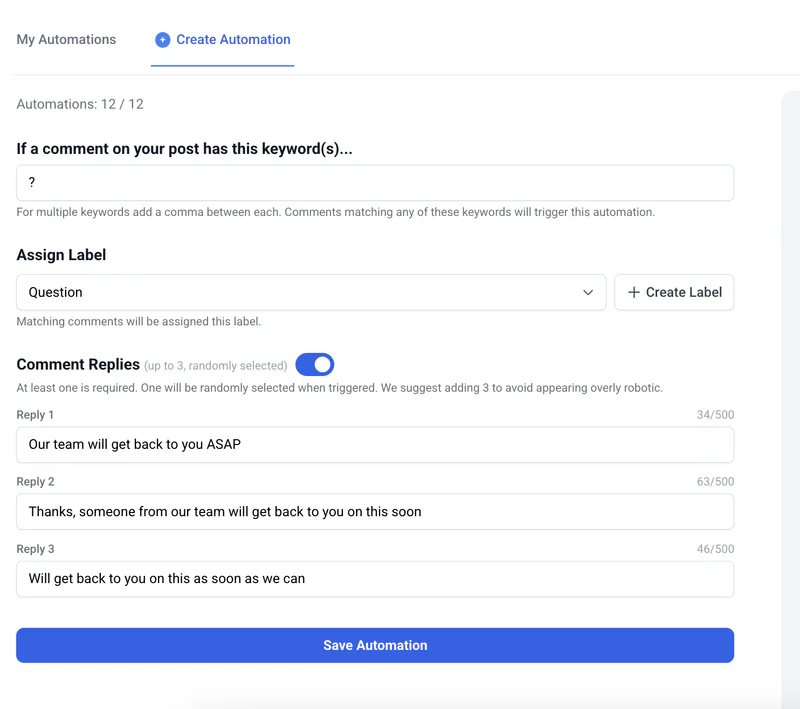
Needs rebuilding: your scheduled queue and keyword rules. No export moves scheduled posts from NapoleonCat into OneUp, so rebuild the calendar with bulk upload. Auto-moderation rules need rethinking, not copying: Expert hides or deletes comments automatically by keyword, while OneUp's equivalent is keyword-based comment auto-replies — a public reply, a DM, or both — not automatic hiding. Our guide to auto-replying to comments on Facebook shows the setup.
Doesn't transfer: inbox history, moderation history, and analytics. NapoleonCat collects analytics only from the moment a profile is connected, and that history stays behind. Export reports and benchmarks for clients before cancelling; sentiment analysis and competitor benchmarking have no direct OneUp equivalent.
Step 1: Audit your NapoleonCat setup
List your plan tier and bundle size: NapoleonCat bills in fixed bundles — Standard starts at 2 users and 5 profiles for $79 a month billed annually, and adding a third user or a sixth profile pushes you to the next bundle. Note your tier: Standard has no social inbox; the inbox starts on Pro at $89 billed annually, and automatic moderation starts on Expert at $119. Also flag Pinterest: NapoleonCat's pricing page lists Facebook, Instagram, TikTok, LinkedIn, YouTube, X, and Google Business Profile as profile types, with no Pinterest — so a Pinterest account is a new connection in OneUp.
Step 2: Start OneUp's 7-day trial and connect your accounts
Sign up for the trial and connect your accounts, leaving NapoleonCat untouched. Basic is $15 a month billed annually for 5 accounts, Intermediate is $48 for 15, Growth is $84 for 30, and Business is $240 for 80. Five profiles fit on Basic; ten fit on Intermediate. Approvals start on Intermediate. For the market-wide cost picture, see how much a social media scheduler costs in 2026.
Step 3: Export your content, rules, and reports
Download your media and save your best captions. Write down every auto-moderation and saved-reply rule — keywords, action, profiles — because you'll recreate the intent of each one in OneUp. Export analytics too, and prune as you go.
Step 4: Rebuild your queue with bulk upload and repeating posts
Use bulk upload to import scheduled one-off posts in batches, then set evergreen content to repeat. Repeating posts are on every OneUp plan and fill a gap NapoleonCat never addressed: it offers unlimited scheduling but doesn't advertise a recurring evergreen queue, so teams that recycled content did it by hand. Caps are concurrent totals — Basic holds 300 at a time, Intermediate 800, Growth/Business unlimited.
Step 5: Recreate your moderation rules as keyword auto-replies
This step decides whether the switch feels like an upgrade. In OneUp, go to Social Inbox, then Automations, and rebuild each rule as a keyword trigger. OneUp auto-replies to comments by keyword on TikTok, YouTube, Instagram, Facebook, Threads, Bluesky, and LinkedIn, and on Instagram and Facebook a comment keyword can trigger a public reply, a DM, or both. What you lose is automatic hiding and deleting — plan a daily inbox check for spam NapoleonCat used to remove, for a few weeks.
Step 6: Run both tools in parallel for a week
Let NapoleonCat finish publishing what's already scheduled while OneUp publishes everything new. Watch the first week: posts on time, auto-replies firing on the right comments, nothing double-published. NapoleonCat's trial runs 14 days on Expert; OneUp's runs 7 days. For a broader comparison, read NapoleonCat vs OneUp and the best NapoleonCat alternatives.
Step 7: Cancel NapoleonCat and confirm the numbers
Cancel only after the parallel week — NapoleonCat doesn't store historical data for discontinued accounts, so anything you didn't export is gone. Then compare month one in OneUp with your last month in NapoleonCat: posts published, comments answered, and cost. A 2-user, 5-profile team drops from $79 to $15 a month, with the Pro inbox included.
NapoleonCat vs OneUp at a glance
Prices checked November 17, 2026 on napoleoncat.com/pricing (via NapoleonCat's own pricing articles) and oneupapp.io/price.
Where NapoleonCat wins
NapoleonCat earns its price in the inbox. Automatic moderation — hiding spam, deleting abusive comments, moderating ad comments — is deeper than anything OneUp offers. Sentiment analysis, competitor benchmarking, and team performance reports give managers visibility OneUp's analytics don't match. If moderation is your team's main job, NapoleonCat is the better tool. If moderation is a side job and scheduling is the main one, OneUp's breadth is the better fit for the money.
FAQ
Can I export my scheduled posts from NapoleonCat to OneUp?
No — there is no direct export. Rebuild the queue with bulk upload and repeating posts.
Will my auto-moderation rules still work in OneUp?
Not as automatic hiding or deleting. Rebuild each rule as a keyword auto-reply: the keyword triggers a public reply, a DM, or both.
Does OneUp support Pinterest? NapoleonCat doesn't.
Yes. OneUp schedules to Pinterest alongside its other 11 networks — fold it into the same calendar and crossposting workflows.
What happens to my analytics history?
It stays in NapoleonCat, which doesn't retain data for discontinued accounts. Export reports before cancelling.
The bottom line
Switching from NapoleonCat to OneUp trades moderation depth for scheduling breadth and a much smaller bill. The queue is the easy part — bulk upload and repeating posts rebuild it in hours. The real work is your keyword rules: translate each auto-moderation rule into a OneUp automation before you cancel, run both tools for a week, and only then close the account. Start OneUp's 7-day free trial today.
OneUp
OneUp is a social media management tool. Scheduling, cross-posting, analytics, social inbox, DM automations, social listening, and API & MCP, all in one place.
Visit Site