How to Switch from Pallyy to OneUp
Pallyy's per-brand pricing adds up fast. This guide maps plans, moves your queue, and keeps approvals intact...
Contents
Pallyy is the Instagram-first scheduler small agencies love: a grid planner, trending-audio Reels, multi-frame Stories, and per-client pricing. One social set — one brand, up to 11 accounts across 10 networks — costs $25 a month on Pro, extra sets $10 each. For a freelancer with two or three clients, that is tidy.
The model strains as the client list grows: five brands on Pro cost $65 a month, ten cost $115 — more than Pallyy's Agency plan at $99. Pallyy also stops at 10 networks — no Snapchat, no Discord — and its free plan covers 15 image posts a month.
Quick verdict
Switching from Pallyy to OneUp pays off past a few brands: OneUp charges per account, not per brand, so 15 accounts cost $48 a month instead of $65-plus for five brands, and you gain Snapchat, Discord, recurring posts, and listening.
- Pallyy Pro is $25 a month for 1 social set (1 brand, up to 11 accounts); each extra set is $10 a month, so 5 brands cost $65.
- OneUp Intermediate is $48 a month billed annually for 15 accounts, any number of brands, with approvals included.
- Pallyy's grid preview and link-in-bio pages do not transfer — the two features you will genuinely miss.
Why teams switch
Per-brand pricing compounds. Three clients on Pro cost $45 a month; five cost $65; ten cost $115 — at which point the $99 Agency plan (10 sets, 3 users) is the better buy. OneUp charges per account: 15 accounts on Intermediate cost $48 a month billed annually, whatever the brand count.
Two networks are missing. Pallyy publishes to 10 networks: Instagram, Facebook, LinkedIn, TikTok, Pinterest, Google Business Profile, YouTube, X, Threads, and Bluesky. There is no Snapchat and no Discord. OneUp publishes to 12 networks, including both. If a client asks for Snapchat, Pallyy cannot help.
Approvals and inbox are table stakes. Pallyy includes client and team approvals, an inbox, and API access on every paid plan — genuinely good value at $25. OneUp matches all three and adds listening, recurring posts, and crossposting workflows Pallyy does not offer. The direct comparison is in Pallyy vs OneUp.
The free plan is a demo, not a tier. Pallyy's free plan allows 15 image posts a month for one brand — no video, no Reels, 30 days of analytics — so it is a trial, not a tier. OneUp has no free plan either, just a 7-day trial.
How to switch, step by step
1. Audit your sets and count accounts
List every social set, the accounts inside it, and the posts queued for next month. Count accounts, not sets: OneUp prices by account (5 on Basic, 15 on Intermediate, 30 on Growth, 80 on Business), so 5 brands with 3 accounts each is 15 accounts — Intermediate.
2. Export your queue and media
Pallyy has no bulk export, so copy your queue into a spreadsheet. Download media not stored elsewhere. Published posts stay published, so only the future queue needs moving.
3. Start a trial and reconnect accounts
Start OneUp's 7-day free trial and connect each account. Instagram connects through the official API, as in Pallyy, so Reels and Stories publish automatically.
4. Rebuild your queue with bulk upload
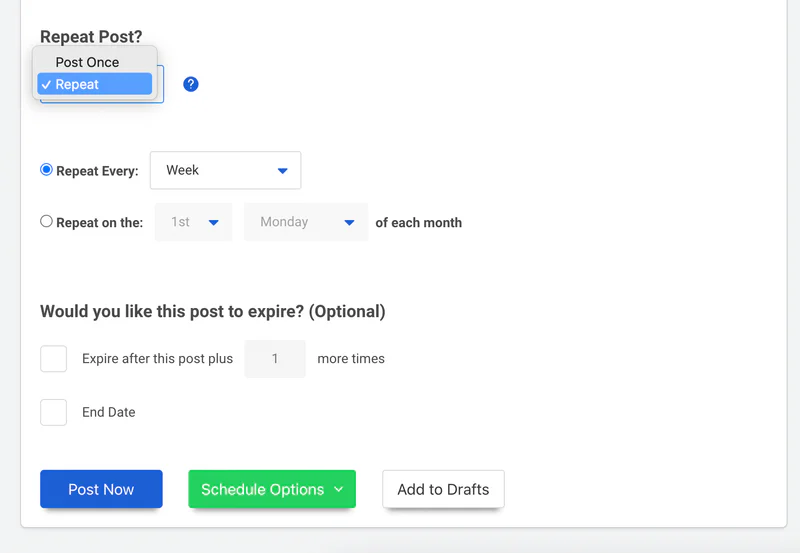
Use OneUp's bulk upload to recreate your posts — up to 200 at a time. Set your timeslots once and OneUp fills them automatically. Now fix Pallyy's biggest missing feature: set your best posts up as recurring posts, so they re-share themselves. The general migration playbook is in Switching Scheduling Tools? How to Migrate Your Content Backlog to OneUp.
5. Recreate approvals — on the right plan
Pallyy includes approvals on Pro, its cheapest plan. OneUp includes them from Intermediate, not Basic — so do not pick Basic and discover your clients cannot approve posts. Choose Intermediate ($48 a month billed annually) or above, and test with one real post before migrating the queue.
6. Set up crossposting and listening
Create crossposting workflows — for example, every new Instagram post also goes to Facebook, Pinterest, and Threads — and turn on listening to monitor brand and keyword mentions, including on Reddit. For Instagram-specific tips, see Best Instagram Scheduling Tools in 2026.
7. Run both tools, then cancel
Keep Pallyy active while OneUp runs your queue for two weeks. Once publishing is clean, cancel Pallyy.
Plan mapping: Pallyy to OneUp
Prices checked November 19, 2026, on pallyy.com/pricing. For the wider cost picture, see How Much Does a Social Media Scheduler Cost? 2026 Pricing Compared.
Rule of thumb: count accounts, not brands. A full Pro set usually lands on Intermediate (15 accounts); 10 Agency sets usually land on Growth (30 accounts), or Business (80) if full.
What you will gain, and what you will miss
You will gain: Snapchat and Discord publishing; recurring posts; crossposting; listening; comment auto-replies on 7 networks and DM automations on Instagram and Facebook; and an API and MCP server on every plan. You will also stop paying per brand.
You will miss: Pallyy's Instagram grid preview — OneUp has no grid planner, so visual feed planning goes back to a spreadsheet or the composer. You will also miss its link-in-bio pages, trending-audio picker for Reels, and multi-frame Story builder; OneUp schedules Stories without the audio library or multi-frame composer. If the grid preview is why you chose Pallyy, that loss is real. More Instagram-first options are in 7 Best Pallyy Alternatives in 2026.
FAQ
Will my scheduled Instagram posts still publish after I cancel Pallyy?
No — only published posts stay live. Anything still queued is lost when the account closes, so export your queue (step 2) before cancelling (step 7).
Does OneUp have Pallyy's Instagram grid preview?
No. OneUp has no visual grid planner, though you can preview posts in the composer. If the grid's look is central to your workflow, Pallyy keeps that edge.
How much will I save by switching from Pallyy?
It depends on brand count. One brand on Pro ($25 a month) is cheaper than Intermediate ($48) — but that buys 15 accounts against 11, with approvals included. At five brands, Pro costs $65 against Intermediate at $48; at ten, Agency is $99 against Growth at $84.
Can OneUp handle Pallyy's approval workflow for clients?
Yes, from Intermediate up — clients review and approve posts before they publish. The difference: Pallyy includes approvals on its $25 Pro plan, while OneUp requires Intermediate at $48 — so a solo Pro user who only needs approvals will pay more on OneUp.
The bottom line
Pallyy is a lovely tool for one brand with a visual Instagram workflow. It stops being the right tool when the brand count grows, a client asks for Snapchat or Discord, or you want your best posts to keep working. The switch is straightforward: count accounts, rebuild the queue with bulk upload, pick Intermediate or above for approvals, and run both tools for two weeks. Start a 7-day free trial and move your first queue.
OneUp
OneUp is a social media management tool. Scheduling, cross-posting, analytics, social inbox, DM automations, social listening, and API & MCP, all in one place.
Visit Site