How to Switch from Planable to OneUp Without Losing Your Queue
Switch from Planable to OneUp without losing your queue: export your workspaces to CSV, reshape the file, and bulk-upload it...
Contents
How to Switch from Planable to OneUp Without Losing Your Queue
Planable is the best approval tool in social scheduling — and the worst value if approvals are not your bottleneck. It charges per workspace, one per brand or client, with unlimited users: Basic is $39 a month ($33 billed annually) for 4 pages and 60 posts; Pro is $59 ($49 annually) for 10 pages and 150 posts. OneUp charges per social account instead — $15 a month for 5 accounts, $48 for 15 — and includes recurring posts, bulk upload, and a social inbox that Planable sells as add-ons.
The good news: Planable's help center documents a CSV export for all pages, with structured data and media links — so this switch is a spreadsheet job, not a rebuild from screenshots. Prices checked November 16, 2026.
Quick verdict
Switch to OneUp if per-workspace pricing is multiplying your bill — Planable's CSV export makes the move straightforward, but its approval workflow is hard to give up.
- Five Planable Pro workspaces cost $245 a month ($49 each billed annually), while OneUp Intermediate is $48 a month for 15 accounts.
- Planable exports scheduled posts to CSV with media links, so the queue moves over by reshaping that file into OneUp's bulk sheet.
- Planable caps Basic at 60 posts and 4 pages per workspace per month; OneUp has no monthly post cap — Basic allows 300 scheduled posts at a time.
Why teams switch from Planable
The reason is usually the workspace math: one workspace per brand or client, and the price multiplies — one client on Pro is $49 a month billed annually, three are $147, five are $245, before add-ons. OneUp's Intermediate plan is $48 a month for 15 accounts, so five small clients can share one plan.
The caps sting too. Basic allows 60 created posts and 4 connected pages per workspace per month; Pro raises that to 150 posts and 10 pages. OneUp has no monthly post cap: Basic holds 300 scheduled posts at a time, Intermediate 800, Growth and Business unlimited. Add-ons stack up — Analytics is $14 a month per workspace, the Social Inbox $9 — while OneUp includes both on every plan. Planable also covers only nine networks — no Snapchat, Discord, or Bluesky; OneUp publishes to 12. For the full head-to-head, see Planable vs OneUp.
What transfers — and what does not
Scheduled posts: yes, by CSV export. Planable's help center documents exporting posts to CSV or PDF. CSV is available for all pages, with structured data and media links — filter by date and status, export per workspace, and you have the raw material for OneUp's bulk upload.
Queues and timetables: rebuild them. Planable's timetable sets posting slots, but it has no documented evergreen or recurring-post feature. Rebuild repeat-worthy posts as recurring posts and Timeslots in OneUp. See how to set up repeating evergreen posts in OneUp.
Approval workflows: rebuild them. Approvals do not transfer. On Planable, Basic offers optional approval only; required approval starts on Pro, multi-level on Enterprise. On OneUp, approvals start on Intermediate at $48 a month — Basic does not include them.
Analytics and reports: no. Past performance data stays in Planable, so export the reports you need before you cancel.
How to switch, step by step
1. Take inventory. For each workspace, count the scheduled posts, drafts, pages, and approval flows, and flag time-sensitive and evergreen posts.
2. Export each workspace's content to CSV. In the calendar view, select the pages, filter by date and status, then export posts as CSV — one workspace at a time.
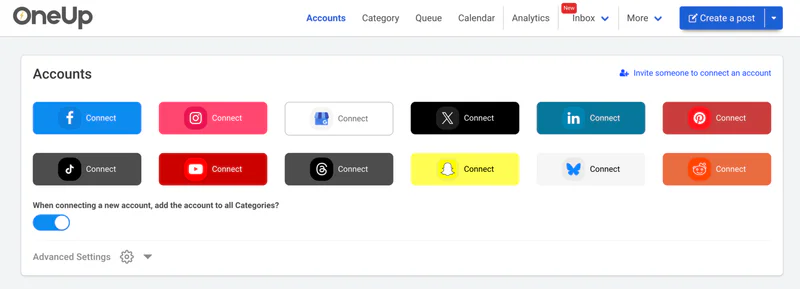
3. Start your OneUp trial and connect your accounts. OneUp offers a 7-day trial on all plans. Connecting accounts first does not disconnect them from Planable. Pick by account count: Basic $15/mo annual (5), Intermediate $48 (15), Growth $84 (30), Business $240 (80).
4. Reshape the CSV into OneUp's bulk sheet and upload in batches. OneUp's bulk upload takes a Google Sheet or CSV with set headers (Content, Image URL, Social Account Name, Platform, Date Time). Map the exported columns onto those headers, use the export's media links as image URLs, and upload in batches of 50 to 100 — see how to bulk upload social media posts with OneUp for the exact format. Note: bulk-uploaded GBP posts go out as What's New posts; recreate Event and Offer posts individually.
5. Rebuild your queues as recurring posts and Timeslots. Flag the evergreen posts, set them to repeat in OneUp, and set up Timeslots for each workspace's rhythm.
6. Recreate approvals if your team needs them. On Intermediate and above, turn on post approval — Planable's multi-level approvals have no direct equivalent.
7. Run both tools in parallel for a week, then cancel Planable. Let OneUp publish for a few days while Planable's remaining posts finish, then cancel before your next billing date. Still weighing the field? See the best Planable alternatives.
Planable vs OneUp: pricing at a glance
See the wider market in this pricing comparison.
Where Planable wins
Planable is the better tool when getting content approved is the hard part of the week. Its whole product is built around review: comments and annotations on the post, internal drafts hidden from clients, locking content once approved, and multi-level approvals on Enterprise. OneUp's approval workflow is simpler — if a client or legal sign-off chain is your daily reality, that gap is real.
Planable also plans non-social content — newsletters, blog posts, ads — through the same review flow, and its trial is 50 posts with no time limit against OneUp's 7 days. If approvals are the product, Planable earns its price; if publishing volume is the job, it does not.
FAQ
Can I export my scheduled posts from Planable?
Yes — Planable's help center documents a CSV export for all pages, with structured data and media links. Reshape it into OneUp's bulk-upload sheet.
Will my approval history transfer to OneUp?
No — approvals, comments, and version history stay in Planable. Rebuild the flow in OneUp on Intermediate or above.
Does OneUp publish to the same networks as Planable?
Mostly, plus more. Planable covers Facebook, Instagram, LinkedIn, X, YouTube, TikTok, Pinterest, GBP, and Threads. OneUp adds Snapchat, Discord, and Bluesky. Neither posts to Reddit.
The bottom line
Switching from Planable to OneUp is a spreadsheet job — the CSV export carries your queue across in a couple of hours. You lose Planable's approval depth, which genuinely matters for approval-heavy teams. But if publishing is the core job, the math is hard to argue with: five clients on Planable Pro cost $245 a month on annual billing, against $48 a month for 15 accounts on OneUp Intermediate, with no monthly post cap and analytics and inbox included. Start OneUp's 7-day trial.
OneUp
OneUp is a social media management tool. Scheduling, cross-posting, analytics, social inbox, DM automations, social listening, and API & MCP, all in one place.
Visit Site