How to Switch from RADAAR to OneUp Without Losing Your Queue
How to move your RADAAR queue to OneUp: export, bulk-upload, rebuild recurring posts and approvals, then cancel...
Contents
Switching from RADAAR to OneUp is one of the easier scheduler migrations, because RADAAR is a conventional queue-based tool and OneUp works the same way. Export your scheduled posts, connect your accounts in OneUp, bulk-upload the queue, and rebuild your recurring posts and approvals — an afternoon's work, plus a week of running both tools side by side before you cancel RADAAR. Watch RADAAR's plan limits, which shape what you can export, and the networks it covers that OneUp does not.
Quick verdict
Switch from RADAAR to OneUp if you want uncapped scheduled posts on Growth and Business, Snapchat and Discord support, and social listening — but check your plan: RADAAR's cheapest tier cannot export.
- RADAAR Basic is $4.99 per month for 3 profiles and 90 posts per month; OneUp Basic is $15 per month billed annually for 5 accounts.
- OneUp bulk-uploads up to 100 posts per batch; RADAAR bulk-uploads up to 480 at once on Advanced.
- OneUp includes social listening on every plan; RADAAR's monitoring caps at 3 queries on Professional and 9 on Advanced.
- OneUp includes API and MCP access on every plan; RADAAR's MCP server is in public beta, with no REST API.
What transfers cleanly — and what does not
Your scheduled posts transfer well, with one catch: RADAAR only offers export on Professional and above. If you are on Basic or Standard, copy your upcoming posts into a spreadsheet by hand — start with the next two weeks — and import it with OneUp's bulk uploader, which accepts CSV files and Google Sheets in batches of up to 100 posts. If you are on Professional or Advanced, export directly and import the file.
Your account connections do not transfer: reconnect each social account in OneUp. OneUp supports Facebook Pages, Groups, and personal Profiles, Instagram, X, LinkedIn, TikTok, YouTube, Pinterest, Threads, Bluesky, Snapchat, Discord, and Google Business Profile. RADAAR covers the same core networks plus Mastodon, Vimeo, WordPress, Medium, and Tumblr — OneUp does not support those five, while RADAAR does not support Snapchat or Discord. Neither tool posts to Reddit.
Note two quirks: X requires your own X developer app and API keys in RADAAR, which OneUp does not need; and RADAAR does not support Facebook personal profiles or Groups, while OneUp does. Recurring posts need rebuilding: RADAAR caps them by plan — 3 on Standard, 6 on Professional, 12 on Advanced, none on Basic — while OneUp includes them on every plan.
How to switch from RADAAR to OneUp in 6 steps
1. Export your scheduled posts from RADAAR
If you are on Professional or Advanced, export your scheduled posts from RADAAR and save the file as your backup. If you are on Basic or Standard, there is no export, so copy your scheduled posts into a spreadsheet manually — post text, link, scheduled date and time, and accounts — starting with the next two weeks. Also list your recurring posts and their intervals, and every profile you publish to.
2. Connect your accounts in OneUp
Start a 7-day free trial and connect your social accounts. Basic includes 5 accounts, extras at $5 per month each; Intermediate at $48 per month billed annually covers 15 accounts and adds post approvals. Connect your most active accounts first. Add Snapchat and Discord if you plan to publish there — RADAAR never supported them.
3. Bulk-upload your scheduled posts
Import your exported file or spreadsheet with OneUp's bulk uploader, up to 100 posts per batch from a CSV file or Google Sheet. Map the columns to post text, link, scheduled time, and accounts, and check the first batch before importing the rest. OneUp's caps are concurrent totals: Basic 300, Intermediate 800, Growth and Business unlimited.
4. Rebuild your recurring and evergreen posts
Recreate each recurring post in OneUp with the same repeat interval. OneUp includes recurring posts on every plan, so nothing about your evergreen rotation forces you onto a higher tier.
5. Rebuild approvals and automations
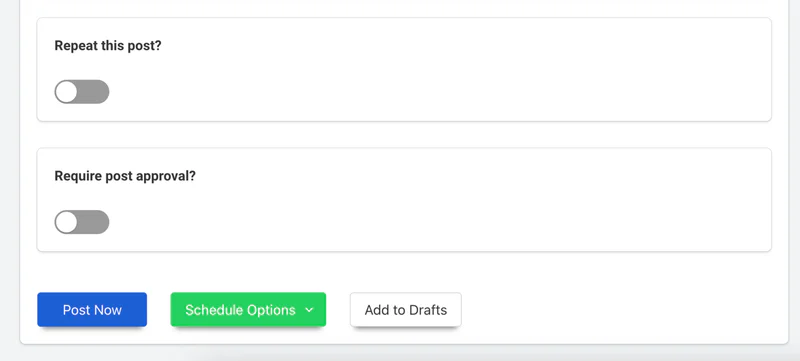
RADAAR includes approvals from Standard upward, so if your team reviews posts before they publish, rebuild that workflow in OneUp. Post approvals in OneUp start on Intermediate — Basic does not include them — so be on Intermediate or higher before you build it. Assign approvers and test with one post.
Rebuild automations in OneUp's Social Inbox under Automations: keyword-based comment auto-replies on TikTok, YouTube, Instagram, Facebook, Threads, Bluesky, and LinkedIn; DM automations on Instagram and Facebook only.
6. Run both tools in parallel, then cancel RADAAR
Keep RADAAR active for a week while OneUp handles new scheduling. Check the first few days of published posts: on time, right accounts, right media. Once a full cycle publishes cleanly, cancel RADAAR.
RADAAR vs OneUp pricing
RADAAR Basic costs $4.99 per month for 3 profiles, 1 user, and 90 posts per month — no inbox, analytics, recurring posts, or bulk upload. Standard costs $9.99 per month, or $6.99 billed annually, for 6 profiles, 3 users, and unlimited posts. Professional is $29.99 per month ($20.99 billed annually) for 12 profiles and 6 users; Advanced is $149.99 ($104.99) for 24 profiles and unlimited users; Enterprise starts at $749.99 per month for 48 profiles. Yearly billing is 30 percent off; every plan has a 14-day free trial.
OneUp Basic costs $15 per month billed annually ($25 monthly) for 5 accounts, extras at $5 per month each. Intermediate is $48 per month billed annually ($60 monthly) for 15 accounts and adds approvals. Growth is $84 per month billed annually for 30 accounts; Business is $240 for 80. Every plan includes recurring posts, crossposting, bulk upload, inbox, AI captions, social listening, and API plus MCP. See the social media scheduler pricing comparison for costs at other account counts.
Where RADAAR wins
RADAAR wins on entry-level price: $4.99 a month for Basic, and $6.99 billed annually for Standard with unlimited posts, both cheaper than OneUp Basic at $15 billed annually. It also covers networks OneUp does not — Mastodon, Vimeo, WordPress, Medium, and Tumblr. Its 14-day free trial is twice OneUp's 7 days. If price is the deciding factor, or if Mastodon or a blogging platform is part of your mix, RADAAR is the better fit: see the RADAAR vs OneUp comparison and the best RADAAR alternatives roundup.
Frequently asked questions
Can I import my RADAAR scheduled posts into OneUp?
Yes, if you are on Professional or Advanced — export your queue and import it with OneUp's bulk uploader, which accepts CSV files and Google Sheets in batches of up to 100 posts. On Basic or Standard there is no export, so copy your upcoming posts into a spreadsheet by hand instead.
Does OneUp support all the networks RADAAR does?
No. OneUp posts to 12 networks including Snapchat and Discord, which RADAAR lacks, but RADAAR also covers Mastodon, Vimeo, WordPress, Medium, and Tumblr, which OneUp does not support.
Do I lose my recurring posts when I switch?
You lose the setup, not the content. Note each recurring post's interval in RADAAR and recreate it in OneUp — recurring posts are included on every plan, with no per-plan cap.
How long does the switch take?
A typical account takes an afternoon to migrate, plus a week running both tools in parallel before you cancel RADAAR.
Start your switch today
Start a 7-day free trial, connect your accounts, and bulk-upload your next week of posts. If you run an agency, our best social media scheduler for agencies guide shows how OneUp compares for agency workflows. If the trial week publishes cleanly, cancel RADAAR.
OneUp
OneUp is a social media management tool. Scheduling, cross-posting, analytics, social inbox, DM automations, social listening, and API & MCP, all in one place.
Visit Site