How to Switch from Sendible to OneUp Without Losing Your Queue
Switching from Sendible to OneUp takes an afternoon: export drafts, capture the queue, reconnect accounts, and refill with bulk upload...
Contents
How to Switch from Sendible to OneUp Without Losing Your Queue
Sendible is built for agencies: unlimited users on every plan, each client in a Workspace with its own calendar, inbox, queues and reports. Profiles come in blocks of six per Workspace, so a seventh jumps you from Core at $35 a month to Plus at $99. It also publishes to 10 networks, no Snapchat, Discord, or Pinterest, and its API and MCP are still "in the works."
Switching is a rebuild, not an import: no tool can pull your Sendible queue out automatically. Done in the right order, it takes an afternoon.
Quick verdict
You can't import your Sendible queue automatically — no tool can — but rebuilding it in OneUp takes an afternoon: export drafts, capture the queue, reconnect accounts, bulk-upload, and run both tools in parallel until Sendible's queue drains.
- Sendible Core is $35/mo monthly ($30 annual) for 6 profiles in 1 Workspace, unlimited users; OneUp Basic is $15/mo annual for 5 accounts.
- Sendible sells profiles in blocks of six, so a 7th profile forces Plus at $99/mo billed monthly; OneUp adds single accounts at $5/mo each on Basic.
- Sendible publishes to 10 networks — no Snapchat, Discord, or Pinterest. OneUp publishes to 12, including all three.
- Approvals start on Sendible Plus ($99/mo monthly) and OneUp Intermediate ($48/mo annual). Sendible's API and MCP are still in the works; OneUp includes both on every plan.
What transfers — and what does not
Scheduled posts: no, not automatically. Sendible has no queue export another tool can import — export drafts to CSV or HTML from Publish > Drafts, capture scheduled posts from the calendar, and rebuild them with bulk upload. Published posts stay live either way; they live on the networks, not inside Sendible.
Smart Queues: rebuild them. Smart Queues recycle evergreen posts at set times; OneUp's recurring posts do the same job on a fixed schedule — simpler, without randomisation.
Workspaces: rebuild them. Map each Workspace to a OneUp Category.
Content library: manually. Libraries don't export — copy items worth keeping into your spreadsheet and download the media.
Approvals: rebuild them. Rebuild Plus-or-above approvals in OneUp's approval workflow — it starts on Intermediate, not Basic.
White label: no equivalent. White labelling is a paid add-on on Elite/Enterprise; OneUp has none — a real loss if client branding matters.
How to switch, step by step
1. Audit your Sendible setup. List every Workspace, its profiles, each Smart Queue's contents, library items, and who approves what. Note daily volume per Workspace too — Core caps at 100 published posts per Workspace per day.
2. Export what you can. In Sendible, go to Publish > Drafts and use More to export drafts worth keeping to CSV or HTML. Then go channel by channel through the calendar and record every scheduled post — text, link, media, time — one row per post, and download the media you'll reuse.
3. Start your OneUp trial and connect your accounts. OneUp offers a 7-day trial on all plans. Connect the same social accounts — OneUp covers all 12 of its networks, including Snapchat, Discord, and Pinterest, which Sendible lacks. Connecting an account to OneUp does not disconnect it from Sendible — queued posts keep publishing until the queue drains. Pick your plan by account count: Basic $15/mo billed annually (5 accounts), Intermediate $48 (15), Growth $84 (30), Business $240 (80).
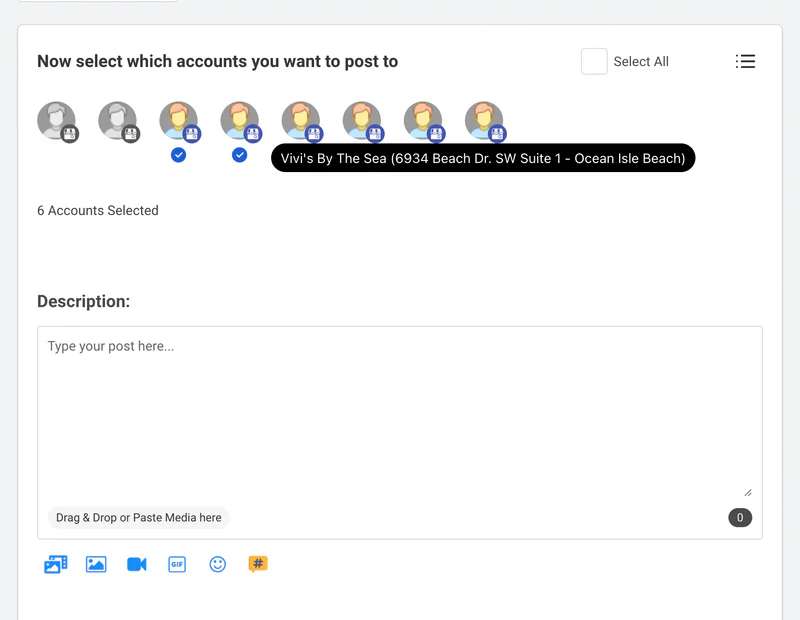
4. Recreate your structure — categories and timeslots. In OneUp, Categories group accounts you post to together; Timeslots are the recurring times posts go out. Set up one Category per client or brand — the equivalent of a Sendible Workspace — and recreate your queue times.
5. Bulk-upload your queue and rebuild your Smart Queues as recurring posts. Turn your Step 2 spreadsheet into a bulk upload — text, links, media, accounts, times, loaded in bulk. Our bulk upload walkthrough covers the exact format. Then set your best evergreen posts to repeat automatically — see our evergreen posts guide.
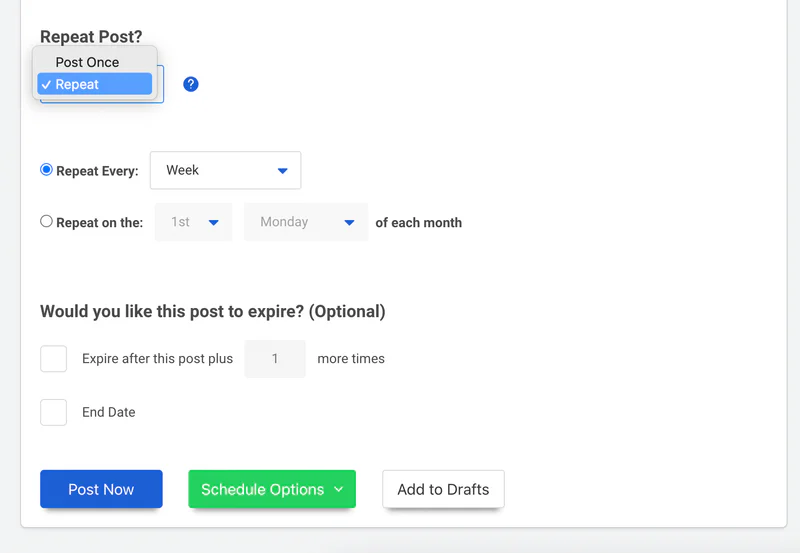
6. Set up crossposting and approvals. A crossposting workflow republishes the same content across networks automatically. For approvals, set up OneUp's approval workflow — it starts on Intermediate.
7. Run both tools in parallel for a week or two, then cancel Sendible. Everything new goes in OneUp only; everything already in Sendible's queue stays there and publishes as planned — never duplicate a post across both. Once Sendible's queue is empty and OneUp has published cleanly for a week or two, cancel before your renewal date (no contracts on standard plans).
Sendible vs OneUp: pricing at a glance
A 7-profile setup costs $99/mo billed monthly on Sendible Plus; the same 7 accounts cost $25/mo billed annually on OneUp Basic. Full side-by-side: Sendible vs OneUp; best Sendible alternatives; wider market: pricing comparison.
Where Sendible wins
Sendible genuinely wins in a few places. First, unlimited users: a 12-person agency pays the same as a solo user, and per-client Workspaces keep each brand's calendar, inbox, queues, and reports separate. Second, content libraries (Premium+) and bulk posting with dynamic fields (Elite) suit agencies pushing one campaign across many locations. Third, white labelling (paid add-on, Elite/Enterprise) and a dedicated account manager (Premium+) are agency features OneUp doesn't offer. Fourth, Sendible publishes to WordPress, which OneUp doesn't — and its 14-day trial needs no card, against OneUp's 7. If your team is large and you never touch Snapchat, Discord, or Pinterest, Sendible is the better tool.
FAQ
Can OneUp import my Sendible queue automatically?
No, and neither can any other scheduler. Sendible offers no queue export other tools can import — drafts export to CSV or HTML, but scheduled posts must be captured from the calendar and rebuilt.
What happens to my Smart Queues?
They don't transfer. Rebuild each queue's evergreen posts as recurring posts in OneUp — you lose Sendible's randomisation, but the posts keep going out on autopilot.
What happens to my Sendible reports and analytics?
They stay in Sendible. Download the reports you care about before you cancel.
The bottom line
Switching from Sendible to OneUp is a spreadsheet exercise: export drafts, capture the queue, reconnect accounts, bulk-upload, and rebuild Smart Queues as recurring posts. You lose per-client Workspaces, unlimited seats, and white labelling — but if the networks you need are the ones Sendible skips, or six-profile blocks keep pushing you up a tier, the math is hard to argue with. Start OneUp's 7-day trial and let next week prove it.
OneUp
OneUp is a social media management tool. Scheduling, cross-posting, analytics, social inbox, DM automations, social listening, and API & MCP, all in one place.
Visit Site