How to Switch from ShortSync to OneUp
ShortSync covers 18 platforms for €14.99 a month, but has no approvals or recurring posts. OneUp adds both...
Contents
ShortSync is a scheduling tool built for one workflow: upload a short-form video once and publish it everywhere. Its Creator plan is €14.99 a month (€11.99 billed annually) for unlimited uploads to 18 platforms — including Snapchat, Reddit, Telegram, Mastodon, and Google Business Profile — with no per-account fees and a free plan at 5 uploads a month. For a video-first creator, that flat price is hard to argue with.
But ShortSync is a video distributor, not a full scheduler. It has no recurring evergreen posts, no approval workflows, no DM automations, and no social listening. OneUp Intermediate is $48 a month billed annually for 15 accounts, with approvals, recurring posts, crossposting, inbox, and listening included. The head-to-head is in ShortSync vs OneUp.
Quick verdict
Switching from ShortSync to OneUp makes sense once video distribution is only part of the job — you trade the widest network list for a full scheduler with approvals, recurring posts, and an inbox.
- ShortSync Creator is €14.99 a month (€11.99 billed annually) for unlimited uploads to 18 platforms, with a free plan at 5 uploads a month.
- OneUp Intermediate is $48 a month billed annually for 15 accounts, approvals included.
- ShortSync's Reddit, Telegram, Mastodon, Tumblr, Pixelfed, and Dailymotion publishing do not transfer — OneUp publishes to 12 networks.
Why teams switch
Video is only part of the calendar. ShortSync moves a video to 18 platforms in one upload — but it does not run a content operation. There is no approval chain, no recurring queue, and no inbox to answer the comments the videos attract.
There is no team workflow. ShortSync's Team plan adds workspaces, not approvals: €49.99 a month (€39.99 billed annually) for 10 client workspaces with no per-user fees. If a client needs to approve posts before they publish, that workflow lives outside ShortSync.
The flat price hides the missing features. €14.99 a month for every platform is cheap — until you add a second tool for approvals, a third for listening, and a fourth for DM automation. OneUp bundles those into one subscription.
The network list cuts both ways. ShortSync's 18 platforms include networks OneUp does not publish to — Reddit, Telegram, Mastodon, Tumblr, Pixelfed, Dailymotion. If those are core to your distribution, switching means losing them.
How to switch, step by step
1. Audit which ShortSync platforms you actually use
List the platforms you published to in the last month.
2. Export your schedule and media
ShortSync has no one-click export of a full scheduled queue, so copy your upcoming uploads into a spreadsheet — captions, links, dates, and times — and download any media not stored elsewhere. Keep your original video files local so the new queue does not depend on re-downloading from ShortSync.
3. Start a trial and connect your accounts
Start OneUp's 7-day free trial and connect your accounts. Accounts: 5 on Basic, 15 on Intermediate, 30 on Growth, 80 on Business. Connect the video platforms first — TikTok, Instagram, YouTube, Facebook, Snapchat — then the text networks OneUp adds. The general migration playbook is in Switching Scheduling Tools? How to Migrate Your Content Backlog to OneUp.
4. Rebuild your queue with bulk upload
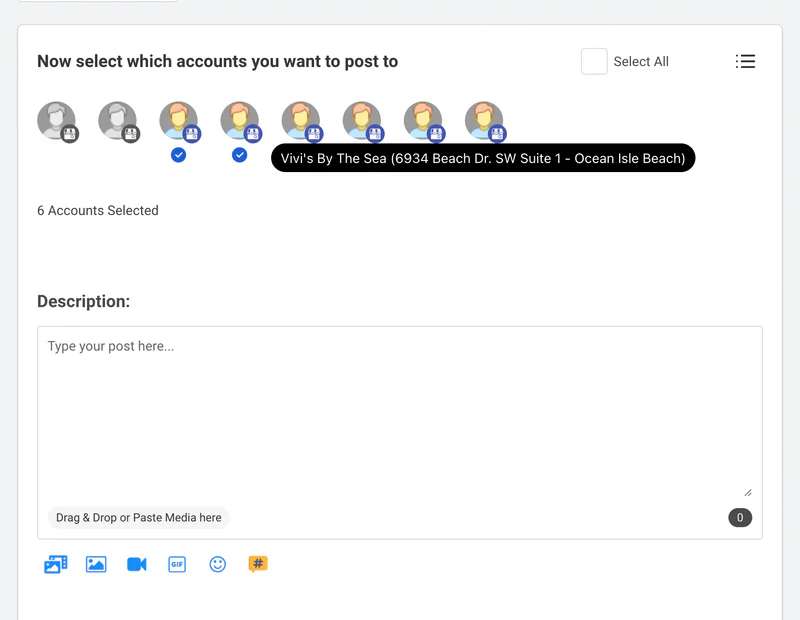
Use OneUp's bulk upload to recreate your posts from the spreadsheet — up to 200 at a time — and set your timeslots once so OneUp fills them automatically. ShortSync's upload-once workflow becomes OneUp's bulk upload plus timeslots.
5. Set up recurring posts for your best videos
ShortSync has no evergreen recycling, so your best videos only went out once. In OneUp, set those videos up as recurring posts that re-share on a schedule you set.
6. Recreate your approval workflow
Recreate your approval chain in OneUp — but note the boundary: approvals start on Intermediate, not Basic, so pick Intermediate or above before inviting approvers. Test with one real post first.
7. Set up crossposting workflows
Create a crossposting workflow — "every new TikTok video also goes to Instagram Reels, YouTube Shorts, and Snapchat" — and OneUp handles the reformatting. Basic includes 1 workflow, Intermediate 3, Growth 5, Business 8.
8. Run both tools, then cancel
Run OneUp live for two weeks while ShortSync stays active, and keep ShortSync's free plan for any Reddit, Telegram, or Mastodon posts OneUp cannot publish. Once your queue is publishing cleanly, cancel the paid ShortSync plan.
Plan mapping: ShortSync to OneUp
Prices checked November 20, 2026, on shortsync.app. For the wider picture, see How Much Does a Social Media Scheduler Cost? 2026 Pricing Compared.
What you will gain, and what you will miss
You will gain: recurring evergreen posts; approvals from Intermediate; a social inbox and listening on every plan; comment auto-replies and DM automations; AI captions; and an API and MCP server on every plan — ShortSync also includes API and MCP on every plan, including free.
You will miss: Reddit, Telegram, Mastodon, Tumblr, Pixelfed, and Dailymotion publishing — OneUp does not post to Reddit at all, and it does not cover the other five. You will also miss the flat price with no per-account fees. If those networks are core to your distribution, ShortSync is still the right home. Alternatives that keep more of the video side are in Best ShortSync Alternatives in 2026.
Where ShortSync wins
ShortSync wins outright on distribution breadth and price. Eighteen platforms for €14.99 a month, with no per-account fees and a real free plan, is a deal no full scheduler matches — and its upload-once workflow is genuinely faster than scheduling the same video five times. Its API and MCP server ship on every plan including free. For a creator whose whole job is getting one video onto every platform that takes it, ShortSync is the better tool. The switch only makes sense when approvals, recurring posts, and inbox work join the job.
FAQ
Is ShortSync really cheaper than OneUp?
Yes, for video distribution alone. Creator is €14.99 a month for unlimited uploads to 18 platforms; Intermediate is $48 a month billed annually. The comparison flips when you add the tools ShortSync lacks — approvals, listening, DM automation — which OneUp bundles in (approvals from Intermediate).
Can OneUp publish to Reddit like ShortSync does?
No. OneUp does not post to Reddit — it only monitors Reddit mentions through social listening. If Reddit publishing matters, keep ShortSync's free plan for Reddit.
What happens to my scheduled ShortSync uploads if I cancel?
They stay scheduled only while the plan is active. Move your upcoming uploads into OneUp's queue before cancelling.
Can I keep ShortSync for video and OneUp for everything else?
Yes — ShortSync's free plan still covers 5 uploads a month. But you would be running two queues, and the paid plan becomes hard to justify once OneUp handles the bulk of your publishing.
The bottom line
ShortSync is a video distributor with a flat price and the widest network list in its class; OneUp is a full scheduler that happens to cover video too. If one video to 18 platforms is your whole workflow, stay with ShortSync. If approvals, recurring posts, an inbox, and DM automations have joined the job, the switch pays for itself in the first month. Start a 7-day trial.
OneUp
OneUp is a social media management tool. Scheduling, cross-posting, analytics, social inbox, DM automations, social listening, and API & MCP, all in one place.
Visit Site