How to Switch from SocialPilot to OneUp Without Losing Your Queue
Switch from SocialPilot to OneUp without losing your queue: export your posts as CSV and reformat them for bulk upload...
Contents
How to Switch from SocialPilot to OneUp Without Losing Your Queue
SocialPilot is a solid, affordable scheduler. But if your account count has crept past 25, you need Snapchat or Discord, or you want an API without an Enterprise plan, the move to OneUp is worth a look. SocialPilot exports scheduled posts as a CSV, so your queue moves over as a spreadsheet job, not a rebuild from memory. Prices checked November 15, 2026.
Quick verdict
Switch to OneUp if you have outgrown SocialPilot's 25-account Premium plan or need Snapchat, Discord, or API access — your queue moves over by CSV export.
- SocialPilot Standard is $40 a month billed annually for 15 accounts and 3 users; OneUp Growth is $84 a month for 30 accounts — the crossover sits past 25 accounts.
- SocialPilot exports your queue as a CSV, which you reformat for OneUp's bulk upload.
- SocialPilot has no Snapchat or Discord; OneUp publishes to both, plus GBP.
- Client approvals start on SocialPilot Premium at $80 a month billed annually; on OneUp they start on Intermediate.
Why teams switch from SocialPilot
The trigger is usually account count. SocialPilot sells four flat plans: Essentials $24 a month billed annually ($30 monthly), 7 accounts, 1 user; Standard $40 ($50), 15 accounts, 3 users; Premium $80 ($100), 25 accounts, 6 users; Ultimate $160 ($200), 50 accounts, unlimited users. Enterprise is custom-priced and holds the only API access and single sign-on.
At 15 accounts with 3 users, SocialPilot Standard at $40 a month billed annually is genuinely cheaper than OneUp — the same 15 accounts on OneUp Intermediate cost $48. The math flips past 25 accounts: 30 accounts fit on OneUp Growth at $84 a month, while SocialPilot needs Ultimate at $160 — and its API stays locked behind Enterprise while OneUp includes API and MCP on every plan. For the full side-by-side, see SocialPilot vs OneUp. SocialPilot covers only 10 networks, with no Snapchat or Discord; OneUp publishes to 12, including both.
What transfers — and what does not
Scheduled posts: yes, by CSV export. SocialPilot's help center documents an Export as CSV feature that downloads all your posts — queued, published, errored, and unscheduled — including media links. Filter by account or group first, then click the CSV button. It is an export, not a migration: no tool imports a SocialPilot file directly, so reformat it into OneUp's bulk-upload format yourself, pasting media URLs into the Image URL column (up to 5 per post). For most queues that takes under an hour; carry across unscheduled posts worth posting and leave the rest.
Evergreen posts: rebuild them. The export carries no repeat settings, so a repeating post publishes once in OneUp. Rebuild your best performers as recurring posts — included on every plan; see how to set up repeating evergreen posts in OneUp.
Analytics history: no. Past performance data stays in SocialPilot, so export any reports you need before you cancel.
Approval workflows: rebuild them. Approvals do not transfer. On SocialPilot, client approval is a Premium feature at $80 a month billed annually; on OneUp, post approvals start on Intermediate at $48 — Basic does not include them.
How to switch, step by step
1. Export your SocialPilot queue. In SocialPilot, go to Posts, filter by account or group, and click the CSV button. Do this before you cancel — exports stop working once the account closes.
2. Tidy the export into OneUp's format. OneUp's bulk upload takes a Google Sheet or CSV with set headers (Content, Image URL, Social Account Name, Platform, Date Time, and more). Replace SocialPilot's Account ID column with the OneUp account name for each row. See how to bulk upload social media posts with OneUp for the exact format.
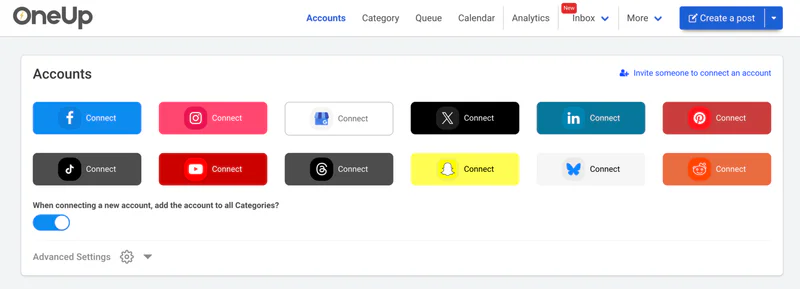
3. Start your OneUp trial and connect your accounts. OneUp offers a 7-day trial on all plans. Connect your accounts on the Accounts page first — this does not disconnect them from SocialPilot. Pick your plan by account count: Basic $15/mo annual (5), Intermediate $48 (15), Growth $84 (30), Business $240 (80).
4. Bulk-upload your queue in batches. Paste your public Google Sheet URL or upload the CSV, prioritizing the next two weeks. Note: bulk-uploaded GBP posts go out as What's New posts, so Event and Offer posts must be recreated individually.
5. Rebuild evergreen content as recurring posts. Flag the posts worth repeating and set them to repeat automatically in OneUp — a recurring post counts as one scheduled post no matter how often it repeats.
6. Recreate approvals if your team needs them. On Intermediate and above, turn on post approval where needed. If your team relied on SocialPilot's approval flow on Premium, Intermediate is the right OneUp plan — not Basic.
7. Run both tools in parallel for a week, then cancel SocialPilot. Let OneUp publish for a few days while SocialPilot's remaining posts finish, then cancel before your next billing date. Still weighing the field? See the best SocialPilot alternatives roundup.
SocialPilot vs OneUp: pricing at a glance
At 30 accounts the same team pays $160 on SocialPilot Ultimate versus $84 on OneUp Growth — see the wider market in this pricing comparison.
Where SocialPilot wins
SocialPilot is the better buy at small scale. Standard at $40 a month billed annually covers 15 accounts and 3 users; OneUp charges $48 for 15. A three-person team with fifteen or fewer accounts that does not need Snapchat, Discord, or an API should stay — SocialPilot is cheaper.
SocialPilot also wins on white-label reporting on Premium, a 14-day trial (twice OneUp's 7 days), and a dedicated account manager on Ultimate.
FAQ
Can I export my scheduled posts from SocialPilot?
Yes. In SocialPilot, go to Posts, filter by account or group, and click the CSV button — the export covers queued, published, errored, and unscheduled posts. Reformat it into OneUp's bulk-upload format (swap SocialPilot's Account ID for the OneUp account name).
Does OneUp have a one-click SocialPilot importer?
No — the route is SocialPilot's CSV export, reformatted for OneUp's bulk upload. Most queues take under an hour.
Can I keep my client approval workflow?
Yes, with one condition: approvals start on OneUp's Intermediate plan at $48 a month billed annually, not on Basic — still less than SocialPilot Premium's $80.
The bottom line
Switching from SocialPilot to OneUp is a spreadsheet exercise, not a rebuild — export your queue as a CSV, reformat it for OneUp's bulk upload, reconnect accounts, and rebuild your best posts as recurring. You lose SocialPilot's historical analytics, and at 15 accounts you give up the cheapest seat in the market. But past 25 accounts the math flips: 30 accounts cost $84 a month on OneUp Growth versus $160 on SocialPilot Ultimate, with Snapchat and Discord publishing, an API on every plan, and approvals kept. Start OneUp's 7-day trial and let next week prove it.
OneUp
OneUp is a social media management tool. Scheduling, cross-posting, analytics, social inbox, DM automations, social listening, and API & MCP, all in one place.
Visit Site