How to Switch from Sprout Social to OneUp Without Losing Your Queue
Moving from Sprout Social to OneUp? Here's what exports, what doesn't, and how to rebuild your queue in OneUp without losing scheduled posts...
Contents
How to Switch from Sprout Social to OneUp Without Losing Your Queue
Sprout Social has one of the best inboxes in the business — but it is priced per seat, and that is usually what drives people away.
Every Sprout plan charges per person, per seat, billed annually: Essentials $79, Standard $199, Professional $299, Advanced $399. Three people on Standard pay $597 a month; a sixth profile forces the whole team onto Professional at $897.
OneUp charges per social account instead, from $15 a month billed annually for 5 accounts, with listening, API, MCP, and recurring posts included. This guide covers the move honestly.
Quick verdict
Switch to OneUp if per-seat pricing is squeezing your team — your queue moves over with a manual rebuild.
- Sprout Standard is $199 per seat per month billed annually, capped at 5 profiles; three seats cost $597, while OneUp Intermediate is $48.
- Sprout has no documented way to export scheduled posts, so the queue moves over by copying from the Publishing Calendar into OneUp's bulk-upload sheet.
- Sprout's listening, Premium Analytics, and API are paid or gated; OneUp includes them on every plan.
- Approvals start on Sprout Professional at $299 per seat; on OneUp they start on Intermediate.
Why teams switch from Sprout Social
First, the seat math. Sprout lists Essentials $79, Standard $199, Professional $299, and Advanced $399 per seat per month on annual billing. Every login multiplies the bill, and the caps force upgrades: Essentials and Standard stop at 5 profiles, so a sixth account pushes every seat to Professional. One user with 6 profiles pays $299 a month; three people pay $897.
Second, the add-on stack: Sprout's help center states listening is not included in any standard plan, and Premium Analytics is the same. OneUp includes listening on every plan.
Third, access: approvals start on Professional at $299 per seat, and the Sprout API is Advanced-only at $399 per seat. On OneUp, approvals start on Intermediate at $48 a month, and API and MCP access are included on every plan. For the full head-to-head, see Sprout Social vs OneUp.
Sprout's Smart Inbox, review management, and reporting are stronger than OneUp's.
What transfers — and what does not
Scheduled posts: not by export, but by hand. Sprout documents no way to export scheduled posts — its exports cover inbox messages, profile lists, and report PDFs. Open Sprout's Publishing Calendar and copy each scheduled post into OneUp's bulk-upload spreadsheet — for 50 to 100 posts, about an hour. Drafts do not export either.
The Sprout Queue: rebuild it as recurring posts. Sprout Queue and ViralPost release posts at chosen times, but once a queued post publishes, it is gone unless you re-add it. OneUp's recurring posts republish automatically on a schedule you set, on every plan.
Media: yes, with re-uploading. Download images and videos from Sprout's asset library and add them to OneUp's bulk sheet — up to 5 per post, separated by ~~. Sprout's bulk import does not support video.
Analytics and listening: no. Past performance data stays in Sprout, so export the reports you need as PDFs before cancelling. Listening topics do not transfer either — set them up fresh in OneUp.
Approvals: rebuild them. Approval workflows do not transfer — on OneUp, Intermediate and above can require approval before a post goes live.
Network coverage: check your list first. Sprout integrates with Snapchat, Reddit, and Bluesky, and publishes to Google Business Profile; OneUp adds Discord and personal Facebook Profiles.
How to switch, step by step
1. Take inventory. Open Sprout's Publishing Calendar and count what is scheduled, queued, and in drafts. Note your renewal date — cancelling an annual plan mid-term may not refund the remaining months.
2. Export what Sprout lets you export. Export sent messages from the Smart Inbox, plus your profile list and the reports you need.
3. Build your OneUp bulk sheet from the Publishing Calendar. OneUp's bulk upload takes a Google Sheet or CSV with set headers — copy each future post across.
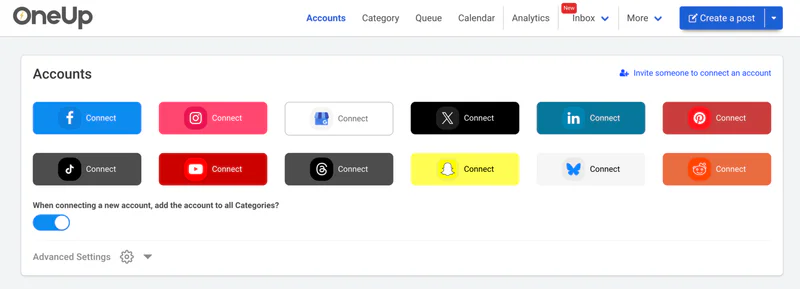
4. Start your OneUp trial and connect your accounts. OneUp offers a 7-day free trial. Connect your accounts on the Accounts page first. Pick your plan by account count: Basic $15/month for 5, Intermediate $48 for 15, Growth $84 for 30, Business $240 for 80.
5. Bulk-upload your queue in batches of 100. Paste your public Google Sheet URL or upload the CSV. Or choose "Add to Timeslots" to let OneUp decide the times.
6. Rebuild your queue as recurring posts and Timeslots. Flag the posts worth repeating, set them to repeat, and set up Timeslots.
7. Recreate approvals if your team needs them. On Intermediate and above, turn on post approval where needed.
8. Run both tools in parallel for a week, then cancel Sprout. Let OneUp publish for a few days while Sprout's remaining posts finish. For a broader checklist, see how to migrate your content backlog to OneUp.
Sprout Social vs OneUp: pricing at a glance
A three-person team on Sprout Standard pays 3 × $199, or $597 a month — for just 5 profiles. A sixth profile moves the whole team to Professional: 3 × $299, or $897 a month. The same team on OneUp Intermediate pays $48 a month for 15 accounts. See the wider market in this pricing comparison.
FAQ
Can I export my scheduled posts from Sprout Social?
No — not as a calendar file. Sprout documents no export for scheduled posts. The queue moves over by copying posts from the Publishing Calendar into OneUp's bulk-upload spreadsheet.
Does OneUp have a one-click Sprout importer?
No — there is no documented one-click importer from Sprout to OneUp, or to any other scheduler. The route is manual: build a Google Sheet or CSV in OneUp's format and upload it in batches of 100.
Will I lose my Sprout Queue?
The queue itself does not transfer, but its purpose does: OneUp's recurring posts and Timeslots replace the Sprout Queue and ViralPost — flag your best content as recurring and it republishes automatically.
What happens to my Sprout listening topics and analytics?
They stay in Sprout, so export any reports you need before cancelling.
The bottom line
Switching from Sprout Social to OneUp is a manual rebuild, not a one-click import — the hour copying your queue is the only cost. You lose Sprout's reporting depth, its Smart Inbox, and your historical data. But if publishing is the core job, the math is hard to argue with: a three-person team goes from $597 a month for 5 profiles to $48 a month for 15 accounts, gaining Discord publishing and listening on every plan, and keeping approvals. If you publish to every network at once, see how to schedule posts to all social media at once. Start OneUp's 7-day free trial and let next week prove it before you cancel Sprout.
OneUp
OneUp is a social media management tool. Scheduling, cross-posting, analytics, social inbox, DM automations, social listening, and API & MCP, all in one place.
Visit Site