Loomly vs OneUp: Approval Workflows vs Flat-Rate Scheduling Value
Loomly's approval-first calendar is great — until a 4th user or 13th account forces a 5x jump to Beyond. See how OneUp's flat pricing compares...
Contents
Loomly is a calendar-first social media tool built for small marketing teams. It walks you through drafting a post, sends it for approval, publishes it, and reports on it — all from a shared calendar. That workflow is genuinely good, and it is why teams pick Loomly over cheaper schedulers.
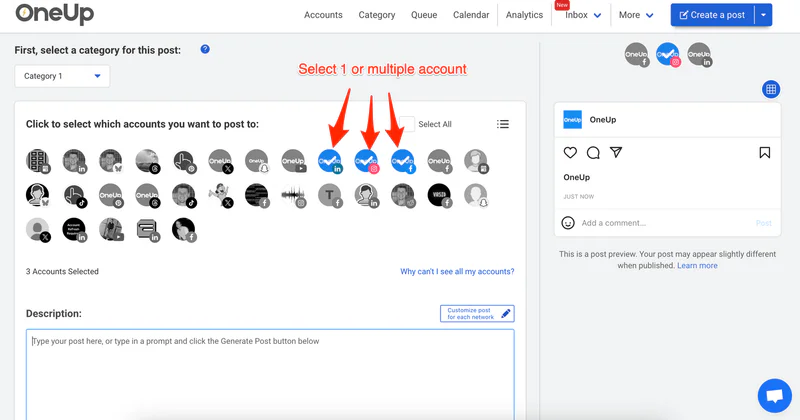
OneUp takes a different approach. It is a flat-rate scheduler: you pay per social account, not per seat, and every plan includes unlimited posts, recurring posts, approval workflows, a social inbox, and API and MCP access.
Quick verdict
Choose Loomly if you are a team of three or fewer managing up to 12 accounts and you live in client approvals; choose OneUp for more accounts, more users, or X, Discord, and Snapchat support without a five-fold price jump.
- Loomly Starter costs $65 a month ($49 a month billed yearly) for 12 social accounts and 3 users; a fourth user or a thirteenth account forces the jump to Beyond at $332 a month ($249 billed yearly).
- OneUp Basic costs $15 a month billed yearly for 5 accounts, with extras at $5 each — 12 accounts cost $50 a month, and 30 on Growth cost $84 a month.
- Loomly supports 10 networks but does not support X; OneUp supports 13 networks, including X, Discord, and Snapchat.
- Approval workflows are included on every plan from both tools, but only OneUp includes API and MCP access on every plan — Loomly lists no public API.
Loomly vs OneUp at a glance
Prices checked on loomly.com/pricing on November 9, 2026.
Pricing: the jump from Starter to Beyond is the whole story
Starter is $65 a month, or $49 a month billed yearly ($588 a year), for 12 social accounts, 3 users, and unlimited calendars. Beyond is $332 a month, or $249 a month billed yearly ($2,988 a year), for 60 accounts and unlimited users. Enterprise, for 61 or more accounts, is custom-priced. Yearly billing saves 25%, but the yearly price is charged upfront and yearly plans cannot be terminated early.
The problem is the gap between the two priced plans. There is no way to buy a fourth seat or a thirteenth account, and Loomly lists no add-on pricing. Growing past Starter's limits means moving to Beyond — a five-fold increase, from $588 to $2,988 a year.
OneUp prices the other way. Basic is $15 a month billed yearly for 5 accounts, with each extra account at $5 a month; Growth is $84 a month billed yearly for 30 accounts, with extras at $3 each. So 12 accounts cost $50 a month on OneUp, almost exactly Loomly's $49 — but 13 accounts cost $55 on OneUp and $249 on Loomly. For the full cost picture, see our social media scheduler pricing comparison.
Platforms: Loomly covers the calendar, OneUp covers more networks
Loomly supports ten platforms, according to its help center: Facebook, Instagram, Pinterest, LinkedIn, Google Business Profile, YouTube, Snapchat, TikTok, Threads, and Bluesky. But two details matter. First, Loomly does not support X — if your content strategy includes X at all, Loomly is a non-starter. Second, Loomly allows only one account per platform per calendar.
OneUp supports 13 networks: Facebook (Pages, Groups, and personal Profiles), Instagram (including accounts not linked to a Facebook Page), X, LinkedIn, TikTok, YouTube, Pinterest, Threads, Bluesky, Snapchat, Discord, and Google Business Profile. The gaps that matter are X and Discord.
Approval workflows: where Loomly is genuinely strong
This is Loomly's home turf. Every plan includes approval workflows and roles, post previews, an ideas board, daily post inspiration based on holidays and trends, and Slack and Microsoft Teams integrations.
OneUp includes approval workflows on every plan too, plus a social inbox and bulk upload. The difference is emphasis: Loomly is designed around the approval conversation; OneUp treats approvals as one feature inside a broader scheduler.
Automation, AI, and the API gap
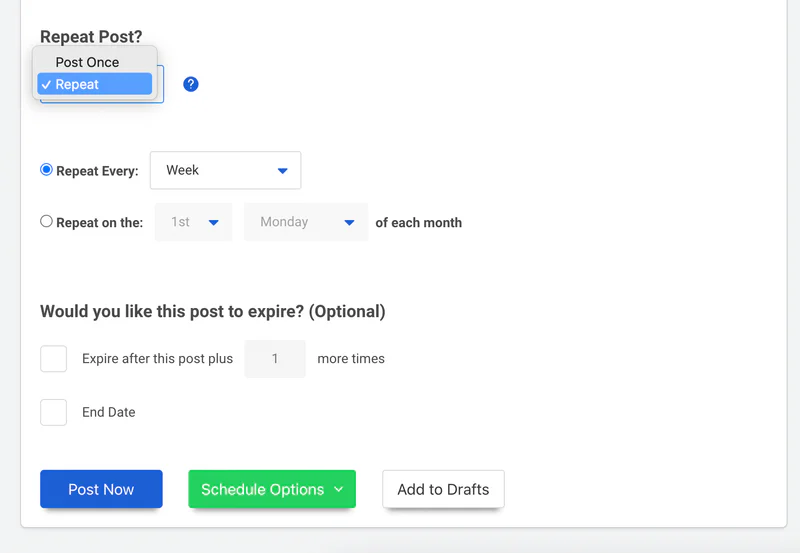
Both tools cover the basics: unlimited scheduling, recurring posts, bulk posting, link shorteners, and AI captions. Loomly adds an AI Assistant chat, post generation, and AI analytics on both paid plans, plus social listening — metered at 2 per month on Starter and 5 per month on Beyond. OneUp includes social listening on every plan with no per-month meter, and its recurring posts are unlimited on every plan.
The sharpest difference is programmability. Loomly lists no public API: its integrations page offers Zapier, Slack, and Microsoft Teams, and there is no developer portal or API reference. OneUp includes API and MCP access on every plan, so an AI assistant such as Claude or ChatGPT can schedule posts directly.
OneUp's evergreen engine re-shares your best content automatically on a schedule you control — useful for small teams that cannot produce fresh posts every day.
See also our SocialPilot vs OneUp comparison for a similar team-workflow tool at a lower entry price.
Where Loomly wins
Loomly wins on the daily experience of planning content as a team. Its calendar is the product, not an afterthought: post ideas, holiday inspiration, and a visual preview of every post make the planning week faster, and approval workflows with client-facing comments are smoother than OneUp's simpler approval flow. Beyond's custom branding lets agencies present a calendar that looks like theirs, and nonprofits get a 50% lifetime discount. Agencies weighing other team tools can also compare Agorapulse vs OneUp.
FAQ
Is Loomly cheaper than OneUp?
At exactly 12 accounts, they cost almost the same: Loomly Starter is $49 a month billed yearly and 12 accounts on OneUp cost $50 a month billed yearly. Above 12 accounts OneUp is much cheaper, because Loomly's next step is Beyond at $249 a month billed yearly while OneUp simply adds $5 per account.
Does Loomly support X (Twitter)?
No. Loomly's help center lists Facebook, Instagram, Pinterest, LinkedIn, Google Business Profile, YouTube, Snapchat, TikTok, Threads, and Bluesky — X is not among them.
Does Loomly have a free plan?
Loomly's help center documents a limited free plan (1 user, 3 social accounts, 5 posts a month), but it is not listed on the public pricing page. The pricing page offers a free trial with no credit card required but does not state how long the trial lasts.
Which is better for a growing agency, Loomly or OneUp?
OneUp, in most cases. Loomly's Starter caps you at 3 users and 12 accounts with no add-on path, so growth forces a jump to Beyond at $249 a month billed yearly. OneUp's per-account pricing scales a few dollars at a time, and it supports X and Discord.
The bottom line
Loomly is a well-designed calendar and approval tool with a pricing cliff. For a team of three managing up to 12 accounts without X, Starter at $49 a month billed yearly is fair for a genuinely pleasant workflow. But the moment you add a fourth teammate, a thirteenth account, or an X profile, the price jumps to $249 a month.
OneUp does not have Loomly's calendar polish, but it charges $15 a month billed yearly for 5 accounts with extras at $5 each, supports X and Discord, and includes API and MCP access on every plan. For most growing teams, that is the better deal. Try OneUp free for 7 days before you commit to Loomly's next tier.
OneUp
OneUp is a social media management tool. Scheduling, cross-posting, analytics, social inbox, DM automations, social listening, and API & MCP, all in one place.
Visit Site