This post goes over how to schedule and publish posts on TikTok with OneUp. And yes, they post DIRECTLY (no need for mobile notifications).
TikTok is one of the fastest-growing social networks. TikTok is a social media platform where people can watch, create, and share video content in real-time. However, in the TikTok mobile app, there is no way to schedule a TikTok post for more than 30 days into the future.
If you want to schedule TikTok posts for more than 30 days into the future, you have to use a social media scheduling tool like OneUp.
Using OneUp, you can schedule TikTok posts as far into the future as you want, and it works with all TikTok account types (Personal, Creator, or Business accounts).
Here is how scheduling TikTok posts with OneUp works 👇
How to schedule TikTok posts
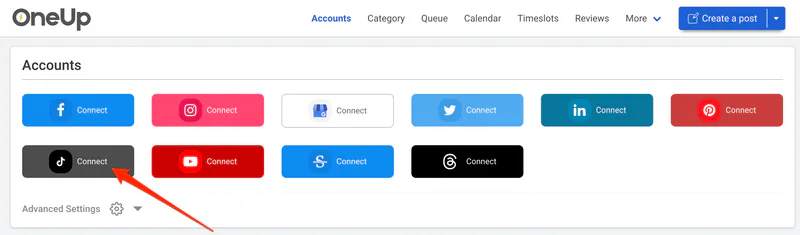
Connect your TikTok account on the Accounts page of OneUp
Click “Create a post”
Select which TikTok account you want to post to (if you have more than 1 TikTok account connected)
Upload the video or images you want to schedule to TikTok
Schedule your TikTok post
Here are those steps with screenshots:
Connect your TikTok account on the Accounts page:
2. Click “Create a post”:
3. Select which TikTok account you want to post to (if you have more than one TikTok account connected):
4. Upload the video or images you want to schedule to TikTok. OneUp also supports choosing your TikTok thumbnail, and adding music to your TikTok post.
OneUp has a post preview so you can see how your post will look on TikTok once it’s published.
5. Schedule your TikTok video:
That’s it! Your video will then post to TikTok DIRECTLY (no need for mobile notifications).
OneUp also supports Instagram Reels, Facebook Reels, and YouTube Shorts, so you can schedule to Reels, Shorts, and TikTok all at the same time with OneUp.
In addition, OneUp also supports Twitter, LinkedIn, and Pinterest, which means that a single video can be posted to TikTok, Instagram Reels, Facebook Reels, YouTube Shorts, Pinterest, LinkedIn, and Twitter – all at the same time with OneUp!