Schedule Discord Posts with OneUp
Schedule and publish posts to Discord servers you manage, with full control over channels and bots.
Schedule and publish posts to Discord servers you manage, with full control over channels and bots.
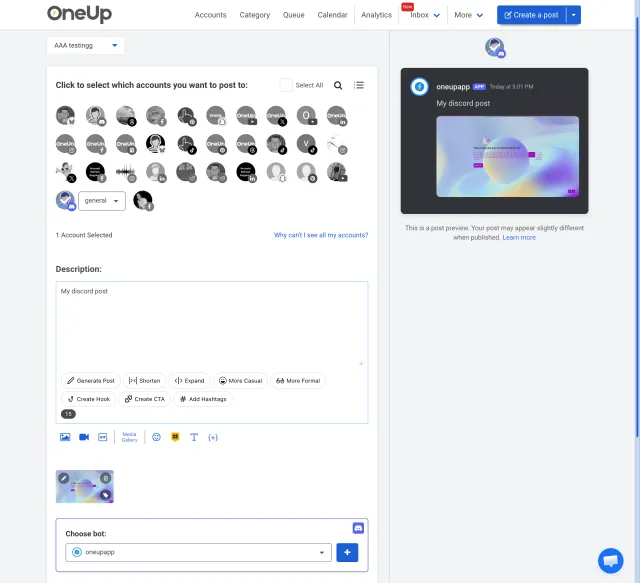
Powerful Discord scheduling, simplified:
Post to Discord servers that you are the Admin of, with the ability to choose what channel you want to post to, and what bot you want to post as.
Easily select the specific channel you want your post to appear in.
Choose which bot profile you want to use for your Discord announcements.
Got writer's block? Just give OneUp a prompt, and OneUp will write your post's content for you.
Set Discord posts to automatically repeat at whatever interval you choose.
OneUp supports Discord, Facebook, Instagram, YouTube, X, TikTok, LinkedIn, Threads, Bluesky, Snapchat, Pinterest, and Google Business Profiles.
Send Discord posts to team members or managers for approval before they go live.
⭐️⭐️⭐️⭐️⭐️ (Based on 400+ reviews on Capterra)
OMG when I found OneUp it solved all my social media scheduling issues!
Excellent customer service, extremly easy to use Oneup's platform.
I enjoyed the ease of the program.
OneUp supports Discord, Facebook, Instagram, YouTube, X, TikTok, LinkedIn, Threads, Bluesky, Snapchat, Pinterest, and Google Business Profiles.
Discord scheduling lets you create posts in advance and choose when they should appear in your server. With OneUp, you can schedule posts to Discord servers where you are an Admin.
Yes, you can select the exact Discord channel where your post should appear. This is useful for sending announcements, updates, reminders, or community messages to the right place.
Yes, OneUp lets you choose the bot profile you want to post as. This gives you more control over how scheduled announcements appear inside your Discord server.
Scheduling Discord announcements helps you plan updates ahead of time and avoid last-minute posting. It is useful for launches, events, reminders, community updates, and recurring messages.
Yes, OneUp includes an AI post writer that can create Discord post content from a prompt. This helps when you need quick drafts, announcement ideas, or better wording.
Yes, Discord posts can be set to repeat at your chosen interval. This works well for weekly reminders, recurring events, community rules, promotions, and regular announcements.
Yes, Discord posts can be sent to team members or managers for approval before they go live. This helps teams review announcements before they are published in a server.
Yes, OneUp supports Discord along with platforms like Facebook, Instagram, YouTube, X, TikTok, LinkedIn, Threads, Bluesky, Snapchat, Pinterest, and Google Business Profiles.
You can schedule posts to Discord servers that you manage as an Admin. This helps ensure you have the right permissions to choose channels, bots, and publishing settings.
Scheduled Discord posts can be used for event reminders, product updates, server announcements, community prompts, livestream alerts, rule reminders, and campaign messages.
To start scheduling Discord posts, connect your Discord server to OneUp, choose the channel, select the bot profile, write your message, and pick the date and time you want it to publish.
You can try Discord scheduling with OneUp for free. For full feature access, account limits, and current pricing details, check OneUp's pricing page before choosing a plan.