Auto-Post Your Instagram Videos & Images To Google Business Profile
The next time you post images or a video on Instagram, it gets published automatically to Google Business Profile without you lifting a finger. Or you can post your entire back catalog of existing Instagram posts to Google Business Profile on a schedule.
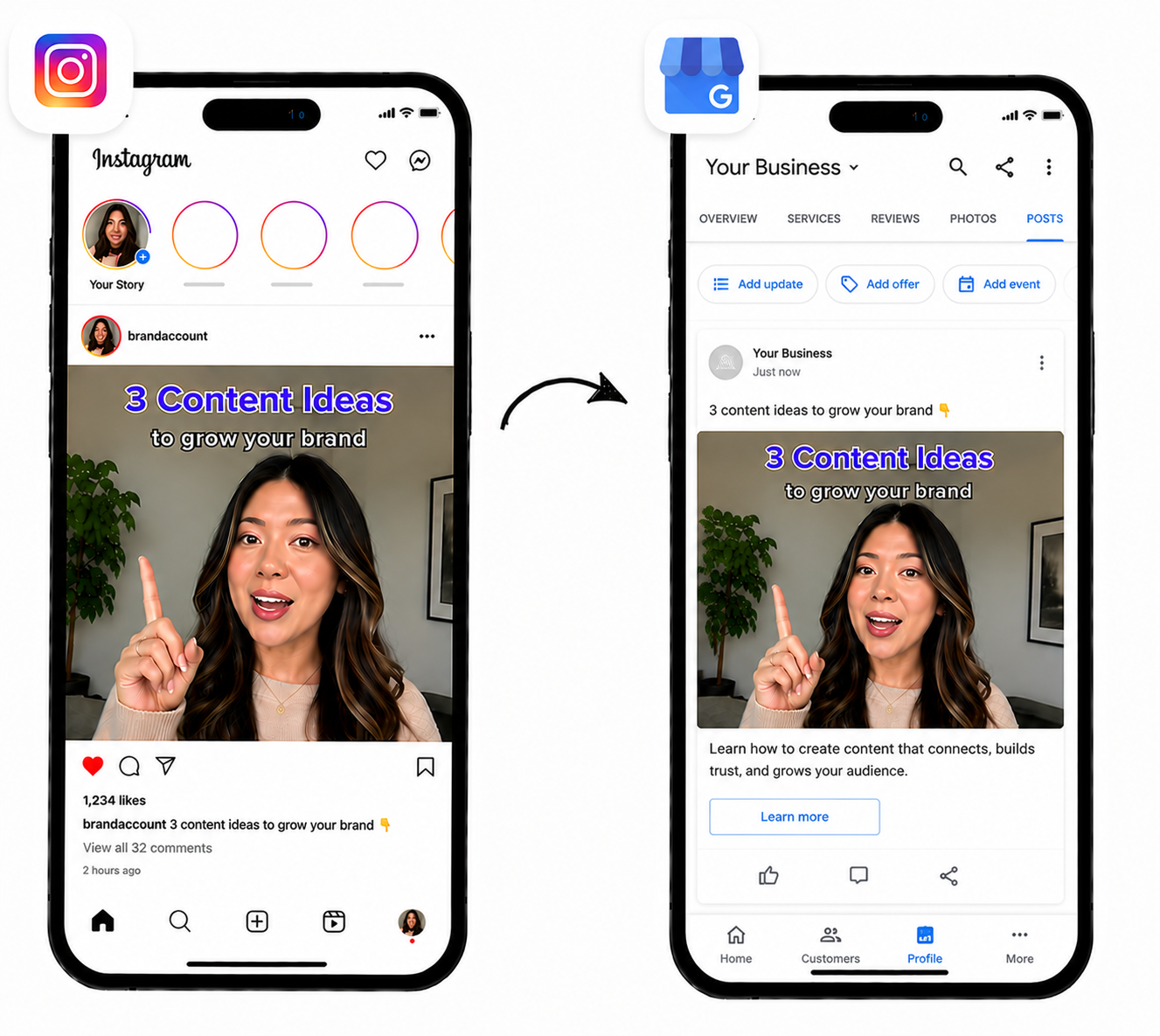
Repurpose in 3 Simple Steps
Get started in under 2 minutes with our easy setup process.
Connect Your Accounts
Connect your Instagram and Google Business Profile accounts. Takes just 25 seconds.
Create a Workflow
Create a workflow to send your Instagram videos and images to Google Business Profile plus any other social networks you choose.
Publish Automatically
Moving forward, every video or image you publish to your Instagram account will automatically post to Google Business Profile (and any other social networks you choose).
Why Use OneUp for Repurposing
Focus on growing your business while your content grows with you.
Save Hours Every Week
Stop manually reposting content. Let OneUp handle it automatically so you can focus on what matters.
Reach More People
Expand your reach across multiple platforms without extra work. Get your content in front of more eyeballs.
Consistent Posting Schedule
Maintain an active presence on all platforms effortlessly. Never miss a posting opportunity again.
Music
Any music you add to your video also gets applied to your cross-posted video.
Thumbnails
Any thumbnail you add to your video also gets applied to your cross-posted video.
Add Delay
Optionally add a delay between when you post your video to your main account and when it gets posted on your other accounts. (Example: Post to my other accounts 24 hours after it's posted to my main account)
Control which posts get cross-posted
OneUp gives you the option to only cross-post posts that contain a certain keyword or hashtag in the caption. Or to skip posts that contain a certain keyword or hashtag.
Auto-post existing posts
Automatically post your entire back catalog of posts from one account to all your other accounts. Add an interval between posts to drip them out over time.
Frequently Asked Questions
Can I automatically post Instagram videos and images to Google Business Profile?
Yes. With OneUp, you can create a workflow that automatically cross-posts your Instagram videos and images to Google Business Profile. Once the workflow is set up, new content is automatically published to Google Business Profile without needing to download and re-upload manually.
Can I cross-post my entire back catalog of existing posts from Instagram to Google Business Profile with OneUp?
Yes, OneUp supports cross-posting all your existing posts from Instagram to Google Business Profile on a schedule, so you can drip the posts out over time.
What if I want to cross-post some but not all of my posts from Instagram to Google Business Profile?
OneUp’s keyword filter feature gives you the option to only cross-post posts that contain a certain keyword or hashtag in the caption. Or to skip posts that contain a certain keyword or hashtag.
Does OneUp cross-posting work even if I publish directly from the Instagram mobile app?
Yes. OneUp will auto-post your Instagram posts to Google Business Profile, regardless of whether the post was created on the Instagram mobile app, the Instagram website, or a scheduling tool.
Does OneUp automatically detect new Instagram posts?
Yes. OneUp automatically checks your Instagram account for new content and can repurpose that content to Google Business Profile and other social networks based on the workflow you create.
Can I cross-post Instagram videos to Google Business Profile with music?
Yes. Any music you add to your Instagram video is carried over when OneUp cross-posts the video to Google Business Profile.
Can I automatically post Instagram collaborator (Collab) Reels to Google Business Profile?
Yes. If you are added as a collaborator on an Instagram Reel, OneUp can automatically detect that Reel and cross-post it to Google Business Profile through your workflow (regardless of whether you were the original creator of the post or not). This is useful for creators, agencies, and brands that frequently publish collaborative content.
Can I automatically post Instagram content to multiple Google Business Profile accounts?
Yes. You can connect multiple Google Business Profile accounts and create workflows that publish content to one or more Google Business Profile profiles automatically.
Do I need to download Instagram videos before posting them to Google Business Profile?
No. OneUp automatically handles the transfer between Instagram and Google Business Profile. There is no need to download videos to your device and upload them again manually.
Can I delay posting to Google Business Profile after publishing on Instagram?
Yes. OneUp allows you to add a delay between when content is published on Instagram and when it gets published on Google Business Profile. For example, you can have Google Business Profile posts go live 24 hours after the original Instagram post.
Can I cross-post Instagram content to platforms other than Google Business Profile?
Yes. In addition to Google Business Profile, OneUp can automatically repurpose content to TikTok, Instagram, Facebook, YouTube, X (Twitter), LinkedIn, Threads, Bluesky, Pinterest, Snapchat, and more.
Ready to Automate Instagram to Google Business Profile Posting?
Start repurposing your Instagram content today with OneUp.